If you're searching for an XE.com API alternative, you've probably noticed that XE's Currency Data API is sold the way enterprise software is sold. Plans start at $599 per year on its product page (its developer docs list the entry plan at $799), billed up front. The trial lasts 7 days. There's no permanent free plan to build against. CurrencyFreaks takes the opposite route: a free tier of 1,000 API calls a month that needs no card, then paid tiers from $9.99 a month ($99.99 if you pay yearly), and historical rates that reach back to 1984. It also lists 870+ cryptocurrencies, against 23 codes in XE's API spec. This guide compares the two on price, data, endpoints, and migration effort, using figures taken from XE's own pages on 12 November 2026.
We build CurrencyFreaks, so we have a stake in this comparison. Every XE number below comes from XE's published pages.
How we checked: XE figures come from XE's Currency Data product page, the help center article "Currency Data API packages, pricing and payment", and the Currency Data API "Getting started" guide, Data plans page and OpenAPI specification in the XE Developer Portal, all read on 12 November 2026. CurrencyFreaks figures come from its pricing page, documentation, status page and public /historical-data-limits endpoint on 11 and 12 November 2026.
The Short Version
- Entry cost: XE's cheapest plan is $599 per year on its product page ($799 in its developer docs), paid annually. CurrencyFreaks starts free, and the first paid plan is $9.99 per month, or $99.99 per year with annual billing.
- Testing: XE gives you a 7-day trial that returns placeholder rates by default. CurrencyFreaks gives you a free plan with real rates and no expiry.
- Crypto and coverage: CurrencyFreaks covers 1,000+ currencies, including 870+ cryptocurrencies, 166 fiat currencies and 4 precious metals. XE's API spec lists 23 crypto codes behind a
crypto=trueflag, all of which CurrencyFreaks also lists, and its product page quotes 170+ and 220+ currencies in different places. - History: CurrencyFreaks'
/historical-data-limitsendpoint shows USD, GBP, JPY, CHF, CAD and AUD starting on 28 November 1984, Bitcoin on 7 January 2013 and Ethereum on 3 August 2015. XE's own materials give two different start points for fiat (1998 and 16 November 1995) and say most crypto history starts in May 2022. - Throttling: XE caps you at 900 requests per 15 minutes. CurrencyFreaks documents no daily or hourly throttle, only the monthly quota.
CurrencyFreaks vs XE at a Glance
| CurrencyFreaks | XE Currency Data API | |
|---|---|---|
| Free plan | Yes. 1,000 API calls per month, no credit card | No. 7-day trial, placeholder rates by default |
| Entry paid plan | Starter, $9.99 per month | Core, $599 per year on the product page (Lite, $799 in the developer docs) |
| Billing | Monthly or annual | Annual, paid up front |
| Entry quota | 15,000 API calls per month (Starter) | 10,000 requests per month (Core) |
| Entry update frequency | Hourly (Starter) | Daily (Core) |
| Every-minute updates | Professional, $99.99 per month or $999.99 per year | Live rates add-on on top of a plan: $400 per year on Lite ($1,199 in total, 10,000 requests a month) up to $1,500 on Prime ($5,999 in total, 150,000 requests a month) |
| Currencies | 1,000+ (166 fiat, 870+ crypto, 4 metals) | 170+ and 220+ on different parts of the product page |
| Crypto | 870+ cryptocurrencies | 23 assets listed in the API spec, via crypto=true |
| Historical data (fiat) | From 28 November 1984 for USD, GBP, JPY, CHF, CAD and AUD (EUR from 31 December 1998), paid plans | 1998 in some XE materials, 16 November 1995 in others |
| Historical data (crypto) | Bitcoin from 7 January 2013, Ethereum from 3 August 2015 | "Most start from May 2022 onward" per the API spec |
| Request throttle | None documented beyond the monthly quota | 900 requests per 15 minutes, shared across all keys |
| IP to currency | Yes (Growth and above) | Not in the published endpoint list |
| Authentication | apikey query parameter | API key as a Bearer token (recommended) or Basic authentication |
| AI tooling | Give your AI assistant live exchange rates | Not listed on the pages reviewed |
Why Developers Look for an XE.com API Alternative
Developers most often look for an XE.com API alternative because of annual up-front billing, a short trial that starts with placeholder rates, per-rate request metering, and published figures that don't agree with each other. The friction with XE shows up in how you buy and test it.
Annual billing, paid in full. XE's help center says subscriptions are billed annually, with the full 12 months charged at the start. Wire transfers on packages under $1,200 a year carry a 3% fee.
A trial that starts with fake rates. By default, XE's 7-day trial returns placeholder rates. To test with real rates, you request them in the web app with your work email. Those trial rates are daily rates, the trial is capped at 5,000 requests and 90 days of history, and you can extend it once, by 3 days. That's tight for a team that wants to wire up a staging environment, wait for a sprint review, and then decide.
Metering by rate. XE counts each rate the API returns as one request. A call that returns ten rates uses ten requests from your monthly allowance. That's easy to overlook when you're comparing quotas, and it's a reason to measure your real usage before choosing a tier.
Figures that don't agree with each other. XE's entry plan is $599 per year on its product page and $799 in its developer docs and help center. The product page gives the currency count as 170+ in the package features and 220+ in the section headings and FAQ. The history start date has two versions too: the product page and the API spec's endpoint description say 1998, while the help center and the spec's date parameter say 16 November 1995. Before you sign anything, ask XE which numbers apply to the plan you're buying.
A throttle on top of the quota. XE's getting started guide describes a limit of 900 requests per 15 minutes, shared across all your keys and credentials. That works out to an average of one request per second. It matters if you run bursty jobs such as nightly backfills or a cache warm-up after a deploy. CurrencyFreaks documents no daily or hourly throttle, only the monthly quota for your plan.
The price of the middle tiers. Intermediate costs $1,799 a year for 50,000 requests a month, and Prime costs $4,499 for 150,000. If your workload sits between a side project and a bank, those jumps are steep.
XE API Pricing Compared With CurrencyFreaks
CurrencyFreaks costs less than XE at every tier where XE publishes a price, and it adds a free plan. Here's what each provider charges at roughly comparable scale. XE prices come from its product page, and CurrencyFreaks prices come from its pricing page. CurrencyFreaks yearly prices are the annual-billing prices on its pricing page, which include two months free. Monthly billing is also available.
| Your situation | XE | CurrencyFreaks |
|---|---|---|
| Prototype or side project | 7-day trial | Free. 1,000 calls per month, no card |
| Small production app | Core: $599 per year ($799 for Lite in XE's docs), 10,000 requests per month, daily rates | Starter: $99.99 per year ($9.99 per month), 180,000 calls per year, hourly rates |
| Growing product, 50,000 to 150,000 volume | Intermediate: $1,799 per year, 50,000 requests per month. Prime: $4,499 per year, 150,000 requests per month, 15-minute rates | Growth: $499.99 per year ($49.99 per month), 1.8 million calls per year, updates every 10 minutes |
| Rates every 60 seconds | Live rates add-on on top of a plan: $400 per year on Lite ($1,199 in total, 10,000 requests a month) up to $1,500 on Prime ($5,999 in total, 150,000 requests a month) | Professional: $999.99 per year ($99.99 per month), 6.6 million calls per year |
At 150,000 requests a month, XE's Prime plan plus its live rates add-on comes to $5,999 per year. The add-on prices come from XE's Data plans page, while its product page lists add-ons "from $200 / yr", so confirm the figure for your plan. CurrencyFreaks Professional is $999.99 per year and includes 550,000 calls a month.
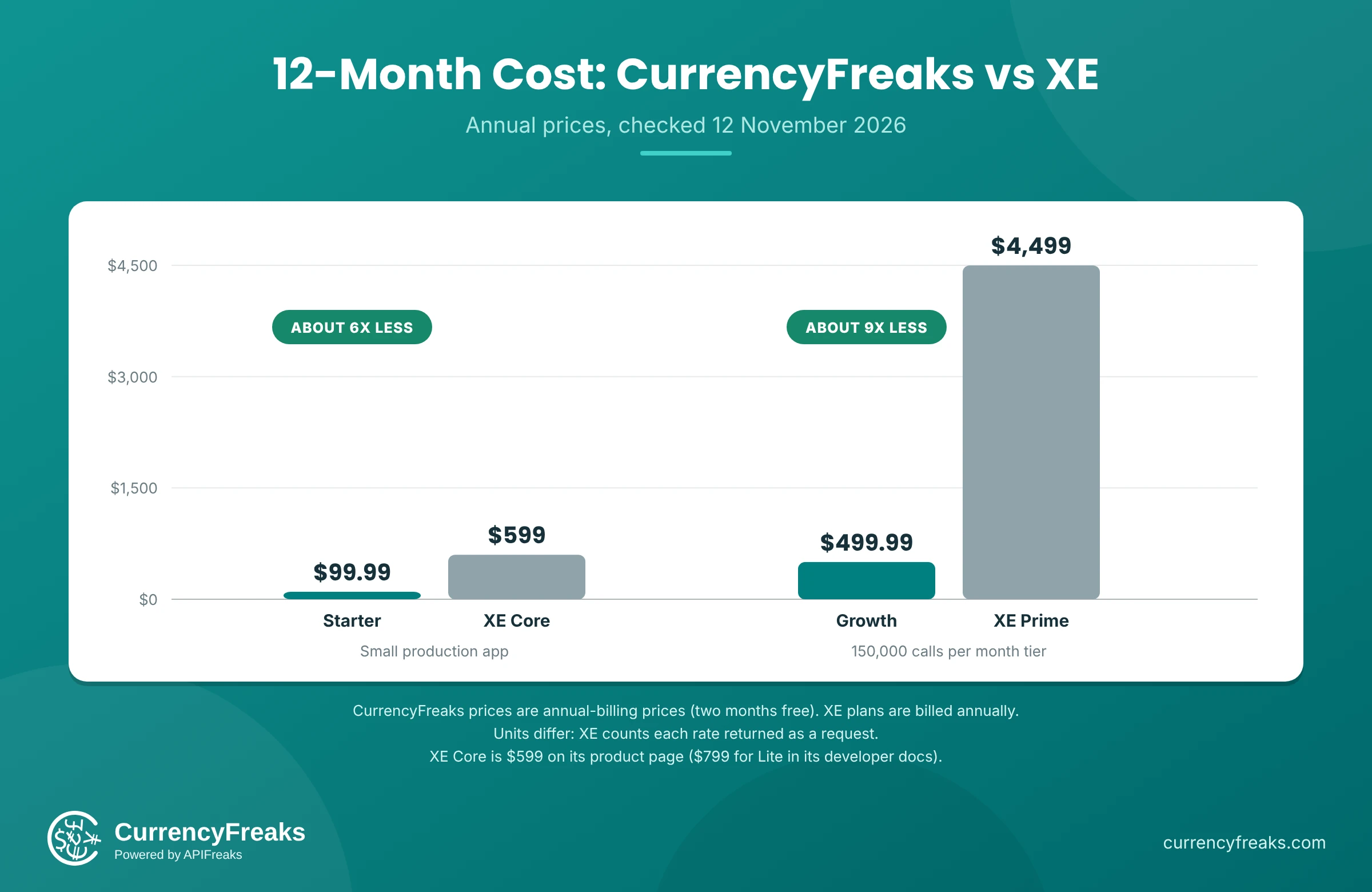
Two comparisons stand out. At the small-app tier, CurrencyFreaks Starter costs about one sixth of XE's $599 entry plan over a year (one eighth of the $799 in XE's docs) and updates hourly instead of daily. At the 150,000 mark, Growth comes to $499.99 a year against $4,499 for Prime, roughly 9 times less, with updates every 10 minutes against every 15.
A fair caveat: the units aren't identical. XE meters per rate returned, and CurrencyFreaks publishes its quotas as API calls. Run a day of your real traffic through the free plan to see how your usage maps before you pick a paid tier.
Both providers stop serving requests once you hit your quota. CurrencyFreaks documents hard limits per plan and no separate daily or hourly rate limits. XE lets you switch on overage billing, which charges extra requests at month end, and it enforces the 900-requests-per-15-minutes throttle regardless of plan. If you want to stretch a quota, the guide Optimize API Usage: How to Reduce Monthly Calls with Symbols & Base Parameters covers the tricks.
Data Coverage and Historical Depth
CurrencyFreaks starts fiat history in 1984 and Bitcoin history in 2013, while XE's materials show fiat history from 1998 or 1995 and most crypto history from May 2022. CurrencyFreaks lists 166 fiat currencies, 870+ cryptocurrencies and 4 precious metals, which is where the 1,000+ figure comes from. You can browse the full list on the Supported Currencies page or pull it from the /supported-currencies endpoint, which needs no API key.
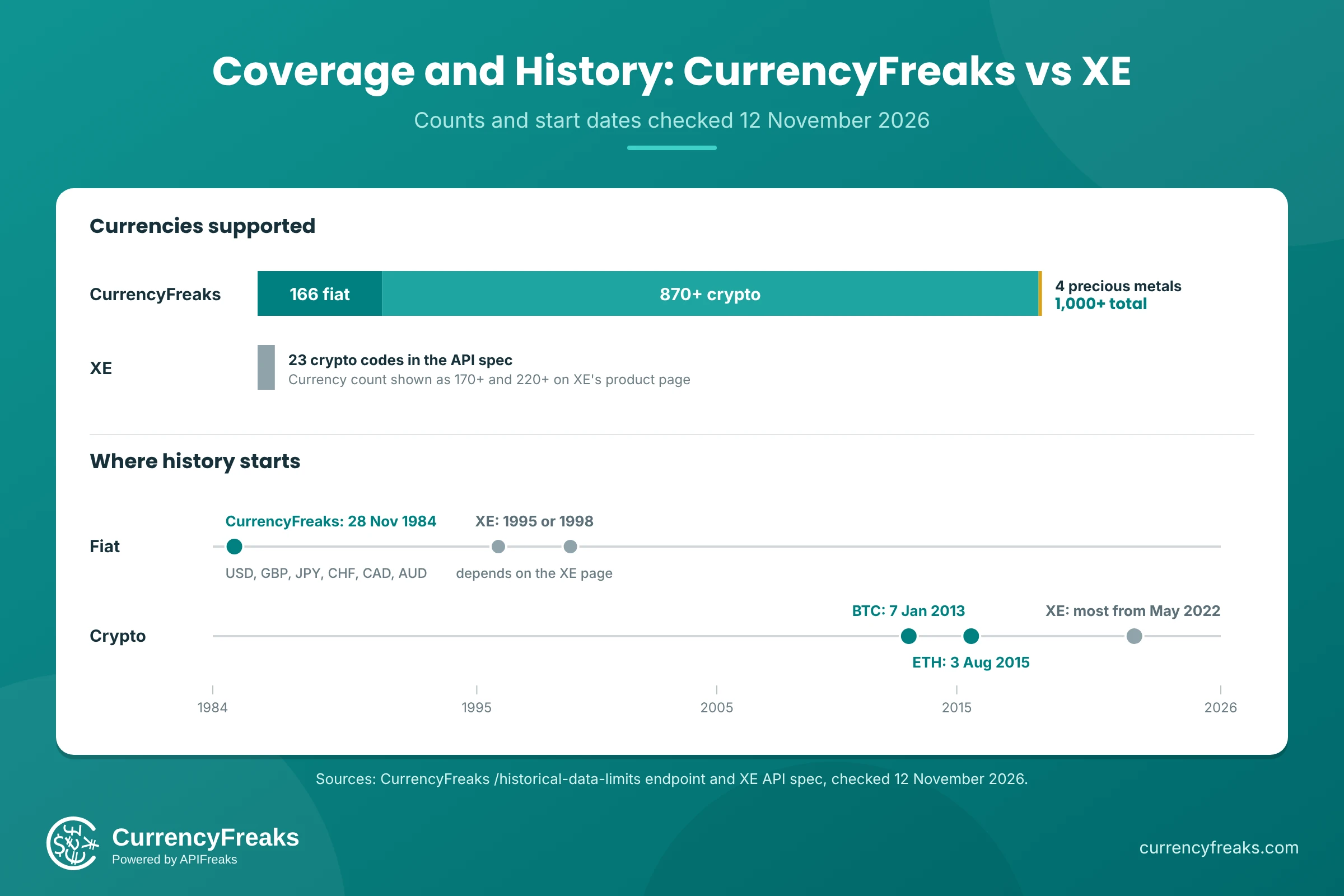
History is where the two differ most. CurrencyFreaks carries major fiat pairs from 28 November 1984, and its public /historical-data-limits endpoint, which needs no API key, reports the exact range for every currency. On 11 November 2026 it showed USD, GBP, JPY, CHF, CAD and AUD starting on 28 November 1984, EUR on 31 December 1998 (the euro's own start), Bitcoin on 7 January 2013 and Ethereum on 3 August 2015.
XE's materials are less consistent. The product page and the API spec's endpoint description say 1998, while the help center and the spec's date parameter say 16 November 1995. For crypto, the spec says "Most start from May 2022 onward." If you're backtesting against the 1980s, or against Bitcoin before 2022, CurrencyFreaks has the longer record. You can sample the data without writing code in the Foreign Currency Historical Exchange (Forex) Rate Converter or browse past rates on the Historical Exchange Rates page. To pull a whole range into a spreadsheet, How to Batch Download Historical Forex Data to CSV and Excel walks through it.
Crypto Coverage: 870+ Assets vs XE's 23
Crypto is the widest gap between the two APIs. CurrencyFreaks lists 870+ cryptocurrencies, and every one of the 23 codes in XE's API spec is on that list (checked against the /supported-currencies endpoint on 12 November 2026). The reverse doesn't hold. Tokens such as SHIB, TON, PEPE, NEAR, ATOM, APT, ICP, FIL, XMR, HBAR, SUI and AAVE are available on CurrencyFreaks but are not among XE's 23 codes.
XE's crypto access is also narrower in how it works. You pass crypto=true to reach "20+ crypto assets" on the currencies, conversion, historic and stats endpoints, and the API spec lists 23 codes: ADA, ARB, AVAX, BCH, BNB, BTC, DAI, DOGE, DOT, ETH, EURC, LINK, LTC, LUNA, POL, SOL, TRX, UNI, USDC, USDP, USDT, XLM and XRP. The spec adds that historical crypto data varies by currency and that most of it starts from May 2022 onward. On CurrencyFreaks, the /historical-data-limits endpoint shows Bitcoin from 7 January 2013 and Ethereum from 3 August 2015.
A note on the count: the supported list also carries retired entries, and some assets have no category label in the API, so treat 870+ as a current approximation. When you need an exact figure, pull the live list from the /supported-currencies endpoint, which needs no API key. If your product touches anything outside XE's 23 codes, you'll need a second data source alongside XE.
Endpoints and Features Side by Side
CurrencyFreaks covers latest rates, conversion, historical rates, time series and period statistics, plus IP to currency detection. Some of the advanced endpoints need Professional or higher. Here's how the XE endpoints you may use today line up with CurrencyFreaks.
| What you need | XE endpoint | CurrencyFreaks endpoint | CurrencyFreaks plan |
|---|---|---|---|
| Latest rates | convert_from, convert_to | /rates/latest | Free (USD base). Other bases on paid plans |
| Convert an amount | convert_from, convert_to | /convert/latest | Paid |
| Rates on a past date | historic_rate | /rates/historical, /convert/historical | Paid |
| Rates across a date range | historic_rate/period | /timeseries | Professional and above |
| Change and volatility over a period | stats | /fluctuation | Professional and above |
| Detect a visitor's currency | Not in the published list | /iptocurrency | Growth and above |
| List supported currencies | currencies | /supported-currencies | All plans |
| Currency symbols | Not a separate endpoint in the spec | /currency-symbols | All plans |
| Earliest date per currency | Not in the published list | /historical-data-limits | All plans |
A few of those CurrencyFreaks extras are worth a closer look. The /iptocurrency endpoint resolves a visitor's IP address to a currency so you can show local prices on first load, and the guide Currency Localization: How To Detect User Currency From an IP Address walks through it. The /fluctuation endpoint is CurrencyFreaks' answer to XE's stats, covered in Analyze Currency Volatility With A Foreign Exchange Rates API: Fluctuation Endpoint Guide. Both /timeseries and /fluctuation sit on Professional, so check your plan before designing around them.
CurrencyFreaks also ships an MCP server (npm package @currencyfreaks/mcp) that lets AI assistants call the API directly, described on the page Give your AI assistant live exchange rates. If you'd rather wire rates into a model through tool calls, Currency Exchange Rate API with AI - Real Tool Calls for ChatGPT, Claude, and Gemini (2026) shows how.
Uptime and Reliability
CurrencyFreaks publishes a public status page. On 11 November 2026 it showed 100% uptime for each month from June to October 2026 and for the trailing month. It's a live record you can check for yourself.
XE's product page claims "guaranteed availability" without giving a figure. If you need a contractual availability number, ask any vendor for it in writing. CurrencyFreaks Enterprise plans include custom SLAs.
How to Migrate From XE to CurrencyFreaks
Migrating from XE to CurrencyFreaks takes six steps: list your endpoints, create a key, swap authentication, write an adapter, map errors, and run both providers in parallel. Most migrations come down to swapping an HTTP client and a response parser. Here's a sequence that keeps risk low.
- List the XE endpoints you actually call. Use the endpoint table above to map each one. Most teams find they use two or three.
- Create a free account and key. Sign up and grab your API key. Keep it on the server. The CurrencyFreaks documentation advises against using the key in client-side JavaScript.
- Swap the authentication. XE takes your API key as a Bearer token in the
Authorizationheader (Basic authentication is the alternative). CurrencyFreaks takes a singleapikeyquery parameter (see Authorization), so keep full request URLs out of your logs. - Write a thin adapter. Keep your app calling your own
convert()function and change what's behind it. The next section has a working example. - Map the errors. CurrencyFreaks returns 401 for an invalid or inactive key (the full list is under HTTP Error Codes), 402 when a feature isn't in your plan, and 429 when you've used your quota. XE returns its own error codes and messages, so don't reuse its status code handling as is.
- Run both in parallel for a week. Log the differences. Two providers use different sources, so small gaps are normal. Decide what tolerance your product can live with before you cut over. If you're coming from another provider too, Migrate from Fixer API to CurrencyFreaks (2026 Guide) follows the same pattern.
The guide Exchange API Handling Errors Gracefully: A Deep Dive Into CurrencyFreaks Error Handling covers retry and fallback patterns worth adding in step 5.
A Python Adapter for the Free Plan
The free plan returns rates against a USD base, so the adapter below cross-rates through USD. That keeps it working on day one without a paid plan. It uses Decimal rather than floats, because money and binary floating point don't mix.
import os
from decimal import Decimal

import requests

API_KEY = os.environ["CURRENCYFREAKS_API_KEY"]
BASE_URL = "https://api.currencyfreaks.com/v2.0"


class CurrencyFreaksError(Exception):
    pass


def usd_rates(symbols):
    """Fetch USD-based rates for the given currency codes."""
    response = requests.get(
        f"{BASE_URL}/rates/latest",
        params={"apikey": API_KEY, "symbols": ",".join(symbols)},
        timeout=10,
    )
    if response.status_code == 401:
        raise CurrencyFreaksError("Invalid or inactive API key")
    if response.status_code == 402:
        raise CurrencyFreaksError("Feature not included in your plan")
    if response.status_code == 429:
        raise CurrencyFreaksError("Monthly quota reached")
    response.raise_for_status()
    rates = response.json()["rates"]
    return {code: Decimal(str(value)) for code, value in rates.items()}


def convert(amount, from_code, to_code):
    """Convert an amount by cross-rating through USD."""
    amount = Decimal(str(amount))
    if from_code == "USD":
        return amount * usd_rates([to_code])[to_code]
    if to_code == "USD":
        return amount / usd_rates([from_code])[from_code]
    rates = usd_rates([from_code, to_code])
    return amount / rates[from_code] * rates[to_code]
Set CURRENCYFREAKS_API_KEY in your environment, then call convert(250, "EUR", "GBP") from your own code. This is the request the adapter makes under the hood, and the response it parses (captured on 11 November 2026):
curl "https://api.currencyfreaks.com/v2.0/rates/latest?apikey=YOUR_API_KEY&symbols=EUR,GBP,JPY"
{
  "date": "2026-11-11 14:47:00+00",
  "base": "USD",
  "rates": {
    "JPY": "159.7",
    "EUR": "0.901917",
    "GBP": "0.753551"
  }
}
Rates come back as strings, which is why the adapter wraps each value in Decimal instead of converting through a float. If you're on a paid plan, you can skip the cross-rating and call the conversion endpoint directly:
curl "https://api.currencyfreaks.com/v2.0/convert/latest?apikey=YOUR_API_KEY&from=USD&to=EUR&amount=100"
{
  "date": "2026-11-11 14:48:00+00",
  "from": "USD",
  "to": "EUR",
  "rate": "0.90196",
  "givenAmount": "100.0",
  "convertedAmount": "90.196"
}
The converted amount is already calculated for you, so there's no cross-rating step to write or maintain.
The CurrencyFreaks documentation includes code samples in other languages, and there's a Postman collection if you'd rather test requests by hand. The same adapter pattern carries over to other languages:
- Currency Converter API in Python: Tutorial with Full Code (2026)
- Node.js Currency API: Build an Express Exchange Rate Converter
- PHP & Laravel Currency API Integration (with Code Examples)
- Go (Golang) Currency API Integration: Real-Time Exchange Rates Tutorial (2026)
- Django Currency API Integration - Real-Time Exchange Rates Tutorial (2026)
Who Should Switch From XE to CurrencyFreaks
Pick CurrencyFreaks if you need crypto beyond XE's 23 codes or Bitcoin history from before 2022, want to test with real rates before paying, or would rather pay monthly than commit to a year. It also suits teams that need fiat history before 1995, run bursty workloads that a 900-requests-per-15-minutes throttle would pinch, or want features like IP to currency detection and an MCP server for AI assistants. For small and mid-sized workloads, the published price gap is large.
If you're still weighing options, 10 Best Currency Exchange API Options for Developers in 2026 puts more providers side by side.
Conclusion
An XE.com API alternative earns its place when the buying process matters as much as the data. CurrencyFreaks includes a free tier you can test against with real rates, paid plans from $9.99 per month, 1,000+ currencies including 870+ cryptocurrencies, history back to 1984, and endpoints for looking up a visitor's currency by IP, plus time series and fluctuation. Test it with your real traffic on the free plan before you commit to anything.
Start testing your XE migration with 1,000 free API calls every month. The CurrencyFreaks API requires no credit card to get started. Create a free account and make your first call in minutes.
FAQs
Does XE offer a free API plan?
No. XE has no standing free tier for its Currency Data API. It offers a 7-day trial that returns placeholder rates by default. To test with real rates you request them in the XE web app, and those trial rates are daily rates. The trial is capped at 5,000 requests and 90 days of history, and you can extend it once, by 3 days.
What does XE's Currency Data API cost?
XE's product page lists Core at $599 per year for 10,000 requests a month, Intermediate at $1,799 per year for 50,000 requests, and Prime at $4,499 per year for 150,000 requests. Enterprise is custom. Plans are billed annually and paid up front. XE's developer docs and its help center article on packages and pricing both call the entry package Lite and price it at $799 per year, while its product page shows Core at $599, so confirm the current price with XE before you buy.
Is there a good free alternative to the XE API?
The CurrencyFreaks free plan gives you 1,000 API calls a month without a card. It returns real rates with a USD base, updated every 24 hours, which suits prototypes and low-volume tools. When you need other base currencies, conversion or history, paid plans begin at $9.99 a month, or $99.99 if you pay yearly (see the pricing page).
Can I switch from XE to CurrencyFreaks without rewriting my app?
Usually you can switch by changing one adapter. Map each XE endpoint you use to its CurrencyFreaks equivalent, replace the Bearer token or Basic authentication with a single apikey query parameter, and update the response parser. Run both providers in parallel for a week and compare the differences before you cut over.
How far back does CurrencyFreaks historical data go?
CurrencyFreaks carries major fiat pairs from 28 November 1984. Newer currencies and cryptocurrencies start from their own listing dates, which the historical-data-limits endpoint reports. Bitcoin starts on 7 January 2013 and the euro on 31 December 1998. Historical rates are available on paid plans. XE's materials give 1998 and 16 November 1995 as the start for fiat history.
How many cryptocurrencies does CurrencyFreaks support compared with XE?
CurrencyFreaks lists 870+ cryptocurrencies, all browsable on the Supported Currencies page, alongside 166 fiat currencies and 4 precious metals. XE's API spec lists 23 crypto codes behind the crypto=true parameter, including BTC, ETH, SOL, USDC and XRP. All 23 also appear on CurrencyFreaks, which adds hundreds more.
Does XE limit how fast I can call its API?
Yes. XE's getting started guide describes a throttle of 900 requests per 15 minutes, shared across all your keys and credentials, on top of the monthly allowance for your plan. CurrencyFreaks documents no daily or hourly throttle, only the hard monthly quota for your plan.