Last updated: 20 July 2026
Introduction
This Go currency API integration guide shows how to fetch real-time exchange rates in Golang using only the standard library - no framework, no third-party HTTP client. By the end you will have a production-safe CurrencyFreaks integration: one that makes the net/http request, parses the JSON into typed structs, handles errors the way Go code should, and will not hang forever when the network misbehaves.
Quick answer: Call https://api.currencyfreaks.com/v2.0/rates/latest with your API key using net/http, decode the response into a struct with encoding/json, and parse the rate strings with strconv.ParseFloat. The free plan gives you 1,000 calls a month across 1,000+ currencies (USD base, no credit card).
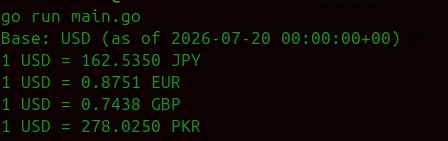
Here is the whole integration up front. Export your key (export CURRENCYFREAKS_API_KEY=your_key), save this as main.go, and run it with go run main.go:
package main

import (
	"encoding/json"
	"fmt"
	"net/http"
	"os"
	"strconv"
	"time"
)

// RatesResponse maps the CurrencyFreaks latest-rates JSON response.
// Note: rate values arrive as strings, not numbers.
type RatesResponse struct {
	Date  string            `json:"date"`
	Base  string            `json:"base"`
	Rates map[string]string `json:"rates"`
}

func main() {
	apiKey := os.Getenv("CURRENCYFREAKS_API_KEY")
	if apiKey == "" {
		fmt.Println("Set the CURRENCYFREAKS_API_KEY environment variable first.")
		os.Exit(1)
	}

	// USD base and the symbols filter both run on the free plan.
	url := "https://api.currencyfreaks.com/v2.0/rates/latest" +
		"?apikey=" + apiKey + "&symbols=EUR,GBP,JPY,PKR"

	client := &http.Client{Timeout: 10 * time.Second}

	resp, err := client.Get(url)
	if err != nil {
		fmt.Println("Request failed:", err)
		os.Exit(1)
	}
	defer resp.Body.Close()

	if resp.StatusCode != http.StatusOK {
		fmt.Println("API returned status:", resp.Status)
		os.Exit(1)
	}

	var data RatesResponse
	if err := json.NewDecoder(resp.Body).Decode(&data); err != nil {
		fmt.Println("Failed to parse JSON:", err)
		os.Exit(1)
	}

	fmt.Printf("Base: %s (as of %s)\n", data.Base, data.Date)
	for currency, rateStr := range data.Rates {
		rate, err := strconv.ParseFloat(rateStr, 64)
		if err != nil {
			fmt.Printf("Skipping %s: bad rate value\n", currency)
			continue
		}
		fmt.Printf("1 USD = %.4f %s\n", rate, currency)
	}
}
Fifty-odd lines and it works. The rest of this guide hardens it for production: timeouts that actually cancel, errors you can act on, a cache that keeps you inside the free tier, and arithmetic that will not quietly corrupt money values.
What Runs on the Free Plan vs a Paid Plan
Before writing more code, here is where the plan boundary sits, so nothing returns an unexpected HTTP 402 mid-tutorial:
| Feature used in this guide | Free plan | Paid plan |
|---|---|---|
Latest rates (/rates/latest) |
Yes | Yes |
Filter currencies with symbols |
Yes | Yes |
| USD base currency | Yes | Yes |
Custom base currency (base parameter) |
No | Yes |
Historical rates (/rates/historical) |
No | Yes |
| Higher call volume and update frequency | No | Yes |
Everything up to the historical-rates section runs on the free plan. Note that the code above deliberately omits the base parameter: USD is the free-plan default, and sending a non-USD base on the free plan returns HTTP 402.
Prerequisites
- Go 1.16 or later (install Go)
- A free CurrencyFreaks API key (sign up here)
Verify your installation with go version. No external packages are needed - the entire integration uses the standard library.
Step 1: Store Your API Key Securely
Never hardcode API keys in source files. Go reads environment variables with os.Getenv:
# Linux / macOS
export CURRENCYFREAKS_API_KEY=your_key_here

# Windows (PowerShell)
$env:CURRENCYFREAKS_API_KEY="your_key_here"
apiKey := os.Getenv("CURRENCYFREAKS_API_KEY")
if apiKey == "" {
	log.Fatal("CURRENCYFREAKS_API_KEY is not set")
}
For local development, tools like direnv or a .env loader such as joho/godotenv keep keys out of your shell history. In production, inject the variable through your deployment platform's secret management.
Step 2: Parse the JSON Response into a Go Struct
The CurrencyFreaks latest-rates endpoint returns this shape:
{
  "date": "2026-07-17 12:00:00+00",
  "base": "USD",
  "rates": {
    "EUR": "0.923100",
    "GBP": "0.781200",
    "JPY": "157.840000",
    "PKR": "278.500000"
  }
}
Two details matter for your struct definition. First, rate values are strings, not numbers, so the map type must be map[string]string, and each value needs strconv.ParseFloat before arithmetic. Second, the date field includes a time and timezone, so slice it (data.Date[:10]) if you only need the date portion.
type RatesResponse struct {
	Date  string            `json:"date"`
	Base  string            `json:"base"`
	Rates map[string]string `json:"rates"`
}
Decode directly from the response body with json.NewDecoder(resp.Body).Decode(&data) rather than reading the whole body into memory first - it is both simpler and more efficient for API responses.
Step 3: Idiomatic Error Handling in Go
Explicit error returns are where Go earns its keep in API work. Every failure point sits right at the call site, impossible to miss. Wrap the fetch logic in a function that returns (*RatesResponse, error) and let the caller decide what happens next:
package rates

import (
	"encoding/json"
	"fmt"
	"net/http"
	"net/url"
	"os"
	"time"
)

type RatesResponse struct {
	Date  string            `json:"date"`
	Base  string            `json:"base"`
	Rates map[string]string `json:"rates"`
}

// apiError maps the error object CurrencyFreaks returns on failed requests.
type apiError struct {
	Error struct {
		Info string `json:"info"`
	} `json:"error"`
}

func FetchLatest(symbols string) (*RatesResponse, error) {
	apiKey := os.Getenv("CURRENCYFREAKS_API_KEY")
	if apiKey == "" {
		return nil, fmt.Errorf("CURRENCYFREAKS_API_KEY is not set")
	}

	params := url.Values{}
	params.Set("apikey", apiKey)
	params.Set("symbols", symbols)
	endpoint := "https://api.currencyfreaks.com/v2.0/rates/latest?" + params.Encode()

	client := &http.Client{Timeout: 10 * time.Second}

	resp, err := client.Get(endpoint)
	if err != nil {
		return nil, fmt.Errorf("fetching rates: %w", err)
	}
	defer resp.Body.Close()

	if resp.StatusCode != http.StatusOK {
		var apiErr apiError
		if decodeErr := json.NewDecoder(resp.Body).Decode(&apiErr); decodeErr == nil && apiErr.Error.Info != "" {
			return nil, fmt.Errorf("api error (status %d): %s", resp.StatusCode, apiErr.Error.Info)
		}
		return nil, fmt.Errorf("api returned status %d", resp.StatusCode)
	}

	var data RatesResponse
	if err := json.NewDecoder(resp.Body).Decode(&data); err != nil {
		return nil, fmt.Errorf("parsing response: %w", err)
	}

	return &data, nil
}
The %w verb wraps errors so callers can inspect them with errors.Is and errors.As. The API returns error details under error.info in the response body on failures - decoding that gives you a human-readable reason ("invalid api key", "plan limit reached") instead of a bare status code.
Step 4: Production-Safe Requests with Context and Timeout
A client-level timeout protects against slow responses, but real services need cancellation that propagates. When an incoming HTTP request is abandoned, your outbound API call should stop too. That is what context is for, and it is the single most important upgrade between a tutorial script and production Go code:
func FetchLatestCtx(ctx context.Context, symbols string) (*RatesResponse, error) {
	apiKey := os.Getenv("CURRENCYFREAKS_API_KEY")
	if apiKey == "" {
		return nil, fmt.Errorf("CURRENCYFREAKS_API_KEY is not set")
	}

	params := url.Values{}
	params.Set("apikey", apiKey)
	params.Set("symbols", symbols)
	endpoint := "https://api.currencyfreaks.com/v2.0/rates/latest?" + params.Encode()

	req, err := http.NewRequestWithContext(ctx, http.MethodGet, endpoint, nil)
	if err != nil {
		return nil, fmt.Errorf("building request: %w", err)
	}

	resp, err := http.DefaultClient.Do(req)
	if err != nil {
		return nil, fmt.Errorf("fetching rates: %w", err)
	}
	defer resp.Body.Close()

	if resp.StatusCode != http.StatusOK {
		return nil, fmt.Errorf("api returned status %d", resp.StatusCode)
	}

	var data RatesResponse
	if err := json.NewDecoder(resp.Body).Decode(&data); err != nil {
		return nil, fmt.Errorf("parsing response: %w", err)
	}
	return &data, nil
}
Call it with a deadline:
ctx, cancel := context.WithTimeout(context.Background(), 5*time.Second)
defer cancel()

data, err := rates.FetchLatestCtx(ctx, "EUR,GBP,JPY")
if err != nil {
	log.Println("rate fetch failed:", err)
	// fall back to cached rates here - see next section
}
Inside an HTTP handler, pass the request's own context (r.Context()) instead of context.Background() so the API call is cancelled automatically if the client disconnects.
Step 5: Cache Exchange Rates in Memory
Exchange rates on the free plan update every 24 hours, so calling the API on every request wastes your quota. A small cache with a TTL, guarded by sync.RWMutex, keeps a busy Go service within the free plan's 1,000 monthly calls:
type RateCache struct {
	mu        sync.RWMutex
	data      *RatesResponse
	fetchedAt time.Time
	ttl       time.Duration
}

func NewRateCache(ttl time.Duration) *RateCache {
	return &RateCache{ttl: ttl}
}

func (c *RateCache) Get(ctx context.Context, symbols string) (*RatesResponse, error) {
	c.mu.RLock()
	if c.data != nil && time.Since(c.fetchedAt) < c.ttl {
		defer c.mu.RUnlock()
		return c.data, nil
	}
	c.mu.RUnlock()

	c.mu.Lock()
	defer c.mu.Unlock()

	// Double-check after acquiring the write lock.
	if c.data != nil && time.Since(c.fetchedAt) < c.ttl {
		return c.data, nil
	}

	fresh, err := FetchLatestCtx(ctx, symbols)
	if err != nil {
		// Serve stale rates rather than failing, if we have any.
		if c.data != nil {
			return c.data, nil
		}
		return nil, err
	}

	c.data = fresh
	c.fetchedAt = time.Now()
	return fresh, nil
}
With a one-hour TTL, a service makes at most 24 API calls per day regardless of traffic. The stale-fallback in the error path means a temporary API outage degrades gracefully instead of breaking your pricing pages. Users see slightly older rates rather than an error.
Handling Money Values Safely in Go
Fetching accurate rates is half the job; the other half is not corrupting them with floating-point arithmetic. float64 cannot represent most decimal fractions exactly, and rounding errors compound across transactions.
Two safe approaches:
Fixed-point with int64. Store amounts in the currency's smallest unit - cents for USD, whole yen for JPY. $10.50 becomes 1050. All arithmetic stays exact.
| Currency | Example | Stored value | Type |
|---|---|---|---|
| USD | $10.50 | 1050 | int64 |
| JPY | ¥10 | 10 | int64 |
| EUR | €10.50 | 1050 | int64 |
A decimal library. For calculations involving rates (which are not whole subunits), shopspring/decimal provides exact decimal arithmetic:
import "github.com/shopspring/decimal"

rate, _ := decimal.NewFromString(data.Rates["EUR"]) // rates are strings - no float round-trip
amount := decimal.NewFromInt(100)
converted := amount.Mul(rate).Round(2)
fmt.Println(converted) // exact to 2 decimal places
Because CurrencyFreaks returns rates as strings, decimal.NewFromString consumes them directly without ever passing through a float64, keeping the value exact from API to database. Always store the ISO 4217 currency code alongside every amount; a bare number like 100 is meaningless without knowing whether it is USD, EUR, or JPY.
Historical Exchange Rates in Go (Paid Plans)
The historical endpoint returns rates for any past date. It is available on paid plans (Starter and above) and returns HTTP 402 on the free plan:
// Requires a paid plan. Date goes in the ?date= query parameter.
url := "https://api.currencyfreaks.com/v2.0/rates/historical" +
	"?apikey=" + apiKey + "&date=2026-06-01&symbols=EUR,GBP"
The response shape is identical to latest rates, so the same RatesResponse struct and parsing code work unchanged. A common production pattern: when recording a transaction, store the rate used at that moment, so historical invoices always reflect the rate that actually applied. See pricing for plan details.
API Error Codes Reference
| HTTP status | Meaning | What to do |
|---|---|---|
| 400 | Missing key or invalid parameters | Check symbols and date values |
| 401 | API key invalid or inactive | Verify the key in your environment |
| 402 | Feature requires a higher plan | Stay on USD/latest rates, or upgrade |
| 404 | Rates not available for that date/currency | Pick a supported date or symbol |
| 429 | Monthly request limit exceeded | Raise your cache TTL or upgrade |
| 206 | Partial response; some requested currencies returned | Handle the rates that did return and log the missing symbols |
Conclusion
You now have a complete Golang currency API integration built entirely on the standard library: a typed client with idiomatic error handling, context-based timeouts for production safety, an in-memory cache that keeps you inside the free plan, and exact decimal arithmetic from API response to stored value.
The free plan covers real-time rates for 1,000+ currencies at 1,000 calls per month, which the caching pattern above stretches comfortably across a production service. If you work across languages, the Python currency converter API guide covers the same endpoints, and the 10 best currency exchange APIs comparison helps if you are still evaluating providers.
FAQs
Is there a free currency API for Golang?
Yes. The CurrencyFreaks free plan works with Go's standard net/http package and includes 1,000 calls per month for real-time rates across 1,000+ currencies with a USD base. No SDK is required - the code in this guide uses only the standard library.
How do I get exchange rates in Go?
Send a GET request to the latest-rates endpoint with net/http, decode the JSON response into a struct with encoding/json, and parse each rate string with strconv.ParseFloat or decimal.NewFromString. The complete working example at the top of this guide does exactly this in about 50 lines.
Why are the rate values strings instead of numbers?
Returning rates as strings preserves exact decimal precision in transit. Parse them with strconv.ParseFloat(rateStr, 64) for display, or feed them directly into shopspring/decimal for financial calculations that must stay exact.
Can I fetch historical exchange rates in Go on the free plan?
No. The /rates/historical endpoint requires a paid plan (Starter and above) and returns HTTP 402 on the free plan. To build your own history on the free plan, fetch the latest rates once a day on a schedule and store them in your database.
Should I use float64 for currency amounts in Go?
No. float64 introduces rounding errors that compound across transactions. Store amounts as int64 in the currency's smallest unit (cents), or use shopspring/decimal for exact decimal arithmetic. Always keep the ISO 4217 currency code with every stored amount.
Start fetching live exchange rates in your Go application. Sign up at CurrencyFreaks for free.