Currency localization means resolving a visitor's IP address to a currency code, converting your base prices with a live exchange rate, and formatting the result the way that locale writes money. A single API call does the first two steps. This guide walks through the CurrencyFreaks IP-to-Currency endpoint with runnable cURL, browser JavaScript, and Node.js examples, then covers the parts that break in production: VPN and proxy traffic, cache invalidation, price rounding, and GDPR handling of IP data.
One warning before you start. "Dynamic currency conversion" also names a card payments practice where a terminal converts a transaction at the point of sale, usually at a poor rate. That is a different thing entirely, handled by acquirers and card networks. This guide is about the web and application layer: what currency your interface displays, not how a card transaction settles. IP-to-currency detection makes this possible without asking users to lift a finger.
Quick Answer
Currency localization detects a visitor's currency from their IP address and displays prices in it. A geolocation lookup maps the IP to a country, the country maps to an ISO 4217 currency code, and a live exchange rate converts the base price. The CurrencyFreaks IP-to-Currency endpoint returns the resolved currency code, the applied rate, and the converted amount in one request, so no separate geolocation provider is required.
What Is Currency Localization, and How Is It Different From Dynamic Currency Conversion?
Currency localization is a display-layer feature. Your catalog stores one base price, usually in USD, and the interface renders that price in the visitor's currency at request time. Nothing about the payment changes: the charge still settles in whatever currency your payment processor is configured for, unless you also run multi-currency settlement.
Dynamic currency conversion, or DCC, is a payments-industry term for something else. When a cardholder pays abroad, the merchant terminal offers to bill the card in the cardholder's home currency instead of the local one. The acquirer sets that rate and adds a margin. Card networks regulate it, cardholders are usually advised to decline it, and it has nothing to do with your front end.
The two get confused because both end with a price in the user's own currency. They differ in who does the converting and what the conversion binds.
| Aspect | Currency localization (this guide) | Dynamic currency conversion (payments) |
|---|---|---|
| Layer | Web or application display | Card terminal or checkout processor |
| Who converts | Your code, via an exchange rate API | Acquirer or payment provider |
| What it binds | Nothing, display only | The settled transaction amount |
| Rate source | Market rate from your API provider | Acquirer rate plus margin |
| Reversible by user | Yes, with a currency selector | Only by declining at the terminal |
| Regulated | No | Yes, by Visa and Mastercard rules |
If you came here looking for the payments practice, the rest of this guide will not help you. If you want your product page to read PKR 27,800 instead of USD 99 for a visitor in Karachi, keep reading. The system detects location, converts values, and displays amounts that feel familiar.
Static currency selection allows users to choose their currency manually from a dropdown. Dynamic conversion removes that step and does the work quietly in the background. The difference feels small, but it changes how natural the experience feels.
A dynamic currency conversion example is an ecommerce store showing euros to shoppers in France and US dollars to users in the US. SaaS pricing pages work just like online marketplaces. The goal is clarity, not cleverness.
Why Currency Localization Matters For Global Users
Seeing prices in a familiar currency helps people feel confident right away. The numbers make sense because they match how they think about money every day. Feeling comfortable often beats fancy design updates.
Checkout and signup flows work better when users do not need to calculate exchange rates. Fewer steps mean fewer exits, especially on mobile. This directly affects how many users finish a transaction.
Currency localization also improves transparency. Users see the real price upfront, including any dynamic currency conversion fee. That removes doubt, lowers anxiety, and helps international shoppers move forward with confidence.
Three concrete failures happen when a global product shows one currency to everyone.
The first is arithmetic. A visitor who thinks in JPY seeing USD 99 has to know the rate to judge whether the price is reasonable. That is a decision they now have to make with incomplete information, and some of them stop rather than open a converter in another tab.
The second is comparison. If a competitor in that market prices in the local currency and you do not, your price is the one that requires work to evaluate. Localized pricing is table stakes in markets where local competitors exist.
The third is formatting, which is the failure teams notice last. Getting the currency code right and the format wrong still reads as broken. 1.234,56 EUR is correct in Germany and wrong in Ireland. A price of INR 1,00,000 uses the Indian grouping convention, not 100,000. JPY has no minor unit, so a decimal point in a yen price is an error, not a rounding choice.
Localization also has a hard limit worth stating up front. Showing a price in a visitor's currency does not mean you can charge in it. Multi-currency settlement is a payment processor configuration, separate from anything on this page. Localize the display, and be explicit at checkout about which currency the card will actually be billed in.
How IP-To-Currency Detection Works
The first step is reading the IP address of the visitor. That IP points to a general country or region, not a person. It shows where the request comes from, nothing more.
Once the country is known, the system maps it to a local currency. A foreign country usually has a primary legal tender used for everyday transactions. That mapping step is simple but essential.
Accuracy is high in most cases, but not perfect. Mobile carriers and shared networks sometimes confuse location data. Good systems plan for these limits instead of ignoring them.
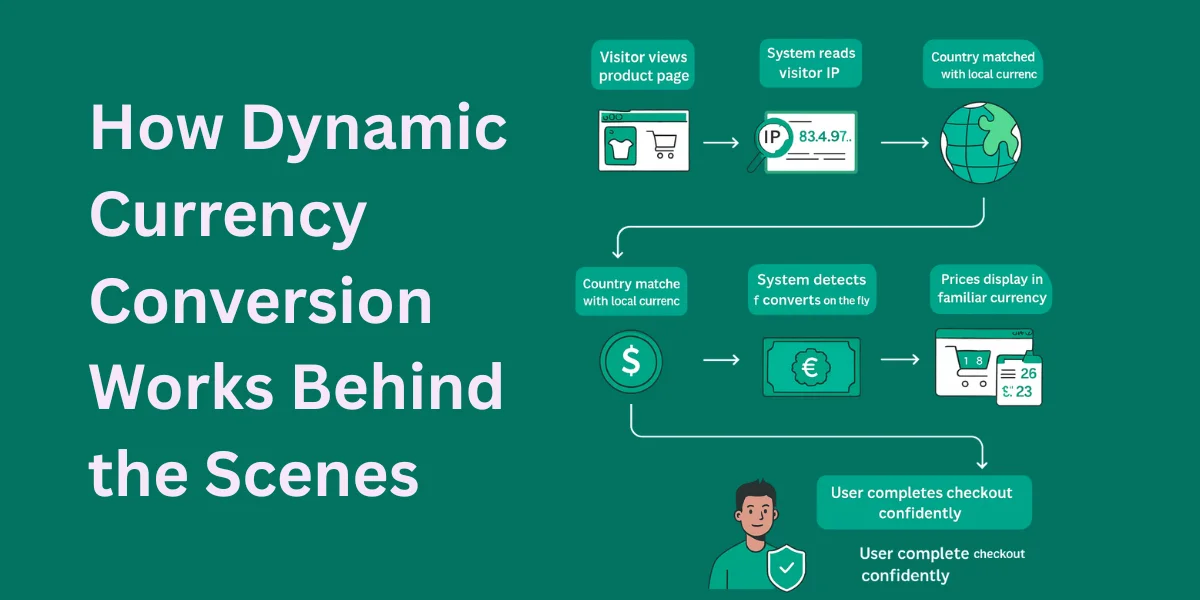
Four steps run between the request arriving and the price rendering.
- Read the client IP. Server-side, this is the socket address, or the leftmost trusted entry in
X-Forwarded-Forwhen you sit behind a proxy or CDN. Trusting the whole header without validation lets a client spoof its own location. - Resolve the IP to a country. Geolocation databases map IP ranges to countries with high reliability. City-level accuracy is much weaker, but country level is all currency detection needs.
- Map the country to an ISO 4217 currency code. Most countries map to exactly one. Some do not: Zimbabwe and Panama transact in USD alongside a local unit, and the euro spans 20 countries.
- Convert and format. Apply a live exchange rate to the base price, round to the currency's minor unit, and format for the locale. The CurrencyFreaks IP-to-Currency endpoint collapses steps 1 through 4's conversion into one request. It reads the IP, resolves the currency, applies the rate, and returns the converted amount together with the rate it used, so you can cache or audit the number later.
Plan requirement: the IP-to-Currency endpoint is available on the Growth plan and above. The free Developer plan does not include it, and it also limits you to USD as a base currency with 24 hour rate updates. Check the current tiers on the CurrencyFreaks pricing page before building against this endpoint, because the code below returns an authorization error on a free key.
Response Fields Returned by /v2.0/iptocurrency
| Field | Type | What it holds |
|---|---|---|
date | string | Timestamp of the rate used |
from | string | Base currency code you sent |
to | string | Currency code resolved from the IP |
rate | string | Exchange rate applied |
ipAddress | string | IP address the lookup used |
givenAmount | string | Amount you sent, defaults to 1.0 |
convertedAmount | string | Converted result |
Two of these matter more than they look. to is the field you branch on, because it tells you whether detection actually produced a currency you support. rate is the field to log, because a customer disputing a displayed price six weeks later is asking which rate you used, and the response is the only record of it. Full parameter reference lives in the CurrencyFreaks API documentation.
IP-To-Currency vs User-Selected Currency
Detection and user selection are not alternatives. Detection sets the default, selection overrides it, and the override is what you persist.
| Scenario | Detection alone | With a currency selector |
|---|---|---|
| First-time visitor, home network | Correct | Correct |
| VPN or corporate proxy | Wrong currency, no recourse | User corrects once |
| Expat paid in a foreign currency | Wrong for their wallet | User corrects once |
| Traveler mid-trip | Currency changes between sessions | Choice persists |
| Returning visitor | Re-detected every visit | Stored preference wins |
| Crawler or bot | Arbitrary currency indexed | Canonical currency served |
The precedence order that works: an explicit user choice in a cookie or user record, then a URL or subdomain signal if you run per-market paths, then IP detection, then your base currency as the floor. Detection only runs when nothing above it answered.
That last row is easy to miss. If a crawler's IP decides what currency your product pages render in, you are letting Google index prices in a currency chosen at random. Serve your base currency to unauthenticated crawler traffic and keep the canonical URL stable.
Store the override server-side against the user record when someone is signed in. A cookie alone loses the preference the moment they switch devices, which reads as the site forgetting a decision they already made.
Core Components Of A Dynamic Currency Conversion System
Every system starts with an IP geolocation service that maps the visitor’s IP address to a country. It has to be fast and dependable.
Next comes the country-to-currency mapping. This step decides which currency to show as the user’s home currency. Some regions use more than one currency, so this part needs extra attention.
Next, you need exchange rates and a pricing layer. The rates do the math. The pricing rules keep everything steady. Finally, the frontend shows prices in a clean and familiar format.
Choosing An IP Geolocation Provider
Get the accuracy right before anything else. Some IP geolocation providers perform better in certain regions than others. Testing with real traffic helps you spot gaps early.
Latency is easy to overlook. But when lookups are slow, pages lag, and everything feels slower than it should. Lightweight responses make a big difference.
Privacy and compliance should never be an afterthought. Choose providers that minimize data retention and respect regulations. Clear communication earns trust in the long run.
Integrating Exchange Rate APIs
Coverage decides whether detection can ever succeed. If an IP resolves to a currency your rate provider does not quote, you have a detected currency and no rate to apply, which is worse than not detecting at all. CurrencyFreaks quotes 1,030 currency codes covering fiat, precious metals, and cryptocurrencies, so the fiat side of country-to-currency mapping is fully served. The full list is on the supported currencies page, and it is worth diffing against your own supported-market list once rather than discovering a gap from a support ticket.
Rate freshness is a plan property, not a product property, and it changes how you cache. The Developer plan updates every 24 hours, Starter hourly, Growth every 10 minutes, and Professional every 60 seconds. Caching a rate for 5 minutes on a plan that refreshes every 24 hours buys you nothing but request volume. Match your cache TTL to your plan's refresh interval, not to a number that sounds fresh.
Real-time exchange rates keep prices honest. Outdated data leads to incorrect totals and unhappy users. Fresh rates reflect real market conditions.
A dynamic currency conversion setup usually defines a base currency and converts from there. The system must calculate exchange rates consistently across products. Small rounding errors can add up.
Caching helps control performance and cost. Exchange rates do not need updating every second for most businesses. Smart intervals balance accuracy and speed.
Currency Formatting And Localization Rules
Currency symbols matter more than people think. Some users prefer symbols, while others trust currency codes like USD or EUR. Context determines what feels clearer.
Formatting rules vary by country. Decimal separators, thousands grouping, and rounding differ widely. Ignoring these details makes prices feel wrong.
Some countries use multiple currencies. Others accept foreign currency alongside local currency. Edge cases require clear fallback rules.
Never build currency strings by concatenation. Intl.NumberFormat already encodes every rule you would otherwise get wrong, including symbol position, grouping, decimal separator, and minor-unit digits.
// Formats one amount for a locale and currency code.
// Returns a display-ready string, symbol and separators included.
function formatPrice(amount, currencyCode, locale) {
  return new Intl.NumberFormat(locale, {
    style: 'currency',
    currency: currencyCode
  }).format(amount);
}

formatPrice(1234.56, 'USD', 'en-US'); // "$1,234.56"
formatPrice(1234.56, 'EUR', 'de-DE'); // "1.234,56 €"
formatPrice(1234.56, 'JPY', 'ja-JP'); // "¥1,235"
formatPrice(1234.56, 'INR', 'en-IN'); // "₹1,234.56"
Four rules the API cannot decide for you.
| Rule | Why it matters | What to do |
|---|---|---|
| Minor units vary | JPY and KRW have zero decimals, BHD has three | Let Intl.NumberFormat set digits from the code |
| Locale is not currency | A German speaker may want USD prices | Pass locale and currency code separately |
| Rounding is a pricing decision | 8,432.17 PKR reads as a conversion artifact | Round converted prices to a psychological boundary |
| Ambiguous symbols | $ means USD, CAD, AUD and more | Use currencyDisplay: 'code' in mixed-currency views |
The rounding row is the one that gets shipped wrong most often. A raw converted number tells the visitor that this price was computed from a different price, which invites them to work out the original and question the markup. Round to the nearest sensible unit in the target currency and hold that rounded price for the session so it does not shift under them mid-visit.
Building A Dynamic Currency Conversion Flow
It starts the moment someone opens a page. The system detects the IP and identifies the country. It then maps that country to a currency.
After this, it checks what the currency is trading at right now. It switches the amount into the right currency. Then it adjusts the final price.
Finally, prices are formatted and rendered. Users view prices in a way that feels natural. The entire process stays invisible.
Access the complete code here.
The CurrencyFreaks IP-to-Currency Endpoint
CurrencyFreaks has a dedicated endpoint that handles geolocation and conversion in a single API call. You pass your store currency and the visitor’s IP - the API returns the detected local currency, the exchange rate, and the converted amount together.
GET https://api.currencyfreaks.com/v2.0/iptocurrency
    ?apikey=YOUR_API_KEY
    &from=USD
    &amount=99.99
    &ip=VISITOR_IP
Parameters:
apikey(required) - your CurrencyFreaks API keyfrom(required) - your store’s base currency code, for example USDamount(optional) - the amount to convert; defaults to 1.0 if omittedip(optional) - IPv4 or IPv6 address of the visitor; if omitted, the caller’s own IP is used automatically
Example response:
{
  "date": "2024-05-12 10:30:00+00",
  "from": "USD",
  "to": "GBP",
  "rate": "0.7923",
  "ipAddress": "212.58.244.18",
  "givenAmount": "99.99",
  "convertedAmount": "79.22"
}
The to field is the currency the visitor’s IP maps to. The convertedAmount is ready to display. No separate geolocation service needed.
This endpoint is available on the Growth plan and above.
Step 1 - cURL: Test the Endpoint Directly
# Omit &ip to auto-detect your own IP - useful for quick testing
curl 'https://api.currencyfreaks.com/v2.0/iptocurrency?apikey=YOUR_API_KEY&from=USD&amount=1'

# Pass a specific IP to simulate a visitor from a known country
# 212.58.244.18 resolves to the UK - response shows to=GBP
curl 'https://api.currencyfreaks.com/v2.0/iptocurrency?apikey=YOUR_API_KEY&from=USD&ip=212.58.244.18&amount=99.99'
Step 2 - Complete HTML + JavaScript (Client-Side Demo)
The snippet below is a fully working product page. Drop it into an .html file, replace YOUR_API_KEY, and open it in a browser. It detects the visitor’s currency from their IP and converts all prices automatically.
Note: embedding your API key in client-side JavaScript exposes it to anyone who views the source. This pattern is fine for internal dashboards and demos. For a public production site, proxy the call through your own backend instead (see the Node.js example below).
<!DOCTYPE html>
<html lang="en">
<head>
<meta charset="UTF-8" />
<title>Dynamic Currency Conversion via IP | CurrencyFreaks</title>
<meta name="description" content="Detect user currency automatically using IP-to-currency detection and show localized prices in real time." />
<style>
:root {
--primary: #2563eb;
--secondary: #1e40af;
--bg: #f1f5f9;
--card: #ffffff;
--text: #0f172a;
--muted: #64748b;
}
* { box-sizing: border-box; }
body {
margin: 0;
font-family: "Segoe UI", system-ui, sans-serif;
background: linear-gradient(180deg, #eef2ff 0%, var(--bg) 100%);
color: var(--text);
padding: 40px 20px;
}
.container { max-width: 1100px; margin: auto; }
header {
background: linear-gradient(135deg, var(--primary), var(--secondary));
color: #fff; padding: 30px; border-radius: 16px;
margin-bottom: 35px; box-shadow: 0 20px 30px rgba(37,99,235,0.25);
}
header h1 { margin: 0 0 10px; font-size: 32px; }
header p { margin: 0; font-size: 16px; opacity: 0.95; }
.status {
background: rgba(255,255,255,0.95); padding: 18px 20px;
border-radius: 12px; margin-bottom: 35px; font-size: 16px;
box-shadow: 0 6px 14px rgba(0,0,0,0.06);
}
h2 { margin-bottom: 20px; font-size: 24px; }
.products {
display: grid;
grid-template-columns: repeat(auto-fit, minmax(250px, 1fr));
gap: 24px;
}
.product {
background: var(--card); border-radius: 18px; padding: 22px;
box-shadow: 0 10px 25px rgba(0,0,0,0.08);
transition: transform 0.25s ease, box-shadow 0.25s ease;
}
.product:hover { transform: translateY(-6px); box-shadow: 0 18px 40px rgba(0,0,0,0.12); }
.product h3 { margin: 0 0 8px; font-size: 18px; }
.product p { margin: 0; font-size: 14px; color: var(--muted); }
.price { margin-top: 18px; font-size: 22px; font-weight: 700; color: var(--primary); }
.price small { display: block; font-size: 13px; font-weight: 400; color: var(--muted); margin-top: 4px; }
footer { text-align: center; margin-top: 50px; font-size: 13px; color: var(--muted); }
</style>
</head>
<body>
<div class="container">
<header>
<h1>Dynamic Currency Conversion</h1>
<p>Automatically detect user currency via IP and display localized pricing</p>
</header>
<div class="status" id="statusMsg">Detecting your location and currency…</div>
<h2>Products</h2>
<div class="products" id="productList"></div>
<footer>Powered by <strong>CurrencyFreaks</strong> IP-to-Currency API</footer>
</div>
<script>
const API_KEY = 'YOUR_API_KEY'; // Replace with your CurrencyFreaks API key
const products = [
{ name: 'Wireless Headphones', priceUSD: 79.99, desc: 'Premium sound quality' },
{ name: 'Mechanical Keyboard', priceUSD: 129.99, desc: 'Tactile typing experience' },
{ name: 'USB-C Hub', priceUSD: 49.99, desc: '7-in-1 connectivity' },
{ name: 'Webcam HD 1080p', priceUSD: 59.99, desc: 'Crystal-clear video calls' },
{ name: 'Monitor Stand', priceUSD: 39.99, desc: 'Adjustable ergonomic design' },
{ name: 'Mouse Pad XL', priceUSD: 24.99, desc: 'Smooth surface, non-slip base' },
];
function renderProducts(currency, rate) {
return products.map(p => {
const converted = (p.priceUSD * rate).toFixed(2);
return `
<div class="product">
<h3>${p.name}</h3>
<p>${p.desc}</p>
<div class="price">
${currency} ${converted}
<small>USD ${p.priceUSD.toFixed(2)}</small>
</div>
</div>`;
}).join('');
}
async function loadLocalPrices() {
const statusEl = document.getElementById('statusMsg');
const listEl = document.getElementById('productList');
try {
// Omitting &ip lets the API detect the visitor's IP automatically
const res = await fetch(
`https://api.currencyfreaks.com/v2.0/iptocurrency?apikey=${API_KEY}&from=USD&amount=1`
);
if (!res.ok) throw new Error(`HTTP ${res.status}`);
const { to, rate, ipAddress } = await res.json();
const numRate = parseFloat(rate);
statusEl.innerHTML =
`Showing prices in <strong>${to}</strong> · ` +
`1 USD = ${numRate.toFixed(4)} ${to} · ` +
`Detected IP: ${ipAddress}`;
listEl.innerHTML = renderProducts(to, numRate);
} catch (err) {
statusEl.textContent = 'Could not detect location - showing prices in USD.';
listEl.innerHTML = renderProducts('USD', 1);
}
}
loadLocalPrices();
</script>
</body>
</html>
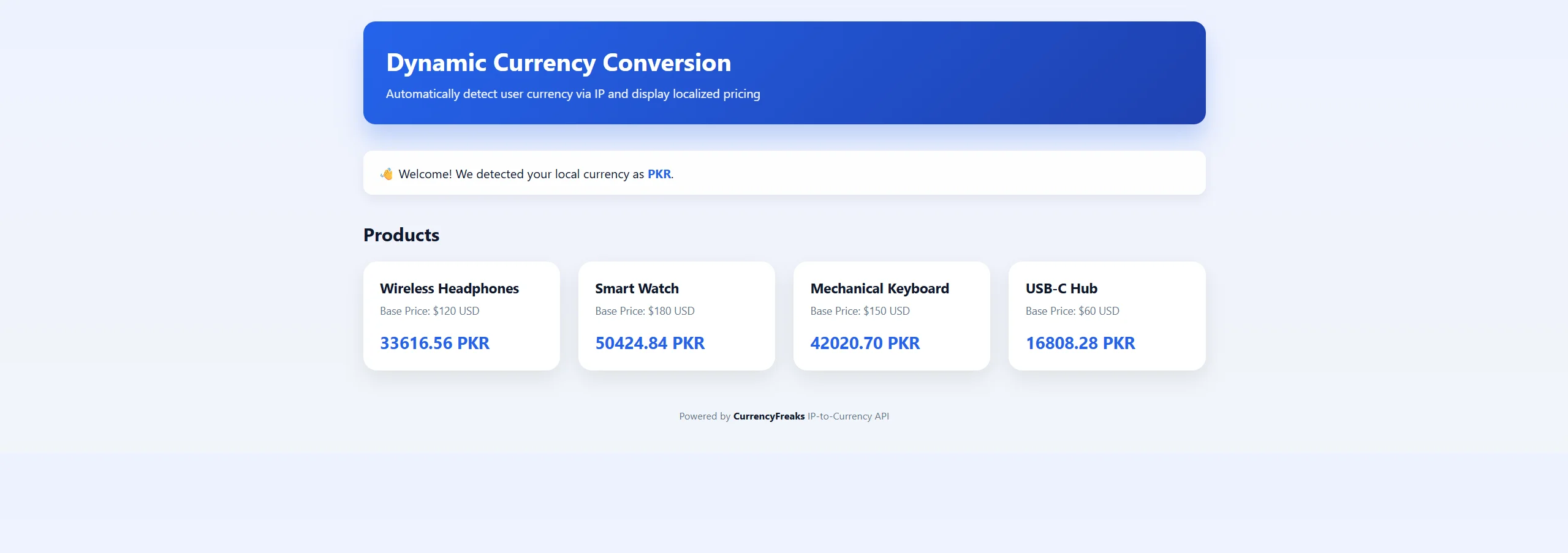
Here is the output when the visitor is browsing from Pakistan:
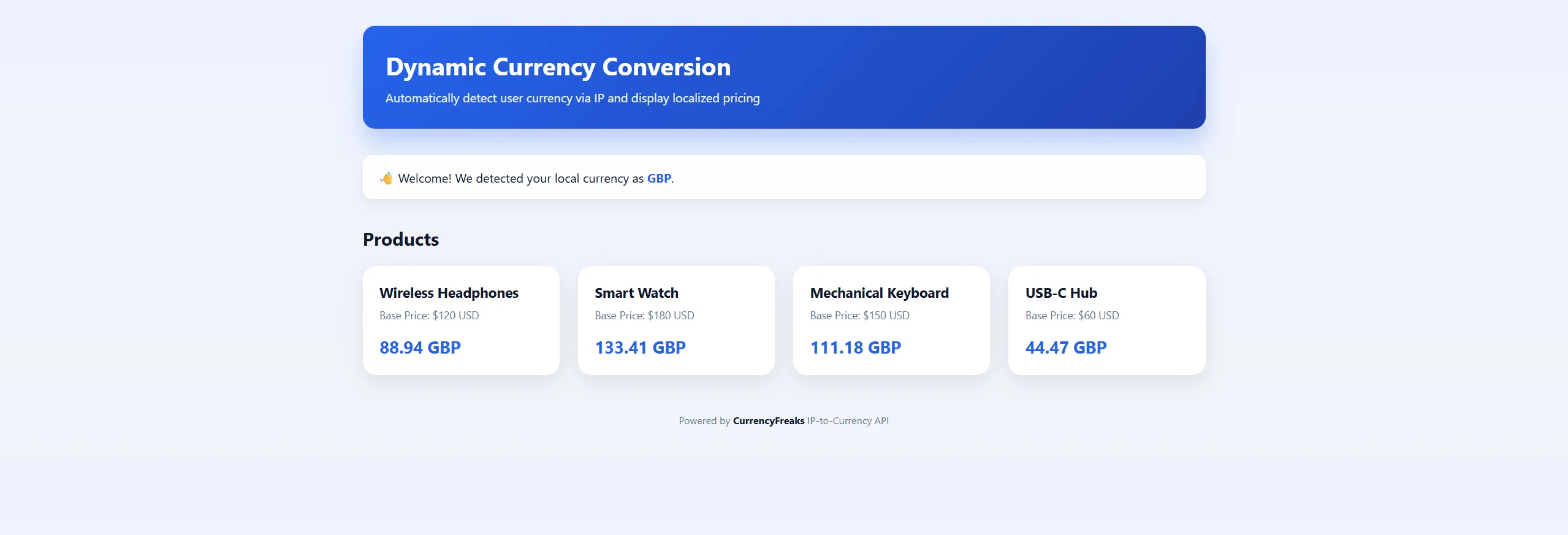
Switch to a UK VPN and refresh - the page detects the new IP and switches to GBP automatically:
Step 3 - Node.js / Express Backend
const https   = require('https');
const express = require('express');

const API_KEY = 'YOUR_API_KEY';

const PRODUCTS = [
  { name: 'Wireless Headphones', priceUSD: 79.99  },
  { name: 'Mechanical Keyboard', priceUSD: 129.99 },
  { name: 'USB-C Hub',           priceUSD: 49.99  },
];

function detectCurrency(visitorIP) {
  return new Promise((resolve, reject) => {
    const url =
      `https://api.currencyfreaks.com/v2.0/iptocurrency` +
      `?apikey=${API_KEY}&from=USD&amount=1&ip=${encodeURIComponent(visitorIP)}`;

    https.get(url, (res) => {
      let body = '';
      res.on('data', chunk => (body += chunk));
      res.on('end', () => {
        try {
          const data = JSON.parse(body);
          resolve({ currency: data.to, rate: parseFloat(data.rate) });
        } catch (e) { reject(e); }
      });
    }).on('error', reject);
  });
}

const app = express();

app.get('/api/products', async (req, res) => {
  const visitorIP = (req.headers['x-forwarded-for'] || req.socket.remoteAddress || '')
    .split(',')[0].trim();

  let currency = 'USD';
  let rate     = 1.0;

  try {
    ({ currency, rate } = await detectCurrency(visitorIP));
  } catch (err) {
    console.error('IP-to-currency lookup failed:', err.message);
  }

  const result = PRODUCTS.map(p => ({
    name:       p.name,
    price_usd:  p.priceUSD,
    price_local: Math.round(p.priceUSD * rate * 100) / 100,
    currency,
  }));

  res.json(result);
});

app.listen(3000, () => console.log('Listening on http://localhost:3000'));
Handling Edge Cases And Exceptions
VPNs and proxy IPs can confuse location detection - a traveler on a VPN might look like they're browsing from the wrong country entirely. Systems should expect this and stay flexible rather than treating it as an error.
Some currencies won't be supported, or the lookup will fail outright. When that happens, fall back to a default currency (usually your store's base currency) instead of showing an error. People can still see a price; it just won't be localized.
Always let users override the detected currency. A manual switcher costs little to build and covers every case automatic detection gets wrong.
Currency detection fails in predictable ways. Handle these six explicitly and the feature stops generating support tickets.
| Case | What goes wrong | Handling |
|---|---|---|
| VPN or proxy traffic | Currency resolves to the exit node's country | Show a visible selector, persist the override |
| Shared euro area | 20 countries, one currency | No special case needed, EUR is correct |
| Dual-currency economies | USD circulates alongside the local unit | Pick one default per market, document it |
| Unsupported currency resolved | Detection succeeds, no rate available | Fall back to base currency, log the code |
| API timeout or error | Prices render blank or as zero | Serve last cached rate, then base currency |
| IPv6 and CGNAT | Resolution accuracy drops | Treat a failed lookup as no signal, not as an error |
The fallback chain matters more than the detection. Last known good rate, then base currency, then a price that is never blank and never zero. A page that renders USD 99 when the lookup fails is working correctly. A page that renders an empty price field is broken, and it is broken in the way that loses the sale.
Fail open, and log the currency code every time detection returns something you do not support. That log is how you find out which markets to add rates or rounding rules for, and it costs nothing to keep. Error semantics for the endpoint family, including which status codes to retry and which to treat as terminal, are covered in the CurrencyFreaks error handling guide.
Performance Optimization Strategies
Caching IP lookups reduces repeated calls, since a lot of traffic tends to come from a small number of regions. This saves both time and API quota.
Exchange rates can also be cached safely - they don't need to be refetched on every page load. Match your cache TTL to how often your plan actually updates rates.
Server-side conversion (computing the localized price on your backend and sending it down already-converted) is usually faster and more secure than doing the lookup in the browser on every request.
One IP-to-currency call per page view is the pattern to avoid. It puts a third-party network round trip on your critical rendering path and burns request quota on visitors whose currency you already resolved.
Cache in three layers instead.
- Rate cache, server-side, keyed by currency pair. TTL equal to your plan's refresh interval. Rates are shared across all visitors, so this is one cached value serving everyone in a market.
- Detection cache, per session. Resolve the visitor's currency once at session start and store the code, not the converted prices. An IP does not change mid-session often enough to justify re-resolving.
- Formatted price cache, per currency, at the edge. Cache rendered pages by currency variant with
Varyhandled explicitly, rather than caching one page and rewriting prices in the browser. Do the detection call server-side during the first request, not from the browser after paint. A client-side call means the visitor sees your base currency, then watches it change, which looks like a bug and shifts layout after render.
Batch where the shape allows it. Fetching all rates against your base currency in one request and converting locally costs one call per TTL window instead of one per pair. The guide to reducing monthly API calls with symbols and base parameters covers the parameter combinations that make this cheap.
Security And Privacy Considerations
Treat IP data responsibly. Use it only to determine currency, and don't retain it longer than the request needs or link it to a user's account.
Regulations like GDPR apply here - if you're processing IP addresses (even briefly, for a currency lookup), users should be able to find out what's collected and why in your privacy policy.
Avoid storing personal details alongside IP data. Being upfront about what you collect and why builds the same trust that accurate localized pricing does.
An IP address is personal data under the GDPR. The Court of Justice of the European Union settled that in Breyer v Germany (C-582/14), which held that a dynamic IP address is personal data for a controller who can combine it with other information to identify the person. Processing one is lawful, but it needs a basis and it needs limits.
Four practices keep IP-based currency detection defensible.
Keep the API key server-side. The code samples above put the key in a backend call for a reason: a key in client-side JavaScript is a public key, and anyone can read it out of the network tab and spend your quota.
Do not store the IP. You need the currency code, not the address that produced it. Resolve, keep the three-letter code, discard the IP. Nothing you store then carries a GDPR retention obligation, which removes the problem instead of documenting it.
Name the processing in your privacy policy. One sentence stating that visitor IP addresses are used to detect display currency and are not retained is enough, and it is the sentence a data subject access request will ask you to point at.
Give the user an override. Under a legitimate interest basis, the balancing test is easier to pass when the subject can correct the outcome, and a visible currency selector is that correction.
Common Mistakes To Avoid
Six mistakes account for most broken currency localization implementations.
Calling the API on every page view. This is a per-request network dependency on a third party and a fast way to exhaust request quota. Cache the rate for your plan's refresh interval and the detected code for the session.
Detecting from the browser instead of the server. The visitor sees the base currency, then watches it change after paint. Resolve during the first server-side request.
Shipping no currency selector. Detection is wrong for VPN users, expats, and travelers, and without an override those visitors have no way to fix it.
Rendering raw converted amounts. A price of 8,432.17 PKR announces itself as a conversion. Round to a sensible boundary in the target currency and hold it for the session.
Implying the charge is in the displayed currency. Display and settlement are separate. State the billing currency at checkout.
Storing IP addresses. Keep the resolved currency code and discard the address. There is no retention question to answer if there is nothing retained.
Key Takeaways
- Currency localization is a display concern. Dynamic currency conversion is a card payments practice. They are not the same problem.
- One call to
/v2.0/iptocurrencyreturns the resolved currency code, the applied rate, and the converted amount. - The endpoint requires the Growth plan or above. Free Developer keys return an authorization error.
- Precedence order: stored user choice, then market path, then IP detection, then base currency.
- Match your cache TTL to your plan's rate refresh interval, not to an arbitrary freshness target.
- Format with
Intl.NumberFormatand round converted prices before display. - Keep the resolved currency code, discard the IP address, and name the processing in your privacy policy.
Conclusion
Dynamic currency conversion solves a quiet but costly problem: users hesitating at a price that doesn't match how they think about money. IP-to-currency detection removes that friction automatically, with no clicks or setup required from the visitor.
This matters most for global ecommerce stores, subscription SaaS pricing pages, and marketplaces - anywhere a clear, localized price directly affects whether someone completes a purchase. Building currency-aware pricing improves trust and helps a product scale internationally without adding real complexity to the checkout flow.
Currency localization is a small feature with a long tail of edge cases. The API call is one line. The work is in everything around it: resolving the IP server-side, caching the rate to your plan's refresh interval, letting a stored user choice beat detection, rounding converted prices before they reach the page, and falling back to your base currency instead of a blank price when the lookup fails.
Build it in that order. Get the detection and fallback chain right first, then formatting, then caching, then the selector. Each step works on its own, and a visitor never sees a price that is missing, zero, or written in a format their locale does not use.
FAQs
What Is Currency Localization and How Does It Work?
Currency localization displays prices in the visitor's own currency by resolving their IP address to an ISO 4217 currency code and converting the base price with a live exchange rate. It changes what the interface shows, not how the payment settles. A single call to the CurrencyFreaks IP-to-Currency endpoint returns the resolved code, the rate applied, and the converted amount.
How Accurate Is IP-To-Currency Detection?
Country-level IP geolocation is reliable enough for currency detection, and country level is all the mapping needs. Accuracy drops for VPN traffic, corporate proxies, CGNAT ranges, and travelers, because the resolved country reflects the network exit point, not the person. Treat detection as a default, not a fact, and ship a currency selector so wrong results can be corrected.
Should Users Be Allowed To Change Their Currency?
Yes, and the stored choice should outrank detection. Use this precedence: an explicit user selection, then any market-specific URL or subdomain signal, then IP detection, then your base currency. Persist the selection against the user record when someone is signed in, because a cookie alone loses it on their next device.
Does Currency Detection Slow Down Page Load?
Only if the lookup sits on the critical rendering path. Resolve the currency server-side during the first request, cache the exchange rate for your plan's refresh interval, and cache the detected code for the session. A browser-side call after paint is what visitors notice, because they see the base currency, then watch the price change and the layout shift.
Is IP-Based Currency Detection GDPR Compliant?
It can be, with a lawful basis and data minimisation. An IP address is personal data under the GDPR, confirmed in Breyer v Germany (C-582/14). Resolve the address, keep only the three-letter currency code, and discard the IP so there is no retention obligation. Name the processing in your privacy policy and give visitors a currency selector.