Manual tracking works fine until the market shifts while you're asleep. Prices change constantly, and no one can watch charts all day. That's what automated alerts are for: a script that checks rates on a schedule and tells you only when something worth reacting to happens.
This guide uses CurrencyFreaks with Node.js and node-cron to build that script. By the end, you'll have a flexible alert engine you can extend with more pairs and channels as you need them.
What Forex Alerts Do And How They Work
What Forex Alerts Actually Do
An alert notifies you when a defined condition occurs - a rate crossing a threshold, or moving by more than a set percentage - instead of you watching a chart waiting for it to happen. That's the whole value: you get pulled in only when a rule actually triggers.
Common Types Of Alerts
Threshold alerts fire when a rate crosses a fixed level you set in advance - useful around a known support or resistance point.
Percentage-change alerts fire when a rate moves by more than a set percent since the last check, which surfaces momentum without you having to read a chart.
Volatility alerts watch for unusually large swings relative to a pair's normal range, which helps catch instability early, particularly around economic releases.
Scheduled Vs. Event-Driven Alerts
Event-driven alerts respond to something happening in real time. Scheduled alerts run at fixed intervals instead, which is simpler to build and debug, and is what this guide implements with node-cron.
Why CurrencyFreaks For This
CurrencyFreaks returns clean, structured JSON for both current and historical rates, which is what an alert script actually needs: fetch today's rate, fetch yesterday's, compare them. The historical rates endpoint makes the comparison possible without you having to store your own rate history.
The free plan is enough to build and test this end-to-end: 1,000 calls a month covers a script that runs once or twice a day comfortably.
System Architecture
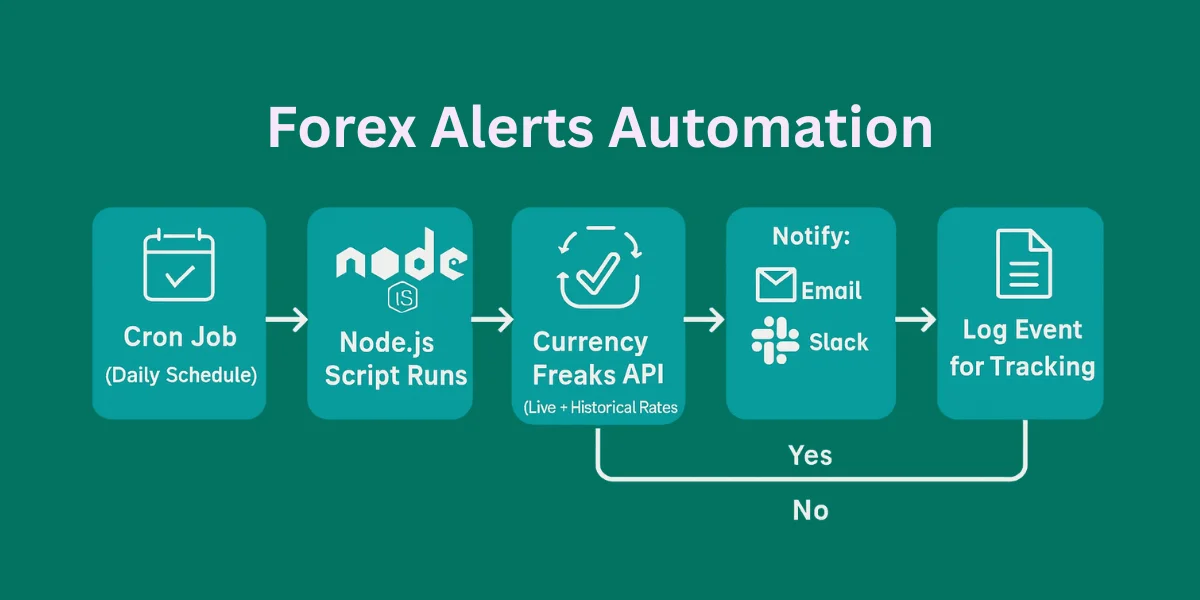
The flow is simple and each part does one job: a cron job runs the Node.js script on a schedule, the script fetches the latest rate and compares it against the previous value, and if a rule's condition is met, it sends a notification and logs the event.
Keeping the data-fetching, the rule logic, and the notification code as separate functions makes this easy to extend later - adding a new pair or a new alert channel doesn't require touching the comparison logic.
Building Automated Forex Alerts With Node.js
Project Setup
Install Node.js and npm, create a project folder, and get your CurrencyFreaks API key from the dashboard. Store it in an environment variable rather than hardcoding it into the script.
Fetching Forex Data
Use axios or fetch to call the latest-rates endpoint for today's value and the historical endpoint for yesterday's, wrapped in a shared helper function so both calls handle errors the same way.
Designing Alert Rules
Keep rules in a config object rather than hardcoding them inline - a threshold or a percentage-change limit per pair - so adding a new rule later is a data change, not a code change.
Implementing The Comparison Logic
Compare today's rate against yesterday's, calculate the percentage change, and round consistently. Track which alerts have already fired in the current run so you don't send the same alert twice.
Scheduling With Cron
node-cron runs the check on a schedule - daily is enough for most swing or position strategies. Pick a time that overlaps with when the market you're tracking is most active, and account for timezones so the job fires when you expect it to.
Sending Notifications
Email works well for daily summaries; Slack or a webhook suits a team that wants alerts in real time. Keep the message itself simple - pair, value, and time - so it's readable at a glance.
Building a Forex Market Analysis Dashboard Using CurrencyFreaks
Node.js lets JavaScript run on your computer.
👉 Download from:
Nodejs.org
✔ Choose LTS version
✔ Install with default settings
Open Command Prompt / Terminal and run:
node -v
npm -v
If you see version numbers, you’re good.
Get a CurrencyFreaks API Key
-
Sign up (free account)
-
Copy your API key
You’ll use this key to access forex prices.
Create Your Project Folder
- Create a folder called:
forex-alerts
-
Open this folder in VS Code (or any editor)
-
Open terminal inside the folder
Initialize Your Node.js Project
Run this command:
npm init -y
This creates a file called package.json
It tells Node.js what your project is.
Install Required Packages
Run:
npm install axios express node-cron dotenv
What each one does (simple explanation):
| Package | Purpose |
|---|---|
| axios | Makes API requests |
| express | Runs a small web server |
| node-cron | Runs tasks on schedule |
| dotenv | Protects API keys |
Create the Backend File
Here is the GitHub repository for the following code
Create a file called server.js
Paste this code:
import express from 'express';
import axios from 'axios';
import path from 'path';
import { fileURLToPath } from 'url';

const app = express();
const __dirname = path.dirname(fileURLToPath(import.meta.url));

// --- CONFIGURATION ---
const API_KEY = 'add-your-api-key'; // 1. Put your CurrencyFreaks Key here

app.use(express.static('public'));

// Endpoint to get the list of 1000+ currency names
app.get('/api/symbols', async (req, res) => {
    try {
        const response = await axios.get('https://api.currencyfreaks.com/v2.0/currency-symbols');
        res.json(response.data.currencySymbols);
    } catch (error) {
        res.status(500).json({ error: "Failed to fetch symbols" });
    }
});

// Step 3: Location/Query Handling - Dynamic Forex Data
app.get('/api/forex-data', async (req, res) => {
    // Get symbols from the browser request, default to a few if empty
    const requestedSymbols = req.query.symbols || "PKR,USD,EUR,GBP,JPY,BTC";

    try {
        // 1. Get Latest Rates
        const latestUrl = `https://api.currencyfreaks.com/v2.0/rates/latest?apikey=${API_KEY}&symbols=${requestedSymbols}`;
        const latestRes = await axios.get(latestUrl);

        // 2. Get Historical Rates (24h ago)
        const yesterday = new Date();
        yesterday.setDate(yesterday.getDate() - 1);
        const dateStr = yesterday.toISOString().split('T')[0];
        const histUrl = `https://api.currencyfreaks.com/v2.0/rates/historical?apikey=${API_KEY}&date=${dateStr}&symbols=${requestedSymbols}`;
        const histRes = await axios.get(histUrl);

        // 3. Get Full Names from Symbols Endpoint
        const symRes = await axios.get('https://api.currencyfreaks.com/v2.0/currency-symbols');
        const fullNames = symRes.data.currencySymbols;

        // Step 5: Data Parsing - Combine everything
        const ratesToday = latestRes.data.rates;
        const ratesYesterday = histRes.data.rates;

        const report = Object.keys(ratesToday).map(symbol => {
            const current = parseFloat(ratesToday[symbol]);
            const prev = parseFloat(ratesYesterday[symbol]);
            const change = prev ? ((current - prev) / prev * 100).toFixed(3) : "0.000";

            return {
                symbol,
                fullName: fullNames[symbol] || "Unknown",
                rate: current < 0.1 ? current.toFixed(6) : current.toFixed(4),
                change: change,
                trend: parseFloat(change) >= 0 ? 'bullish' : 'bearish',
                updated: latestRes.data.date
            };
        });

        res.json(report);
    } catch (error) {
        console.error(error.message);
        res.status(500).json({ error: "API connection failed. Check your API Key." });
    }
});

app.listen(3000, () => console.log(`🚀 Forex Pulse Pro: http://localhost:3000`));
Create the Frontend Folder
Inside forex-alerts, create:
public/
Inside public, create three files:
index.html
style.css
app.js
Write the Frontend Code
index.html
<!DOCTYPE html>
<html lang="en">
<head>
    <meta charset="UTF-8">
    <meta name="viewport" content="width=device-width, initial-scale=1.0">
    <title>Forex Pulse Pro</title>
    <style>
        :root { --bg: #0f172a; --card: #1e293b; --blue: #3b82f6; --green: #22c55e; --red: #ef4444; }
        body { font-family: 'Inter', sans-serif; background: var(--bg); color: white; padding: 20px; }
        .container { max-width: 1200px; margin: 0 auto; }

        /* Control Panel */
        .panel { background: var(--card); padding: 20px; border-radius: 12px; margin-bottom: 30px; border: 1px solid #334155; }
        .search-box { width: 100%; padding: 12px; border-radius: 8px; border: 1px solid #475569; background: #0f172a; color: white; margin-bottom: 10px; }
        .symbol-list { display: grid; grid-template-columns: repeat(auto-fill, minmax(150px, 1fr)); gap: 10px; max-height: 150px; overflow-y: auto; padding: 10px; background: #0f172a; border-radius: 8px; }
        .symbol-item { font-size: 0.8rem; cursor: pointer; padding: 5px; border-radius: 4px; }
        .symbol-item:hover { background: var(--blue); }
        .selected-tag { display: inline-block; background: var(--blue); padding: 4px 10px; border-radius: 15px; margin: 5px; font-size: 0.8rem; }

        /* Grid */
        .grid { display: grid; grid-template-columns: repeat(auto-fit, minmax(300px, 1fr)); gap: 20px; }
        .card { background: var(--card); padding: 20px; border-radius: 16px; position: relative; overflow: hidden; border-left: 6px solid #475569; }
        .bullish { border-left-color: var(--green); }
        .bearish { border-left-color: var(--red); }
        .fullName { font-size: 0.8rem; color: #94a3b8; text-transform: uppercase; letter-spacing: 1px; }
        .price { font-size: 2.2rem; font-weight: 800; margin: 5px 0; }
        .btn { background: var(--blue); color: white; border: none; padding: 12px 24px; border-radius: 8px; cursor: pointer; font-weight: bold; transition: 0.3s; }
        .btn:hover { opacity: 0.8; }
        .btn-csv { background: #64748b; }
    </style>
</head>
<body>

<div class="container">
    <div style="display: flex; justify-content: space-between; align-items: center; margin-bottom: 20px;">
        <h1>Forex Pulse Pro ⚡</h1>
        <div>
            <button class="btn btn-csv" onclick="downloadCSV()">Export CSV</button>
            <button class="btn" onclick="updateDashboard()">Update Dashboard</button>
        </div>
    </div>

    <div class="panel">
        <input type="text" id="searchInput" class="search-box" placeholder="Search 1,000+ Currencies (e.g. 'Rupee' or 'Gold')..." onkeyup="filterSymbols()">
        <div id="symbolList" class="symbol-list"></div>
        <div style="margin-top: 15px;">
            <strong>Active:</strong> <div id="activeTags" style="display: inline-block;"></div>
        </div>
    </div>

    <div id="dashboard" class="grid"></div>
</div>
</body>
</html>
style.css
body {
  font-family: Arial, sans-serif;
  background: linear-gradient(#081a2b, #0d2b45);
  color: white;
  text-align: center;
}

.card {
  background: #132f4c;
  width: 340px;
  margin: 40px auto;
  padding: 20px;
  border-radius: 10px;
}

.up {
  color: #4caf50;
}

.down {
  color: #f44336;
}

.alert {
  font-weight: bold;
  margin-top: 10px;
}
app.js
async function updateDashboard() {
  const res = await fetch("/api/forex-data");
  const report = await res.json();

  const dashboard = document.getElementById("dashboard");
  dashboard.innerHTML = report.map(item => `
    <div class="card ${item.trend}">
      <div class="fullName">${item.fullName} (${item.symbol})</div>
      <div class="price">${item.rate}</div>
      <div class="alert">${item.trend === "bullish" ? "🟢" : "🔴"} ${item.change}%</div>
    </div>
  `).join("");
}

updateDashboard();
Run the Project
In terminal:
node server.js
Open browser:
http://localhost:3000
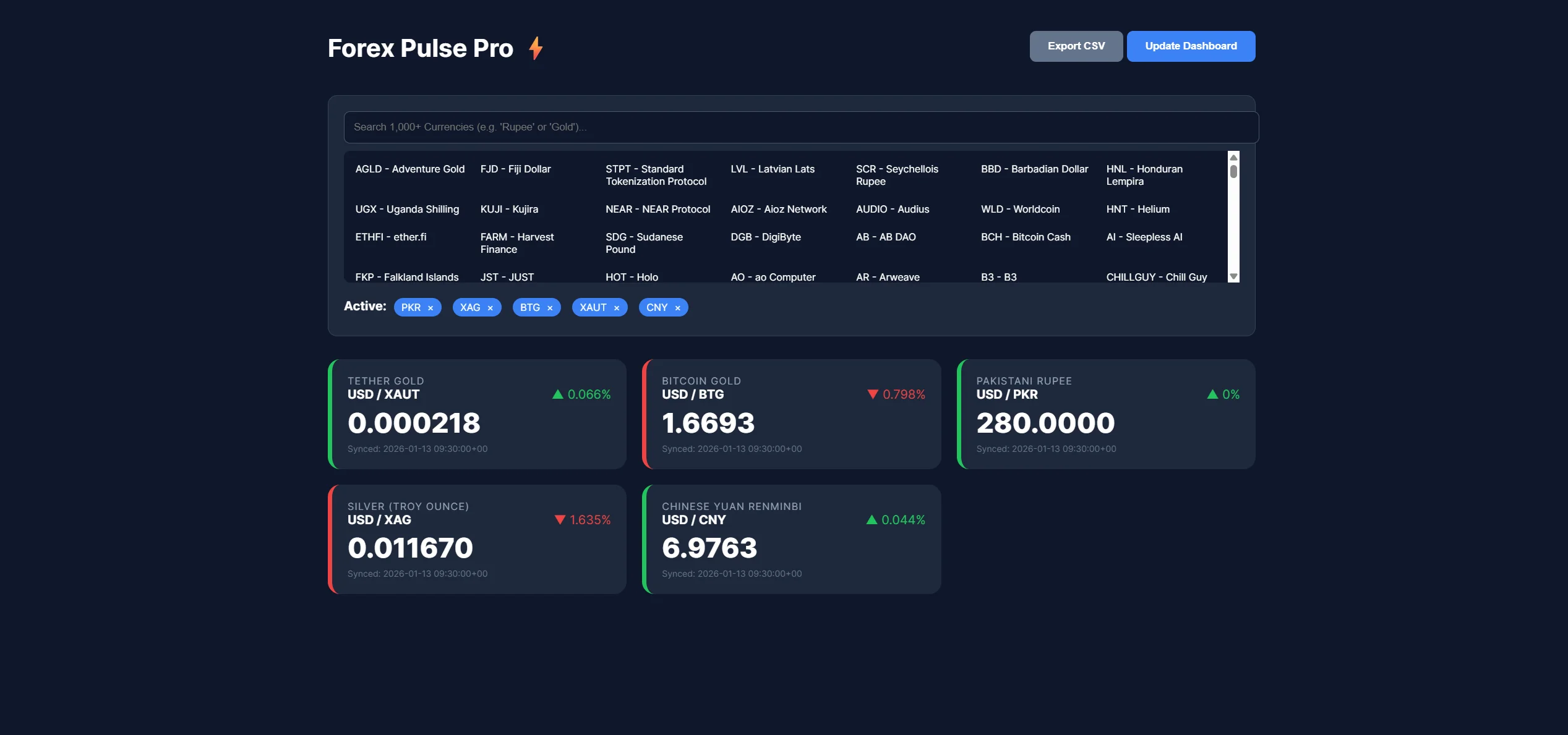
🎉 You now see live forex data.

Choose among the 1000+ currencies and update the dashboard.
Here is a video:
Monitoring, Scaling, And Best Practices
Log every cron run and the rate it fetched, so you can tell a real quiet day from a script that silently stopped working.
Handle API downtime gracefully - retry with a limit rather than looping indefinitely, and fall back to skipping that run rather than crashing.
Only request the pairs you're actually tracking, and avoid calling more often than your alert frequency needs - this keeps you comfortably under the free plan's call limit as you add more pairs.
Store your API key in an environment variable and rotate it periodically, same as any other credential.
Conclusion
Once set up, this runs quietly in the background and replaces manually checking charts throughout the day. A scheduled check with clear rules is more consistent than remembering to look, especially when the market moves while you're away from your desk.
CurrencyFreaks and Node.js are enough to build this reliably, and the rules/config approach means adding more pairs or another notification channel later is straightforward. Get started with the free currency converter API and build your first alert in minutes.
FAQs
What Are Forex Alerts And Why Are They Useful?
They notify you when a rate crosses a threshold or moves by a set percentage, so you only have to pay attention when a condition you actually care about is met.
How Often Should Automated Forex Alerts Run?
Once or twice a day covers most swing and position strategies. Higher frequency makes sense for shorter-term trading, but increases your API call volume accordingly.
Can I Use CurrencyFreaks For Historical Forex Alerts?
Yes - the historical rates endpoint is what makes the day-over-day comparison in this guide possible.
Are Node.js Cron Jobs Reliable For This?
Yes, as long as you log each run and handle failures explicitly rather than letting them fail silently.
Can Forex Alerts Be Sent To Slack Or Mobile Apps?
Yes - email, Slack, and webhooks (which can forward to most mobile notification services) all work from the same notification step.
Build smarter forex alerts with CurrencyFreaks and never miss a market shift.