When money is involved, people want answers right away. Exchange rates move constantly, and nobody wants to open charts or jump between apps just to check a number. A currency exchange bot delivers the rate inside a chat people already use every day.
WhatsApp feels easy because people already use it every day. They trust it for quick chats, updates, and simple questions. Adding currency conversion there lets teams automate replies without slowing anyone down.
A bot currency exchange rate tool solves problems that websites and apps struggle with. There is no login, no interface to learn, and no page to refresh. Users send a message and get a clear answer back.
What Is a Currency Exchange Bot and How It Works
A currency exchange bot lives inside a chat and does one job well. You type a message, and it turns one currency into another.
It reads your message, figures out which currency conversion you want, pulls a live exchange rate from a trusted source, and sends back a clear number you can use right away.
The process stays simple. A user can send something like “100 USD to EUR,” or add a date for an older rate. The exchange rate bot picks up the request, contacts the exchange data source, and sends back the converted value without needing an exchange account.
How Exchange Rate Data Is Processed
Not every bot handles data the same way. Some use real-time exchange rates that follow the market as it changes. These are accurate, but they depend on API speed and traffic when handling a significant amount of requests.
Others rely on cached rates, which load faster and handle a higher volume of messages. They need frequent updates to stay accurate.

Use Cases for a WhatsApp Currency Exchange Bot
When you are moving between countries, quick exchange checks matter. Travelers want clear exchange numbers before spending a large amount. Each stop has a new currency, and seeing the rate first makes spending easier.
Freelancers working with international clients face currency questions daily. They convert invoices, plan pricing, and track payments across borders. A quick WhatsApp check keeps that pricing accurate without opening a spreadsheet.
Finance teams use these bots for fast internal lookups. Support teams use them to answer billing questions quickly for other users. This saves time and reduces manual work across the account.
Choosing the Right Exchange Rate API for the Bot
Accuracy matters when dealing with money. A single wrong digit in a converted amount is enough to lose a user's trust in the bot. A solid API needs to keep up with rate changes and deliver clean, parseable data every time.
You need specific endpoints for a complete solution - live rates, historical rates, and currency conversion all support the step-by-step flow this bot implements.
Rate limits and latency also matter. A slow API response means a user waits longer for a WhatsApp reply, and a bot that regularly times out stops getting used.
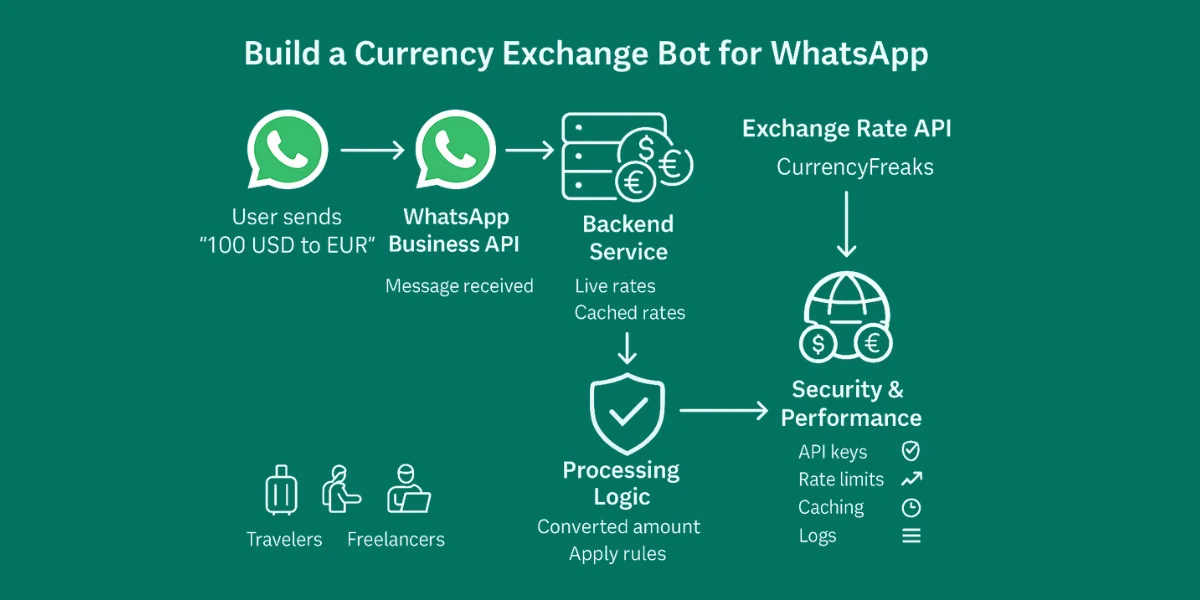
WhatsApp Currency Exchange Bot Architecture Overview
The bot starts with WhatsApp itself. You can use the WhatsApp Business API or Cloud API to simply connect messaging. This setup supports instant replies without manual refresh.
A backend service handles logic and flow. Node.js and Python are common choices for this because they have mature libraries for both webhooks and HTTP requests, and scale well as message volume grows.
The exchange rate API plugs straight into the backend and does its job quietly. Each message gets parsed, processed, and sent back in a clean response. Even as more users join, the system stays easy to manage and predictable.
Building the Currency Exchange Bot (Implementation)
Note: Access JavaScript Code for Currency Exchange Bot Here.
This bot will allow users to:
-
Enter a base currency.
-
Enter an amount.
-
Enter a target currency.
-
Choose latest or historical rates.
-
Get the converted amount step by step.
We will use:
-
Node.js → Backend server.
-
Twilio WhatsApp Sandbox → WhatsApp messaging.
-
CurrencyFreaks API → Exchange rates.
-
Ngrok → Expose local server to the internet for Twilio.
Step 1: Install Node.js
-
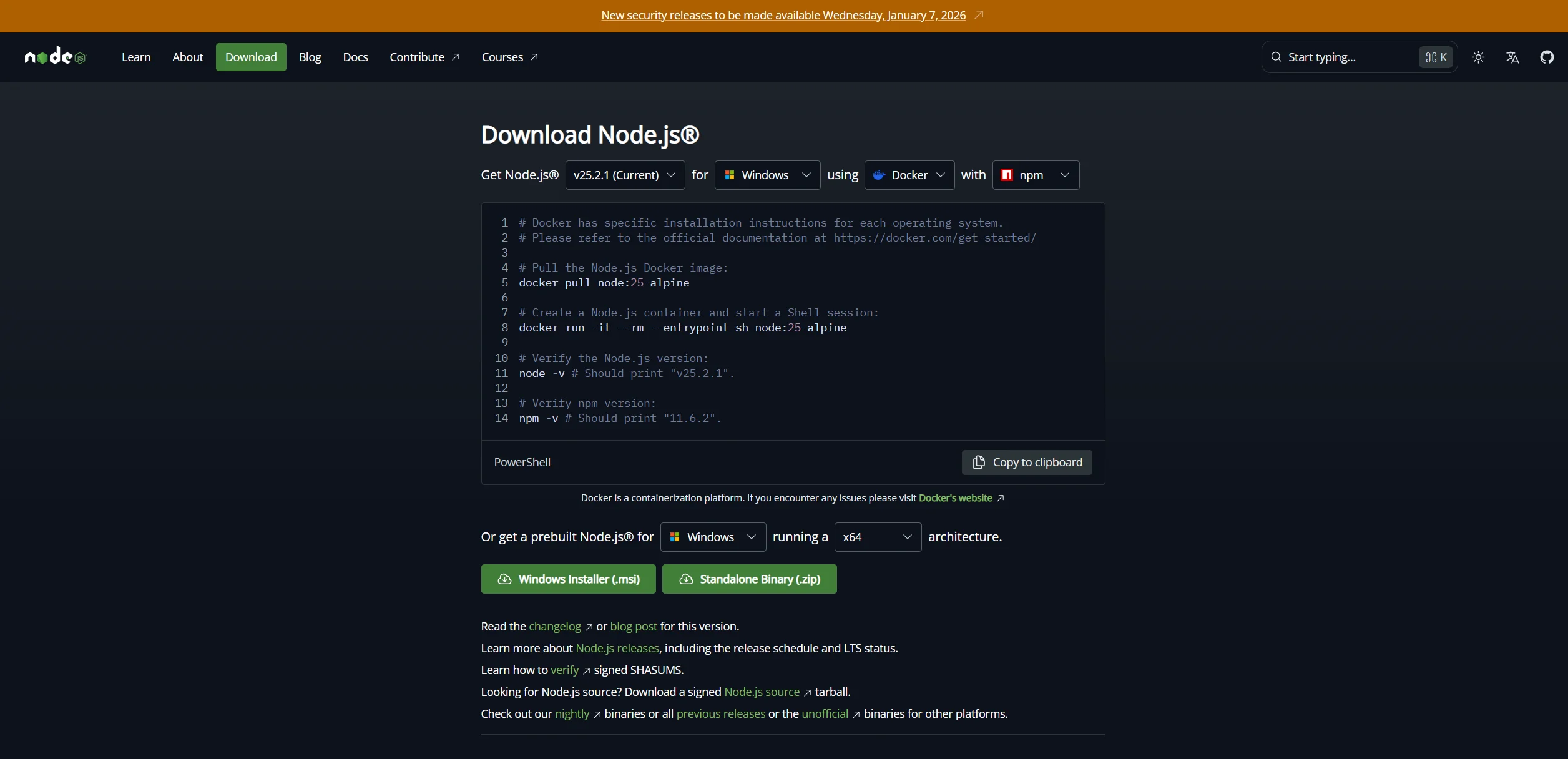
Go to Node.js and download the LTS version.
-
Install Node.js with default options.
-
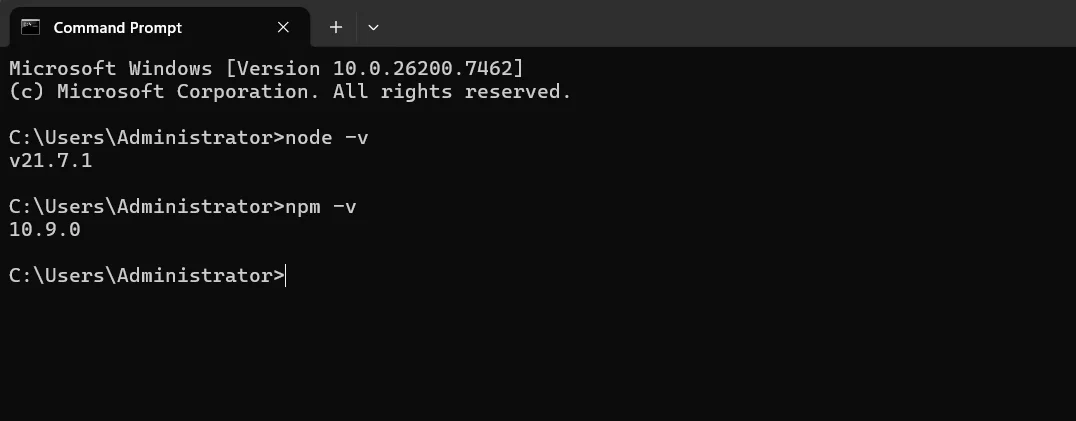
Verify installation in CMD or PowerShell:
node -v
npm -v
You should see version numbers:
Step 2: Create your bot project
- Open CMD/PowerShell and create a folder:
mkdir whatsapp-currency-bot
cd whatsapp-currency-bot
- Initialize Node project:
npm init -y
- Install dependencies:
npm install express axios twilio body-parser
Explanation:
-
express → Creates the web server.
-
axios → Fetches exchange rates.
-
twilio → Connects bot to WhatsApp.
-
body-parser → Reads incoming messages.
Step 3: Create index.js
Create index.js inside the project folder and paste the following final code:
const express = require("express");
const bodyParser = require("body-parser");
const axios = require("axios");
const twilio = require("twilio");

const app = express();
app.use(bodyParser.urlencoded({ extended: false }));

const API_KEY = "YOUR_CURRENCYFREAKS_API_KEY"; // Replace with your API key

// In-memory session storage
const sessions = {};

app.post("/whatsapp", async (req, res) => {
  const from = req.body.From; // User's phone number
  const msg = req.body.Body.trim();
  const twiml = new twilio.twiml.MessagingResponse();

  // Initialize session if new user
  if (!sessions[from]) {
    sessions[from] = { step: 1 }; // Step 1: ask for currency
    twiml.message("👋 Welcome! Which currency do you want to convert from? (e.g., USD)");
    return res.send(twiml.toString());
  }

  const session = sessions[from];

  try {
    if (session.step === 1) {
      session.base = msg.toUpperCase();
      session.step = 2;
      twiml.message(`✅ Base currency set to ${session.base}\nNow enter the amount you want to convert.`);
    } else if (session.step === 2) {
      const amount = parseFloat(msg);
      if (isNaN(amount)) {
        twiml.message("❌ Amount must be a number. Please enter the amount.");
        return res.send(twiml.toString());
      }
      session.amount = amount;
      session.step = 3;
      twiml.message("Great! Which currency do you want to convert TO? (e.g., PKR)");
    } else if (session.step === 3) {
      session.target = msg.toUpperCase();
      session.step = 4;
      twiml.message("Do you want to use latest rates or historical rates?\nReply with:\n1️⃣ Latest\n2️⃣ Historical (then provide date in YYYY-MM-DD)");
    } else if (session.step === 4) {
      let date = null;
      if (msg.startsWith("1")) {
        // Latest rate
        session.step = 5;
      } else if (msg.startsWith("2")) {
        // Historical rate
        session.step = 5;
        twiml.message("Please enter the date (YYYY-MM-DD):");
        session.awaitingDate = true;
        return res.send(twiml.toString());
      } else if (session.awaitingDate) {
        date = msg;
        session.date = date;
        session.awaitingDate = false;
      } else {
        twiml.message("❌ Invalid option. Reply with 1 for latest or 2 for historical.");
        return res.send(twiml.toString());
      }

      const apiUrl = session.date
        ? "https://api.currencyfreaks.com/v2.0/rates/historical"
        : "https://api.currencyfreaks.com/v2.0/rates/latest";

      const response = await axios.get(apiUrl, {
        params: {
          apikey: API_KEY,
          base: session.base,
          symbols: session.target,
          ...(session.date && { date: session.date }),
        },
      });

      const rate = response.data.rates[session.target];
      const convertedAmount = (session.amount * rate).toFixed(2);

      let reply = `💱 ${session.amount} ${session.base} = ${convertedAmount} ${session.target}`;
      reply += session.date ? `\n📅 Rate Date: ${session.date}` : `\n📅 Latest Rate`;

      twiml.message(reply);

      // Reset session
      delete sessions[from];
    }

    res.send(twiml.toString());
  } catch (error) {
    console.error(error);
    twiml.message("⚠️ Unable to fetch exchange rate. Please try again.");
    res.send(twiml.toString());
  }
});

app.listen(3000, () => console.log("Bot running on port 3000"));
Step 4: Set up Twilio WhatsApp Sandbox
-
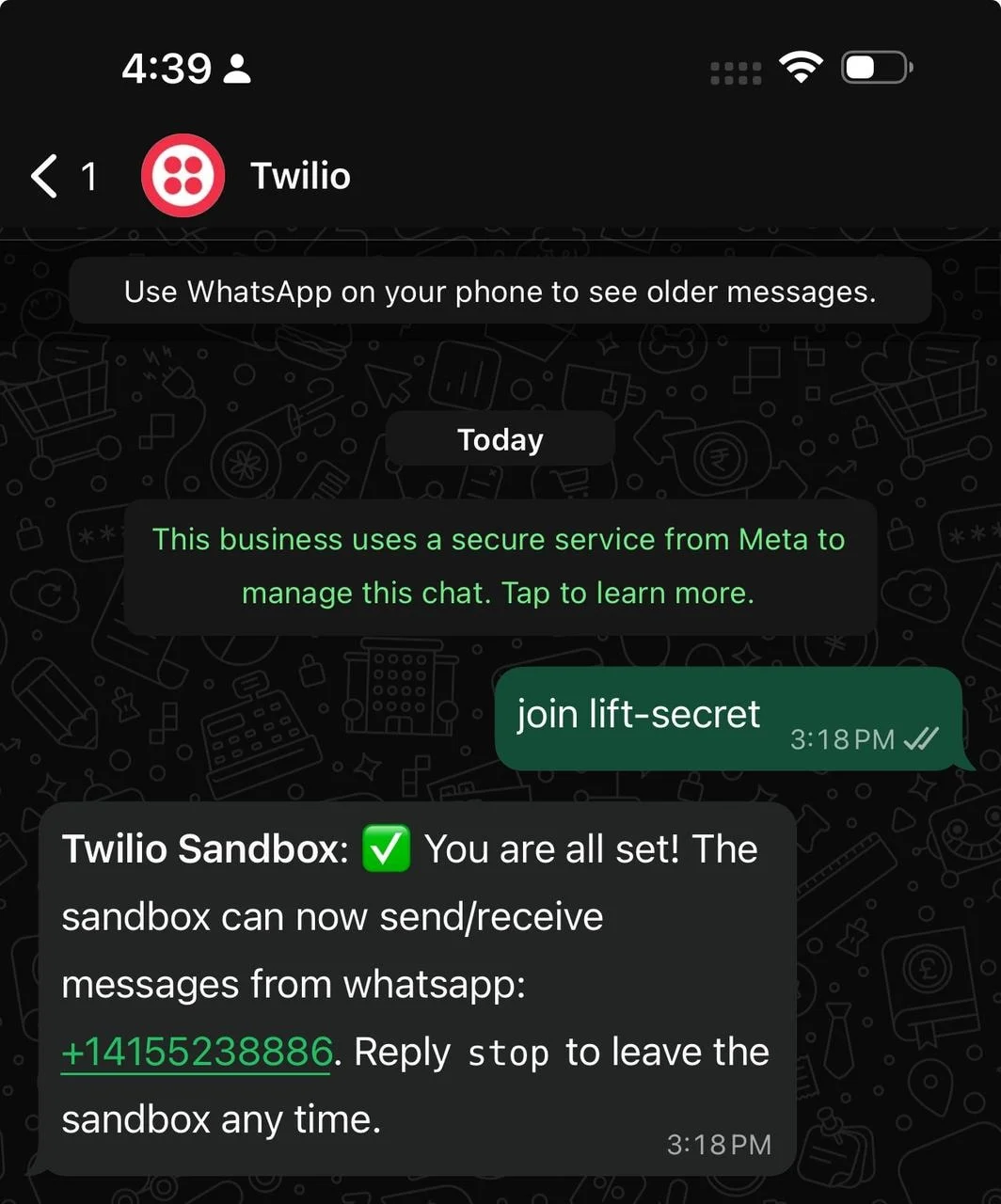
Go to Twilio Console → WhatsApp Sandbox
-
Send the join code to the sandbox number from your WhatsApp.
-
Sandbox is now linked to your WhatsApp.
Step 5: Download & run Ngrok
-
Download Ngrok here (Windows 64-bit).
-
Extract ngrok.exe to Desktop or a folder.
-
Open CMD/PowerShell in that folder and run:
.\ngrok.exe http 3000
- Copy the HTTPS forwarding URL, e.g.:
https://3c6d1fbd0631.ngrok-free.app
Step 6: Connect Ngrok URL to Twilio
-
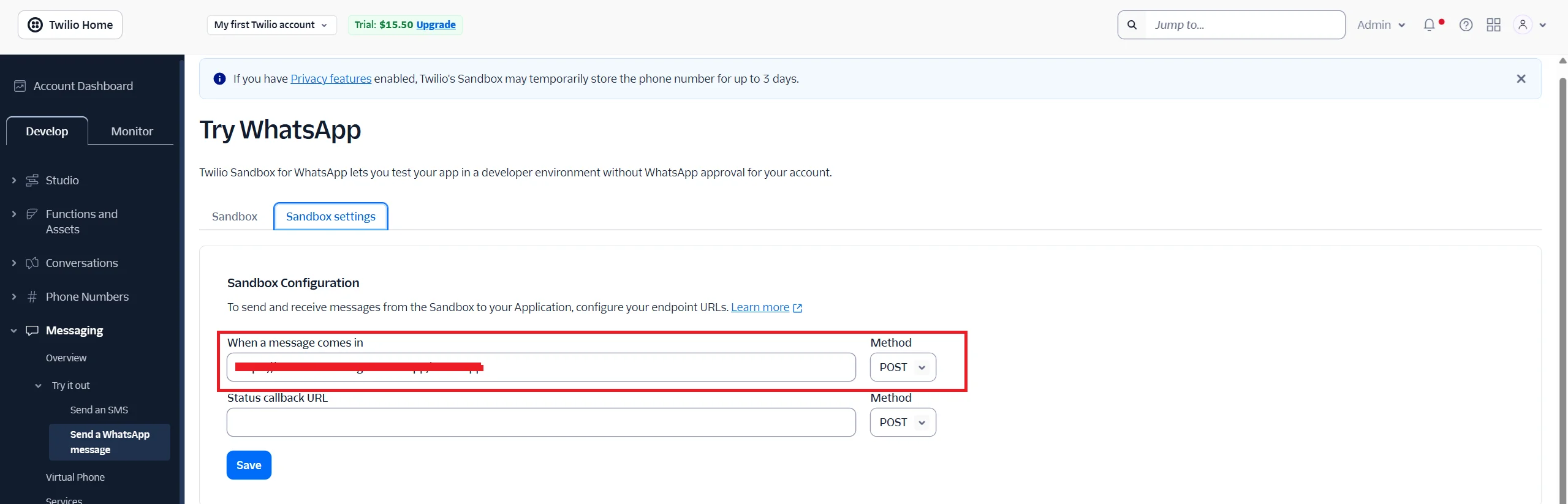
Go to Twilio WhatsApp Sandbox → WHEN A MESSAGE COMES IN
-
Paste the Ngrok URL with /whatsapp:
https://3c6d1fbd0631.ngrok-free.app/whatsapp
-
Method: POST
-
Click Save
Step 7: Run your bot
-
Open VS Code terminal in project folder.
-
Run:
node index.js
- Output:
Bot running on port 3000

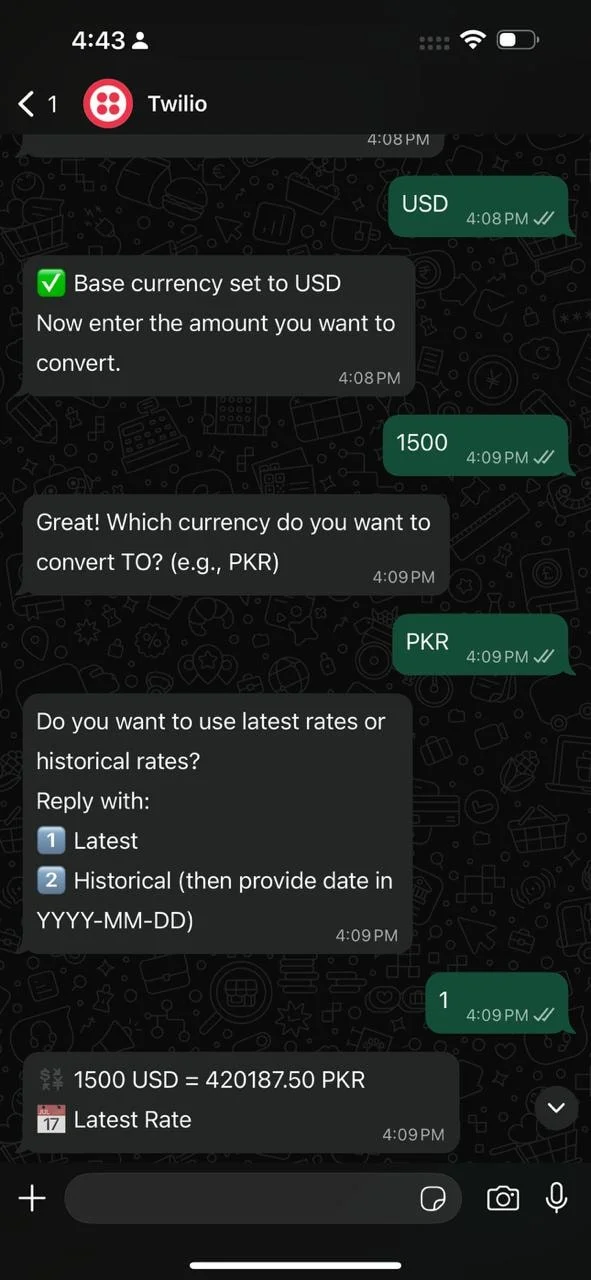
Step 8: Test your bot
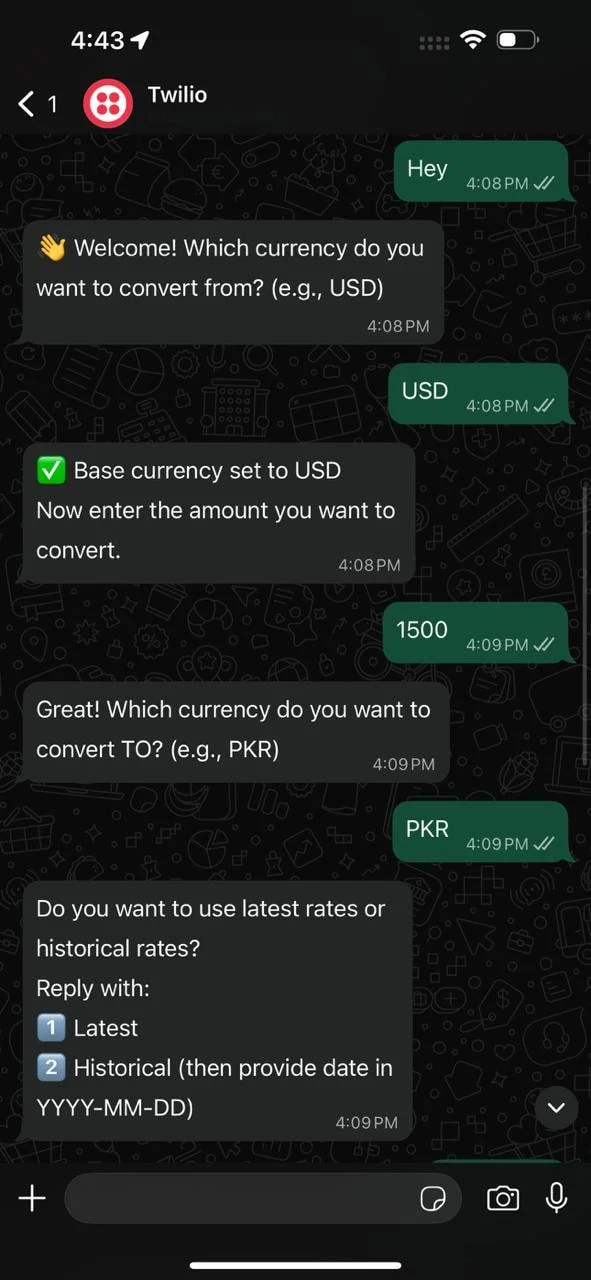
Send messages to your Twilio WhatsApp number:
-
Any message → Bot asks for base currency.
-
Enter base currency → Bot asks for amount.
-
Enter amount → Bot asks for target currency.
-
Enter target currency → Bot asks latest or historical.
-
If historical → Enter date → Bot responds with converted amount.
Example:
User: Hi
Bot: 👋 Welcome! Which currency do you want to convert from? (e.g., USD)
User: USD
Bot: ✅ Base currency set to USD. Enter the amount you want to convert.
User: 100
Bot: Which currency do you want to convert TO? (e.g., PKR)
User: PKR
Bot: Do you want to use latest rates or historical rates?
Reply with: 1️⃣ Latest 2️⃣ Historical
User: 1
Bot: 💱 100 USD = 27845.00 PKR
📅 Latest Rate
Step 9: Updating the bot
Whenever you change code:
-
Save changes in VS Code.
-
Stop server (Ctrl + C) and restart:
node index.js
- Ngrok keeps forwarding to port 3000. Twilio uses the same URL. Your bot is updated instantly.
Tips
-
Free Ngrok URLs change every time → Update Twilio if URL changes.
-
Sessions are in-memory, so restarting Node.js clears them.
-
Optional improvements:
-
Validate currencies automatically.
-
Deploy to cloud (Render / Railway / Vercel) for 24/7 uptime.
-
Add a help menu or short commands.
-
Formatting Currency Conversion Responses
Clear formatting improves trust. Messages show the base currency, target currency, and converted amount clearly, so users can act on the number with confidence.
Decimals stay consistent. Too many numbers confuse people. Clean formatting supports fast reading across devices.
WhatsApp replies stay short. Line breaks help scanning. This keeps replies human and useful.
Handling Errors and Edge Cases
Invalid currency codes happen often. The bot points out what went wrong and shows how to fix it. This reduces repeat mistakes for users.
Some currency pairs may not exist. In those cases, the bot responds politely. Clear feedback keeps trust intact.
If the API is temporarily unreachable, the bot should retry or show a fallback message instead of crashing or leaving the user without a reply.
Security, Logging, and Performance Best Practices
Treat API keys like passwords. Keep them out of public code (use environment variables, not hardcoded strings) and rotate them periodically.
Webhook verification blocks fake traffic. Validating the Twilio request signature ensures an incoming message actually came from Twilio and not a spoofed request, which matters once the bot is public.
Caching rates improves speed and cuts down on API calls. Logs that track failures and response times make it much easier to spot a problem before users start complaining about it.
Strong logging helps trace issues quickly. It also shows usage patterns and traffic spikes over time. These insights support better scaling decisions.
Rate limits protect APIs from abuse. They keep the system stable during sudden demand. This balance helps maintain accuracy and trust.
Conclusion
You now have a working WhatsApp bot that walks a user through base currency, amount, target currency, and latest-vs-historical rates, then replies with a clean converted amount using live exchange rate data. The same pattern - Twilio for the messaging layer, CurrencyFreaks for the rate data, a small session object to track where each user is in the flow - extends easily to more currencies or more conversion options without a rewrite.
Before this goes beyond a sandbox test, a few things are worth doing: move off the free Twilio sandbox to a verified WhatsApp Business number, deploy the backend somewhere persistent instead of a local Ngrok tunnel (Render, Railway, or a small VPS all work), and replace the in-memory session object with something that survives a server restart, like Redis.
As more people use the bot, reliability matters more than new features. Fast, consistent replies are what earn user trust - clean logging that shows failed requests and slow responses over time will tell you where to focus before you build anything else.
FAQs
How Fast Should a Currency Exchange Bot Respond on WhatsApp?
A currency exchange bot should reply within one to two seconds. Fast replies keep the experience natural. Speed depends on API response and backend processing.
Can a Currency Exchange Bot Handle Multiple Requests at Once?
Yes, this works well because a stateless backend scales across users. Async processing prevents slowdowns. This helps manage higher traffic safely.
How Often Should Exchange Rates Be Updated in the Bot?
Live rates work best when you want to note accuracy. For general use, updates every few minutes are enough. The refresh rate should respect limits.
What Message Formats Can Users Send to a Currency Exchange Bot?
Most bots understand simple formats like USD to EUR. Clear examples reduce confusion. This keeps user input clean.
Can a Currency Exchange Bot Be Monetized?
Yes, monetization can include premium tiers or limits. Some businesses use it to manage internal funds and pricing. Reliable data increases trust.
Power your currency exchange bot with fast, reliable rates from CurrencyFreaks. Start building with confidence.