
You’ve seen this. A client offers $35/hour, and it sounds decent. Then you convert to your local currency, subtract fees, and it drops fast.
Rates also shift daily, so yesterday’s good deal can look weak today. That’s why freelancers don’t really struggle with salary. They struggle with real salary value.
In this blog, you’ll build a Real Salary Value calculator with api integration. It pulls exchange data through an application programming interface and applies your fee and tax rules. You’ll learn which endpoints to call, when to use the latest vs historical rates, and how to scale it for multiple clients.
What Is Api Integration And Why Does It Matter Here
Api integration connects different systems so they can share data without manual copy-paste. For this calculator, your app pulls live exchange rates and turns them into a real take-home number. That is the core of api integration work for freelancers who need reliable math.
Api Integration Definition
Api integration means your app calls a web api through endpoints and gets structured JSON back. This remote procedure call link your UI and backend logic like small software components working together. With the right api integration tools, you can enable integration without rewriting your whole app.
Why Freelancers Need It
Manual conversion is slow, and it breaks the moment a rate moves. The benefits of api integration show up fast because your numbers stay current and consistent. It also saves time for software developers who would rather ship features than babysit spreadsheets.
When To Use It
-
When you quote clients in USD, EUR, or GBP but spend in PKR, INR, or NGN. It keeps your pricing grounded in today’s rate. You stop guessing and start using live data.
-
When your earnings depend on timing, like monthly invoices or milestone payouts. A small change in rate can shift your net amount. Tracking it helps you plan.
-
When you want dashboards and alerts for rate dips or spikes. Your calculator can react in near real time. That’s when automation pays off.
Helpful Resource: Currency Exchange API Integration: A Step-by-Step Guide for Developers
How The Real Salary Value Calculator Works
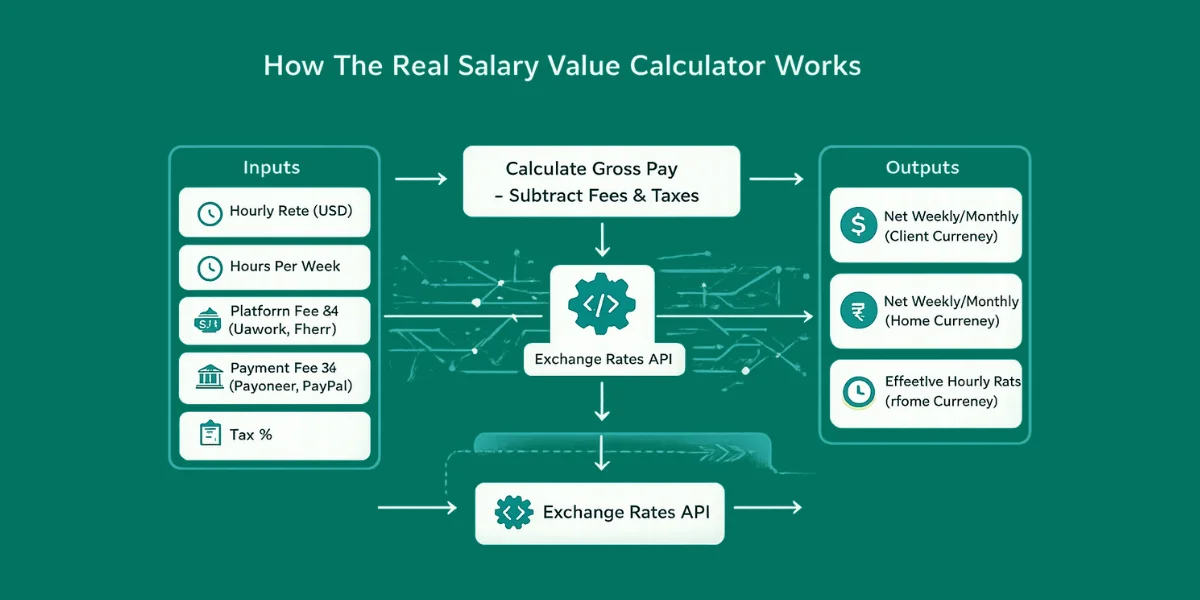
You calculate gross pay as hourly × hours, then subtract platform, payment, and tax costs. Then you convert the remaining amount into your home currency using a reliable FX source, backed by clear api documentation. This logic fits neatly into small software applications where you want numbers that stay consistent.
-
Gross Pay (hourly × hours)
-
Minus platform fee (Upwork/Fiverr/agency cut)
-
Minus payment fee (Payoneer/PayPal/bank)
-
Minus tax estimate
-
Convert to home currency via FX
Inputs You’ll Collect
You capture a few fields, and you keep them strict so external users cannot break calculations. If you ever pull rates from multiple apis, run them through one integration platform to keep results predictable. You can also log inputs for basic data integration later.
-
hourlyRate (USD)
-
hoursPerWeek
-
platformFeePercent
-
paymentFeePercent
-
taxPercent
-
clientCurrency (USD)
-
homeCurrency (PKR)
Outputs You’ll Show
You return net weekly and monthly totals in both currencies so the user can compare quickly. Then you show the effective hourly rate in the home currency, so the real value is obvious. That last number usually drives better pricing decisions.
-
Net weekly/monthly in client currency
-
Net weekly/monthly in home currency
-
Effective hourly rate in home currency
Which API Integration Tools And Endpoints To Use
Currency data changes constantly, so api integration refers to wiring your app to a rate source instead of guessing values. That saves you from manual data entry and prevents pricing mistakes when rates move. Most providers expose RESTful APIs, so you call one URL and get clean JSON back.
Latest Rates gives you near real-time quotes for dashboards and new pricing. Conversion turns a specific amount into another currency for instant totals. Historical, Time Series, Fluctuation, and IP to Currency cover audits, charts, volatility checks, and quick locale defaults.
Helpful Resource: Currencylayer API Vs. CurrencyFreaks | Choose the Most Reliable Exchange Rates REST API
Which One When Table
| Endpoint Type | Best For | When You Should Use It |
|---|---|---|
| Latest Rates | Current quotes | Pricing new gigs today |
| Convert Latest | Quick amount conversion | Showing “You’ll receive PKR X” instantly |
| Historical Rates | Past invoices | Auditing last month’s income |
| Time Series | market trend tracking | Building charts for rate movement |
| Fluctuation | Volatility checks | Deciding whether to hold USD or convert now |
| Supported Currencies / Symbols | UI dropdowns | Populating currency lists cleanly |
To make it reliable, treat the integration process like a small service, not a one-off request. The api integration process should include caching, retries, and validation so bad responses do not break your UI. This is why api integration important when you scale beyond manual processes.
Practical Code Example: Node.js Calculator With CurrencyFreaks
This example uses the “latest rates” style endpoint shown in the docs:
/v2.0/rates/latest?apikey=YOUR_APIKEY&symbols=PKR&base=USD
Keep your API key on the server. Do not expose it in client-side JS.
// real-salary-value.js

// Node 18+ (built-in fetch)

const API_KEY = process.env.CURRENCYFREAKS_API_KEY;

async function getRate({ base, symbol }) {

  const url = new URL("https://api.currencyfreaks.com/v2.0/rates/latest");

  url.searchParams.set("apikey", API_KEY);

  url.searchParams.set("base", base);

  url.searchParams.set("symbols", symbol);

  const res = await fetch(url);

  if (!res.ok) {

    throw new Error(`Rate fetch failed: ${res.status} ${await res.text()}`);

  }

  const data = await res.json();

  const rateStr = data?.rates?.[symbol];

  const rate = Number(rateStr);

  if (!Number.isFinite(rate)) {

    throw new Error(`Invalid rate for ${symbol}: ${rateStr}`);

  }

  return rate;

}

function calcNet({ hourlyRate, hoursPerWeek, platformFeePct, paymentFeePct, taxPct }) {

  const weeklyGross = hourlyRate * hoursPerWeek;

  const platformFee = weeklyGross * (platformFeePct / 100);

  const paymentFee = weeklyGross * (paymentFeePct / 100);

  const preTax = weeklyGross - platformFee - paymentFee;

  const tax = preTax * (taxPct / 100);

  const weeklyNet = preTax - tax;

  const monthlyNet = weeklyNet * 4.33; // average weeks/month

  return { weeklyGross, weeklyNet, monthlyNet };

}

async function run() {

  if (!API_KEY) throw new Error("Missing CURRENCYFREAKS_API_KEY in env");

  // Example: Client pays USD, you spend in PKR

  const clientCurrency = "USD";

  const homeCurrency = "PKR";

  const inputs = {

    hourlyRate: 35,

    hoursPerWeek: 30,

    platformFeePct: 10,

    paymentFeePct: 2,

    taxPct: 12,

  };

  const net = calcNet(inputs);

  const rate = await getRate({ base: clientCurrency, symbol: homeCurrency });

  const weeklyHome = net.weeklyNet * rate;

  const monthlyHome = net.monthlyNet * rate;

  const effectiveHourlyHome = weeklyHome / inputs.hoursPerWeek;

  console.log("=== Real Salary Value ===");

  console.log(`Weekly Net (${clientCurrency}):`, net.weeklyNet.toFixed(2));

  console.log(`Weekly Net (${homeCurrency}):`, weeklyHome.toFixed(2));

  console.log(`Monthly Net (${homeCurrency}):`, monthlyHome.toFixed(2));

  console.log(`Effective Hourly (${homeCurrency}):`, effectiveHourlyHome.toFixed(2));

}

run().catch((e) => {

  console.error(e.message);

  process.exit(1);

});
Best Practices For Managing Multiple Api Integrations
When you grow a single currency API to plenty of tools (billing, invoicing, banking, analytics), you will get to the actual work, which is best practices for managing multiple api integrations.
The following is a simple checklist which you may use:
Centralize Configs
When you manage api based integrations, configs can sprawl fast. Keep base URLs, timeouts, and retries in one config module so your different software systems behave consistently. This also makes the integration of api changes safer because you edit in one place.
Cache Smartly
Caching boosts operational efficiency and keeps your app stable under load. FX rates rarely need a fresh request per user, so cache by base and symbols with a short TTL. This matters even more when you rely on api integration platforms with strict quotas.
Validate Responses
Treat every response as untrusted input, even from paid api integration services. Validate types, required fields, and currency codes before calculations. If you ever connect legacy endpoints using the simple object access protocol, strict validation prevents silent breaks.
Handle HTTP Errors
Accept failures and do not make it dramatic. In the case of rest APIs, bad keys are caught and show 401, and quota limits are caught and show 429. Add exponential backoff retries and give up on it when it is not going to help.
Add Observability
You can't fix what you can't see. See any latency and error rate of logs and quota per provider to identify problems promptly. Monitor spikes in the server during launches to be able to scale limits before users can notice.
Protect Secrets
Always avoid sending keys in client code. Store secrets on the server, rotate them, and have a unique key to each application. Use a secure vault or encrypted environment variables and check the people who accessed them frequently.
Challenges Of Maintaining Multiple Api Integrations
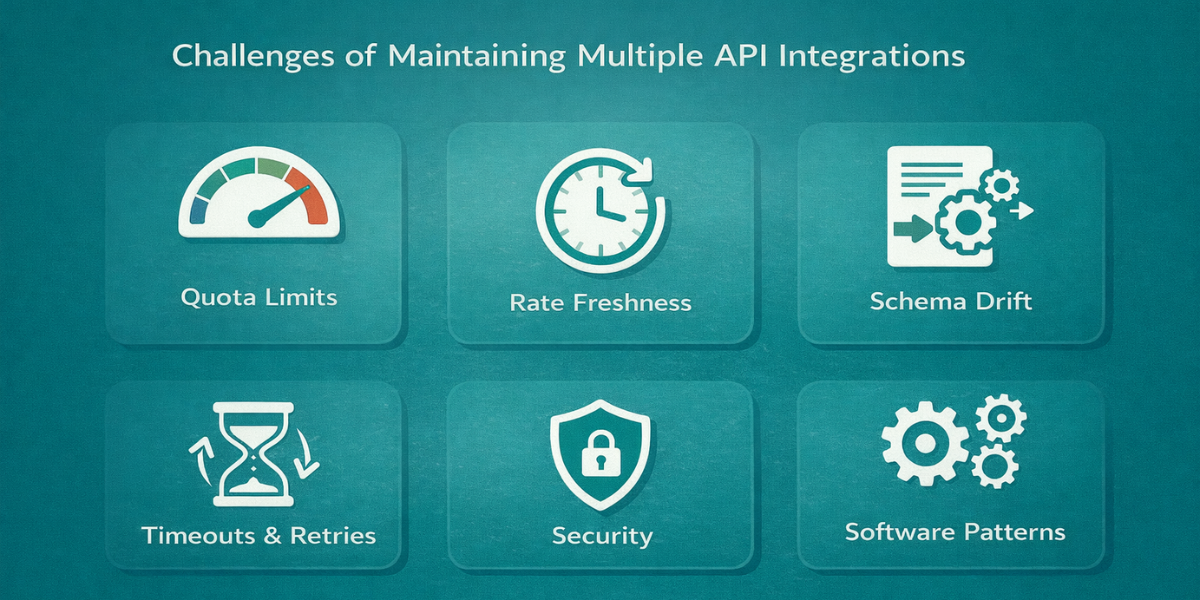
You’ll likely face these challenges of maintaining multiple api integrations:
Quota Limits
Quota limits hit fast when you stack integrations and run lots of api requests. A free plan can cap calls, so cache results and reuse them when you can. This is where an api integration platform helps you track usage.
Rate Freshness
Rate freshness changes what users see, especially when updates move from hourly to minute data. Decide early based on your business processes and how real-time you need to be. If you’re wondering what is an api integration, this is part of the answer.
Schema Drift
Schema drift happens when fields appear, disappear, or change type across responses. Build api integration solutions that validate inputs and fail loudly instead of guessing. Keep your api data integration layer strict.
Timeouts And Retries
Timeouts and retries are normal because networks fail and providers throttle. Use idempotent api call logic, retries with backoff, and clear timeouts. Treat the provider like any web service api you don’t control.
Security
Security breaks first when keys leak or logs expose secrets. Lock down private apis, rotate keys, and follow api integration best practices. Test against existing systems so nothing slips through.
Software Patterns
Once you scale, patterns matter more than adding code. Write down your API integration use cases, standardize integration APIs, and keep error handling in one place. That way, your projects stay stable across teams and over time.
This is where choosing the right api integration software patterns helps more than adding more code.
Helpful Resource: How to Choose the Right API for Currency Exchange: Key Factors
Complete Working Example
Here is a simple salary calculator created using CurrencyFreaks API integration
// real-salary-value.js

// Node 18+ (built-in fetch)

const API_KEY = process.env.CURRENCYFREAKS_API_KEY;

async function getRate({ base, symbol }) {

  const url = new URL("https://api.currencyfreaks.com/v2.0/rates/latest");

  url.searchParams.set("apikey", API_KEY);

  url.searchParams.set("base", base);

  url.searchParams.set("symbols", symbol);

  const res = await fetch(url);

  if (!res.ok) {

    throw new Error(`Rate fetch failed: ${res.status} ${await res.text()}`);

  }

  const data = await res.json();

  const rateStr = data?.rates?.[symbol];

  const rate = Number(rateStr);

  if (!Number.isFinite(rate)) {

    throw new Error(`Invalid rate for ${symbol}: ${rateStr}`);

  }

  return rate;

}

function calcNet({ hourlyRate, hoursPerWeek, platformFeePct, paymentFeePct, taxPct }) {

  const weeklyGross = hourlyRate * hoursPerWeek;

  const platformFee = weeklyGross * (platformFeePct / 100);

  const paymentFee = weeklyGross * (paymentFeePct / 100);

  const preTax = weeklyGross - platformFee - paymentFee;

  const tax = preTax * (taxPct / 100);

  const weeklyNet = preTax - tax;

  const monthlyNet = weeklyNet * 4.33; // average weeks/month

  return { weeklyGross, weeklyNet, monthlyNet };

}

async function run() {

  if (!API_KEY) throw new Error("Missing CURRENCYFREAKS_API_KEY in env");

  // Example: Client pays USD, you spend in PKR

  const clientCurrency = "USD";

  const homeCurrency = "PKR";

  const inputs = {

    hourlyRate: 35,

    hoursPerWeek: 30,

    platformFeePct: 10,

    paymentFeePct: 2,

    taxPct: 12,

  };

  const net = calcNet(inputs);

  const rate = await getRate({ base: clientCurrency, symbol: homeCurrency });

  const weeklyHome = net.weeklyNet * rate;

  const monthlyHome = net.monthlyNet * rate;

  const effectiveHourlyHome = weeklyHome / inputs.hoursPerWeek;

  console.log("=== Real Salary Value ===");

  console.log(`Weekly Net (${clientCurrency}):`, net.weeklyNet.toFixed(2));

  console.log(`Weekly Net (${homeCurrency}):`, weeklyHome.toFixed(2));

  console.log(`Monthly Net (${homeCurrency}):`, monthlyHome.toFixed(2));

  console.log(`Effective Hourly (${homeCurrency}):`, effectiveHourlyHome.toFixed(2));

}

run().catch((e) => {

  console.error(e.message);

  process.exit(1);

});
Output

TL;DR
-
Use live FX rates and clear fees, and save client data.
-
Custom api integrations keep the numbers accurate without manual updates.
-
Quote with latest rates, report with historical or time-series, and add caching plus error checks.
Conclusion
Freelancers don’t need more motivation. They need better numbers. With an api integration service for exchange rates, your calculator stops being a spreadsheet trick.
Start small with a single api integration: one endpoint, one base currency, one output. Keep it simple, then automate processes like refresh and caching. Treat it like an inventory management system that never guesses.
When you grow, add custom integration with your enterprise resource planning stack. Make clean data transformation through service APIs and reuse existing APIs where possible. That’s how you scale without breaking trust.
FAQs
What Is An Api Integration?
It’s the connection between your app and an external system via endpoints, so your app can exchange structured data automatically.
Which Api Integration Platform Should I Use For Exchange Rates?
If you need many currencies, fast response, and clear endpoints, pick a provider that supports the latest, historical, and conversion endpoints. That gives you flexible api integration solutions.
How Do I Avoid Issues With Api Integrations?
Use retries with backoff, caching, strict validation, and server-side key storage. These are the basics of stable api integration tools.
What’s The Difference Between Api Data Integration And Simple Api Calls?
Api data integration focuses on consistent pipelines: normalization, caching, monitoring, and reusability. A simple call is just a request. Integration is the system around it.
Sign up on CurrencyFreaks and get your API key. Add live exchange rates to your calculator today.


