

Have you heard that wrong financial calculations can result in revenue loss for many e-commerce and fintech companies? Money currency handling in any programming language, and Golang currency in particular, is very sensitive. The developers usually ignore this challenge.
Even the slightest mistake with floating-point arithmetic can quickly become the cause of significant differences in finances. In this article, we will examine the best ways to use monetary values in Go. We are going to explore the types of money values, the most frequent mistakes, and show you how to use the CurrencyFreaks API to get real-time and accurate conversions. Let's begin.
Understanding Go Currency
It is important to show accurate money amount values within your fintech apps. This is the very core functionality of accurate financial applications. Go has several built-in types, although not all of them can be used for GoLang currency handling. So, you should know what the risks of each of the Go's are.
Go's Basic Numeric Types
We will look at the standard numeric types of Go: float32 and float64.
Nevertheless, they use the IEEE 754 standard. This standard represents binary forms. It can therefore not accurately show all of the decimal numbers.
Can you imagine trying to show $0.1 in binary and being unable to? The result is minor rounding errors, although with financial implications. This is the reason why float64 should never be used with monetary values. Instead, you should use whole number types such as int64. Storing money values using integers means that you have to store the smallest unit of the same currency.
For example, store $10.50 as 1050 cents. This method is suitable for removing the errors of floating-point numbers. It, therefore, makes all calculations exact.
Common Pitfalls
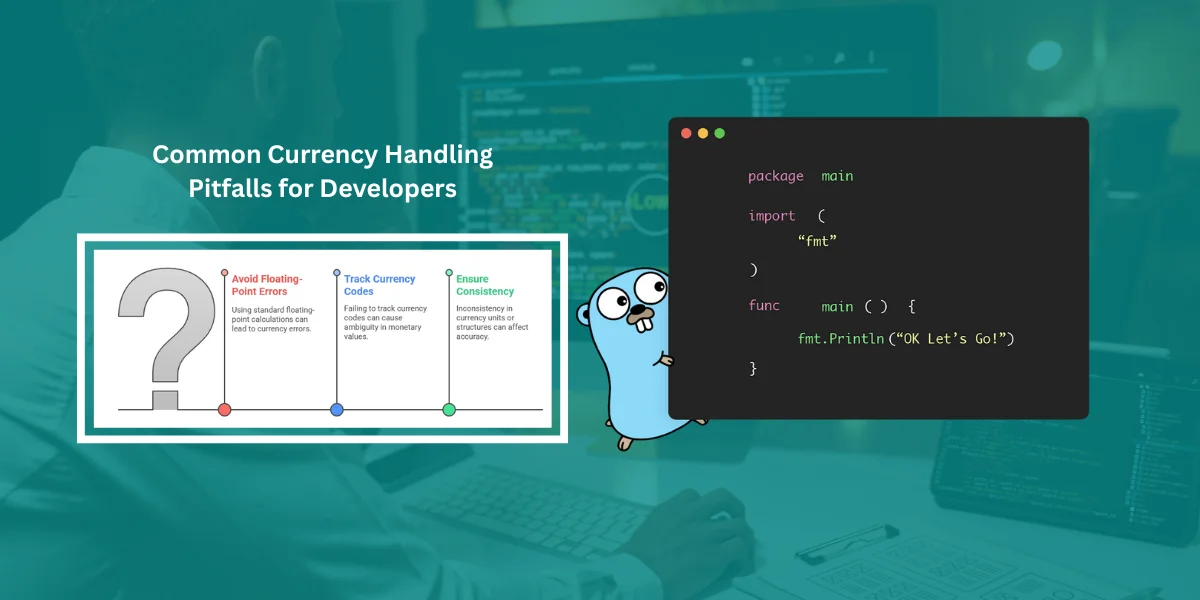
One of the most common mistakes that new developers make is the use of standard types of floating-point calculation. This is the source of the majority of the money currency errors.
In addition, failure to track the currency code is another error. The meaning of a number such as 100 is unknown. Is it USD, EUR, or JPY? There should be a numeric value that is paired with an ISO 4217 currency code.
This also applies when working with different currency units or a money structure pound, as consistency across all monetary values is key for accuracy.
Best Practices For Handling Currency In Golang
Following some practices will significantly improve the strength of your financial Go applications. We should look at the best methods that you should use.
1: Use Fixed-Point Arithmetic
As it has been said, fixed-point math is the best way. You need to store the currency units as whole numbers in the smaller unit. For US Dollars, this is cents. In the case of the Japanese Yen, which has no smaller unit, the central unit is the whole number. To stop overflow, developers usually use an int64.
Here is an example of storing currency units using this method. This approach represents monetary values accurately and helps you set money currency in your Golang applications without rounding errors.
| Currency | Major Unit | Minor Unit | Example ($10.50) | Stored Value | Storage Type |
|---|---|---|---|---|---|
| USD | Dollar | Cent | $10.50 | 1050 | int64 |
| JPY | Yen | None | ¥10 | 10 | int64 |
| EUR | Euro | Cent | €10.50 | 1050 | int64 |
2: Leverage Third-Party Libraries
In complex financial processes, there is no need to rebuild the wheel. A Decimal type is available in libraries such as shopspring/decimal or Rhymond/go-money. It helps with precise mathematical calculations within your financial apps. They also combine the value and represents currency code into a single, safe data structure.
You can split money values for separate processing or usage initialization initialize money when setting up transactions. Finally, such pre-built code will make your code simpler and reduce the chance of an error.
3: Always Set And Validate Currency Codes
Financial transactions often deal with more than one currency. Thus, you need to carefully confirm all codes against ISO 4217 standards when entering and storing. Setting a default value for each code can help maintain consistency. This is an important rule that will make sure wrong or unsupported currencies don't damage your apps. You can monitor it using a library or a fixed list.
Currency Conversion In Golang Using CurrencyFreaks API
Having an accurate monetary unit conversion system within a global fintech app has become challenging. However, you can always use APIs like CurrencyFreaks to get accurate data.
What Is CurrencyFreaks?
CurrencyFreaks offers an API for current, historical, and exchange rate information for more than world currencies. This includes standard money, metals, and cryptocurrencies. They get their information from reliable exchanges and national banks.
This, in turn, ensures quality data for your application and helps avoid losing pennies during conversions or absolute negative comparisons in calculations.
Setting Up The API in Go
It's easy to set up the API in Go. The go standard net/http package will be used to send the GET request to the CurrencyFreaks website. Don't forget to add your own API Key to prove you are real.
The second step is to write a structure in Go that is similar to the form of the JSON response. This allows you to read the data returned by the API's most recent rates web address, which provides a JSON item of the main currency and a list of the rates.
This also helps you perform allocation operations accurately when dealing with leftover pennies from division or during any comparison of money checks. Here is the example Golang code for the latest rates conversion:
package main

import (
  "fmt"
  "net/http"
  "io/ioutil"
)

func main() {

  url := "https://api.currencyfreaks.com/v2.0/rates/latest?base=gbp&symbols=pkr,usd,cad,eur&apikey=YOUR_APIKEY"
  method := "GET"

  client := &http.Client {
  }
  req, err := http.NewRequest(method, url, nil)

  if err != nil {
    fmt.Println(err)
    return
  }
  res, err := client.Do(req)
  if err != nil {
    fmt.Println(err)
    return
  }
  defer res.Body.Close()

  body, err := ioutil.ReadAll(res.Body)
  if err != nil {
    fmt.Println(err)
    return
  }
  fmt.Println(string(body))
}
Writing A Simple Currency Converter
Let's create a simple Golang currency converter.
1) First, you should ensure the Go installation within your system. You can install Go at: https://go.dev/dl/
2) Next, you should check the version of Go within your system through:
go version

Create a folder where you will keep your currency_converter.go file. Paste the code below into that file:
package main

import (
	"encoding/json"
	"fmt"
	"io/ioutil"
	"net/http"
	"strconv"
	"strings"
)

// Struct to parse the API response
type CurrencyResponse struct {
	Base  string            `json:"base"`
	Rates map[string]string `json:"rates"` // Changed to string
}

func main() {
	apiKey := "API_KEY"

	var baseCurrency string
	fmt.Print("Enter base currency (e.g., GBP, USD, EUR): ")
	fmt.Scanln(&baseCurrency)
	baseCurrency = strings.ToUpper(baseCurrency)

	var targetCurrencies string
	fmt.Print("Enter target currencies separated by comma (e.g., USD,EUR,PKR): ")
	fmt.Scanln(&targetCurrencies)
	targetCurrencies = strings.ToUpper(strings.ReplaceAll(targetCurrencies, " ", ""))

	var amount float64
	fmt.Print("Enter amount in ", baseCurrency, ": ")
	fmt.Scanln(&amount)

	url := fmt.Sprintf(
		"https://api.currencyfreaks.com/v2.0/rates/latest?base=%s&symbols=%s&apikey=%s",
		baseCurrency, targetCurrencies, apiKey,
	)

	res, err := http.Get(url)
	if err != nil {
		fmt.Println("Error fetching data:", err)
		return
	}
	defer res.Body.Close()

	body, err := ioutil.ReadAll(res.Body)
	if err != nil {
		fmt.Println("Error reading response:", err)
		return
	}

	if res.StatusCode != http.StatusOK {
		fmt.Println("API request failed with status:", res.Status)
		fmt.Println("Response body:", string(body))
		return
	}

	var data CurrencyResponse
	err = json.Unmarshal(body, &data)
	if err != nil {
		fmt.Println("Error parsing JSON:", err)
		return
	}

	if len(data.Rates) == 0 {
		fmt.Println("No rates found. Check API key or currency symbols.")
		return
	}

	fmt.Println("\nConverted amounts:")
	for currency, rateStr := range data.Rates {
		rate, err := strconv.ParseFloat(rateStr, 64)
		if err != nil {
			fmt.Printf("Error converting rate for %s: %v\n", currency, err)
			continue
		}
		fmt.Printf("%s: %.2f\n", currency, amount*rate)
	}
}
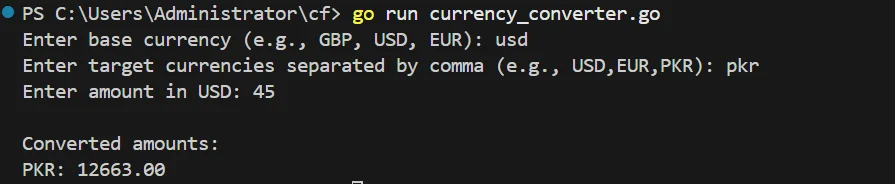
Output
Formatting And Displaying Currency Properly
Half the battle is to be accurate in calculation. You must also show the money struct in the right way to your users. A display of $1,050,000.00 will give a wrong idea of $1050000.00 and appear unprofessional.
Use golang.org/x/text for Locale-Aware Formatting
Different locations have different symbols, separators, and decimal point placements. For example, Americans would use a comma to separate thousands or a dot for decimals. In comparison, it is usually the opposite for Europeans. The golang.org/x/text/currency/unit and language/display packages are perfect. They allow you to format money struct to reflect a location based on the user.
You can also use a decimal library to handle floating point numbers with arbitrary precision, ensuring that the smallest unit value is displayed correctly and avoiding rounding errors or leftover pennies.
Avoiding Ambiguity In UX
The string value of currency should always be shown with the currency code or symbol. The user must be able to tell at a glance whether they are dealing with USD or CAD. Moreover, make it clear what the source of the exchange rate is, and when it was last updated. This transparency builds trust in the user, particularly with rates that fluctuate frequently.
Always ensure accurate display by considering the allocation operation use and verifying the base compare operations for proper data consistency.
Testing And Debugging Currency Logic
Currency conversion testing plays an important role in financial websites or applications. One small mistake and you lose all the trust of your customers. Here are some practices that help you test the return money conversion within your application.
Unit Testing For Currency Calculations
- Unit tests let you isolate and test small pieces of logic without hitting the actual API.
You are supposed to write small-part tests to cover all the special situations. These include zero values, tremendous values, and complex math operations such as division with floating point numbers. For External APIs, use a fake stand-in to separate your tests and make them fast.
Be sure that the smallest unit value is handled correctly to prevent rounding differences and leftover pennies during conversions.
Avoiding Timezone And Rate Sync Pitfalls
Currency rates constantly change; it's crucial to handle time correctly:
- Always fetch the latest rates when converting in real-time, and ensure that your money struct calculations maintain arbitrary precision for accuracy.
url := "https://api.currencyfreaks.com/v2.0/rates/latest?base=GBP&symbols=USD,EUR&apikey=YOUR_APIKEY"
- Historical transactions
-
When storing a transaction, also save the rate used.
-
CurrencyFreaks provides historical rates via:
https://api.currencyfreaks.com/v2.0/rates/YYYY-MM-DD
Example:
url := "https://api.currencyfreaks.com/v2.0/rates/2025-10-20?base=GBP&symbols=USD,EUR&apikey=YOUR_APIKEY"
This ensures old invoices or records reflect the correct historical exchange rate.
Tips for Reliable Testing
-
Round consistently (e.g., 2 decimal places).
-
Validate API responses before using them.
-
Handle errors gracefully (network issues, invalid data).
-
Use mock responses to test edge cases like empty or malformed JSON.
Conclusion
Currency handling is one of the most common challenges in Golang. You have to avoid imprecise float64 and instead use fixed-point math using whole numbers or special decimal code. These are the best ways to ensure that your financial logic is accurate and reliable by considering these best ways and adding a trusted service like CurrencyFreaks.
Always monitor rounding errors carefully to prevent false operations or split operations during calculations.
FAQs
Why Is Using FLOAT64 For Currency A Bad Idea In Go?
Float64 uses a binary form. It cannot accurately show all the decimal numbers, which leads to rounding errors. This brings about minor rounding issues in math. When these rounding errors are not corrected in numerous transactions, there are huge mistakes that impact the financial records. Using techniques like the round robin principle or checks for nil pound values can improve accuracy and stability.
What Is The Best Way To Store And Calculate Currency Values In Go?
The best way would be to use fixed-point math with int64. You store it in the currency's subunit (e.g., cents). Or use a library such as shopspring/decimal to ensure that the calculations are accurate. Keeping a primary key for each transaction and verifying compare comparisons ensures data consistency.
How Can I Perform Real-Time Currency Conversion In My Go Application?
Use a trusted external API such as CurrencyFreaks. It offers the latest exchange rates of hundreds of currencies. This gives you the right conversions, which are up to date. Handling distributed round robin API calls and controlling more pennies rounding outcomes help maintain stability and accuracy. You can also review pull requests to ensure safe string use is displayed when showing conversion data to users.
Are There Any Libraries That Help With Precise Decimal Calculations In Golang?
There are libraries like shopspring/decimal that are designed to calculate financial value data. They provide a Decimal type, which eliminates errors associated with floating-point numbers. This library works under the MIT license and allows developers to manage GitHub issues easily while maintaining precise value handling.
You can also match twopounds or handle nil twopounds cases when performing operations between parties listed in your financial logic.


