
Manual tracking feels fine until the market shifts while you are asleep. Prices change quickly, and no one can watch charts all day. That is where Forex alerts step in and keep an eye on the market for you.
Many traders miss moves because life interrupts chart checking. The forex alerts system works even when attention fades. It brings changes forward instead of hiding them in noise.
Some people prefer charts, others rely on summaries. Forex trading alerts focus on moments that actually matter. They remove constant scanning and surface useful signals.
A single forex alert can prevent hesitation during sudden shifts. It shows up when conditions are met, not when emotions take over. That timing alone changes how decisions feel.
Daily alerts suit most swing and position strategies. A forex price alert highlights movement without overreacting. It balances awareness with sanity.
You can create forex price alerts without complex systems. Scheduled checks keep the process calm and predictable. That rhythm works well for long term thinking.
This guide uses CurrencyFreaks with Node.js cron jobs. It also supports forex trading alert logic at scale. Everything runs quietly in the background.
By the end, you will build a flexible alert engine. It can grow into the best forex alert app later. For now, it stays focused and reliable.
What Are Forex Alerts And How They Work
What Forex Alerts Actually Do
Forex alerts notify when defined conditions occur. These alerts reduce constant monitoring across pairs. They support cleaner thinking during volatile hours and simplify market analysis on any trading platform.
Charts show history, but alerts signal action. The best forex alerts arrive only when rules trigger. That difference saves mental energy during fast market movements measured in pips.
Common Types Of Forex Alerts
Some alerts follow simple price movement. Others watch ranges or volatility. Each style suits different strategies and points out important price changes across indices.
Threshold alerts fire when prices cross limits. Many traders use the best forex trading alerts for this. They work well around known levels and a certain percentage threshold to help decide entries.
Percentage change alerts track daily movement size. A forex alert app often uses this logic. It highlights momentum without chart reading and reveals significant trends and patterns.
Volatility alerts watch unusual activity spikes. They help detect instability early. These alerts work best with historical context and shifting market conditions for assets like gold.
Scheduled Vs Event-Driven Forex Alerts
Event driven alerts respond to outside triggers as they happen. Scheduled alerts run at fixed times you can trust. A forex alert service leans on schedules during economic events to help inform decisions.
Scheduled systems break less and debug faster. They also avoid surprise failures during market stress. That makes the forex alert system easier to trust during sharp market moves and when technical conditions change.
Why CurrencyFreaks Is A Reliable Source For Forex Alerts
Clean And Consistent Forex Data
Alerts depend on clean, stable data. Small data errors create false confidence. That hurts decision making fast when economic results surprise markets and move money.
CurrencyFreaks focuses on structured FX responses. It supports free forex alerts without scraping hacks. Developers get predictable formats that support indicator alerts and improve accuracy.
Powerful API Endpoints For Smart Comparisons
The API exposes real time and historical rates. It also offers fluctuation endpoints. These support smart comparisons across any currency pair inside one account.
Latest rates power daily checks. Historical rates enable trend comparison. It tracks price changes in real time and spots movement fast for pairs like GBP USD.
Free forex price alert app logic stays simple. Clean JSON responses are easy to read and parse. Less cleanup means fewer bugs and alerts that work smoothly on every device.
Reliability, Scale, And Developer-Friendly Integration
The service updates frequently and consistently. That reliability matters for automation. It prevents missed triggers during central bank announcements and provides a clear advantage.
Node.js integrates smoothly with the API. Authentication stays lightweight and clear. That supports free forex price alerts at scale and helps react instantly when markets shift.
For testing, the free tier works well. It lets you validate your logic early and experiment with free forex trade alerts using free charts, without extra downloads.
System Architecture For Automated Forex Alerts
High-Level Alert Flow
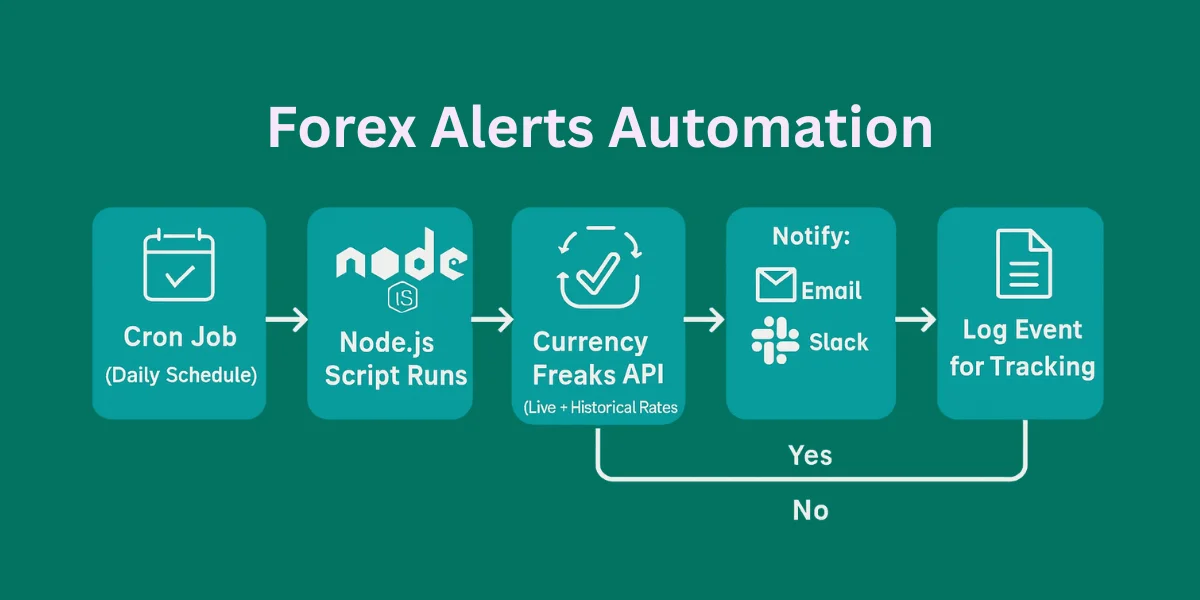
The system follows a clean and simple flow. Each part handles one responsibility. That separation keeps things clear and minimizes time on every run.
A cron job starts the Node.js script on schedule. It pulls live market data, then checks it against predefined technical conditions.
When conditions match, alerts fire. Messages are sent through chosen channels. Logs capture each event so teams can retain time later without confusion.
Design Principles And Maintainability
Data stays separate from logic. Notifications stay separate from calculations. This keeps changes safe as you track more pairs on the same platform.
Simplicity improves long term maintenance. It also reduces mental load. Small systems age better and protect positions open when markets move fast.
Building Automated Forex Alerts With Node.js
All coding lives here under one roof. No scattered scripts or hidden logic. Everything stays readable for developers and traders who are interested.
Project Setup And Prerequisites
Basic JavaScript knowledge helps a lot. Understanding async calls is useful. APIs should feel familiar with handling economic calendar data later.
Install Node.js and npm first. Create a project folder. Add your CurrencyFreaks API key and released set reminders on your phone to rotate it on time.
Store secrets using environment variables. Never hardcode sensitive values. Security starts early and protects access to macroeconomic figures across your account.
Fetching Forex Data From CurrencyFreaks
Install axios or fetch for requests. Create a common API helper that keeps price alert requests clean and reliable.
Fetch the latest rates for comparisons. Fetch previous data for change calculations. Clear error handling helps avoid false signals when markets shifts fast.
Limit requests to necessary endpoints. Cache responses if possible. Efficiency matters when tracking popular indicators and large datasets.
Designing Forex Alert Rules
Rules should live in config files. Hardcoding logic slows growth. Flexibility matters when rules evolve into alert technical indicator alerts.
Rules may track levels or percentages. Some track unusual behavior. Support multiple pairs for broader trading opportunity coverage and lead generation.
Store rules as JSON objects. Loop through rules dynamically. Avoid duplication when watching exponential moving average signals and patterns.
Implementing Forex Alert Logic
Compare today’s numbers with yesterday’s. Work out the percentage change and keep rounding consistently. Small shifts become clearer when you track market changes and trends this way.
Prevent duplicate alerts within a cycle. Log triggered alerts clearly. Debugging becomes easier when alerts are triggered once per condition.
Break logic into small, readable functions. Testing becomes simpler. Maintenance stays manageable as logic grows to set reminders automatically for a chosen amount.
Scheduling Forex Alerts With Cron Jobs
Cron jobs run tasks on schedules. Node cron packages simplify setup. Daily jobs work best for steady indicator alerts.
Choose execution times with care. Focus on market open overlaps for stronger price moves. Manage timezones properly so alerts fire on time for every data release.
Stop jobs from running twice. Lock them while they run. This avoids conflicts during rapid market movements and automatic retries.
Sending Forex Alert Notifications
Alerts can be sent through many channels. Email works for summaries. Slack suits active teams watching price alerts before they sell.
Design messages clearly. Include pair, value, and time. Avoid vague language so users can react instantly on any device.
Good alerts prompt action. Bad alerts create noise. Clarity always wins and protects, saves time and money.
Building a Forex Market Analysis Dashboard Using CurrencyFreaks
Node.js lets JavaScript run on your computer.
👉 Download from:
Nodejs.org
✔ Choose LTS version
✔ Install with default settings
Open Command Prompt / Terminal and run:
node -v
npm -v
If you see version numbers, you’re good.
Get a CurrencyFreaks API Key
-
Sign up (free account)
-
Copy your API key
You’ll use this key to access forex prices.
Create Your Project Folder
- Create a folder called:
forex-alerts
-
Open this folder in VS Code (or any editor)
-
Open terminal inside the folder
Initialize Your Node.js Project
Run this command:
npm init -y
This creates a file called package.json
It tells Node.js what your project is.
Install Required Packages
Run:
npm install axios express node-cron dotenv
What each one does (simple explanation):
| Package | Purpose |
|---|---|
| axios | Makes API requests |
| express | Runs a small web server |
| node-cron | Runs tasks on schedule |
| dotenv | Protects API keys |
Create the Backend File
Here is the GitHub repository for the following code
Create a file called server.js
Paste this code:
import express from 'express';
import axios from 'axios';
import path from 'path';
import { fileURLToPath } from 'url';

const app = express();
const __dirname = path.dirname(fileURLToPath(import.meta.url));

// --- CONFIGURATION ---
const API_KEY = 'add-your-api-key'; // 1. Put your CurrencyFreaks Key here

app.use(express.static('public'));

// Endpoint to get the list of 1000+ currency names
app.get('/api/symbols', async (req, res) => {
    try {
        const response = await axios.get('https://api.currencyfreaks.com/v2.0/currency-symbols');
        res.json(response.data.currencySymbols);
    } catch (error) {
        res.status(500).json({ error: "Failed to fetch symbols" });
    }
});

// Step 3: Location/Query Handling - Dynamic Forex Data
app.get('/api/forex-data', async (req, res) => {
    // Get symbols from the browser request, default to a few if empty
    const requestedSymbols = req.query.symbols || "PKR,USD,EUR,GBP,JPY,BTC";

    try {
        // 1. Get Latest Rates
        const latestUrl = `https://api.currencyfreaks.com/v2.0/rates/latest?apikey=${API_KEY}&symbols=${requestedSymbols}`;
        const latestRes = await axios.get(latestUrl);

        // 2. Get Historical Rates (24h ago)
        const yesterday = new Date();
        yesterday.setDate(yesterday.getDate() - 1);
        const dateStr = yesterday.toISOString().split('T')[0];
        const histUrl = `https://api.currencyfreaks.com/v2.0/rates/historical?apikey=${API_KEY}&date=${dateStr}&symbols=${requestedSymbols}`;
        const histRes = await axios.get(histUrl);

        // 3. Get Full Names from Symbols Endpoint
        const symRes = await axios.get('https://api.currencyfreaks.com/v2.0/currency-symbols');
        const fullNames = symRes.data.currencySymbols;

        // Step 5: Data Parsing - Combine everything
        const ratesToday = latestRes.data.rates;
        const ratesYesterday = histRes.data.rates;

        const report = Object.keys(ratesToday).map(symbol => {
            const current = parseFloat(ratesToday[symbol]);
            const prev = parseFloat(ratesYesterday[symbol]);
            const change = prev ? ((current - prev) / prev * 100).toFixed(3) : "0.000";

            return {
                symbol,
                fullName: fullNames[symbol] || "Unknown",
                rate: current < 0.1 ? current.toFixed(6) : current.toFixed(4),
                change: change,
                trend: parseFloat(change) >= 0 ? 'bullish' : 'bearish',
                updated: latestRes.data.date
            };
        });

        res.json(report);
    } catch (error) {
        console.error(error.message);
        res.status(500).json({ error: "API connection failed. Check your API Key." });
    }
});

app.listen(3000, () => console.log(`🚀 Forex Pulse Pro: http://localhost:3000`));
Create the Frontend Folder
Inside forex-alerts, create:
public/
Inside public, create three files:
index.html
style.css
app.js
Write the Frontend Code
index.html
<!DOCTYPE html>
<html lang="en">
<head>
    <meta charset="UTF-8">
    <meta name="viewport" content="width=device-width, initial-scale=1.0">
    <title>Forex Pulse Pro</title>
    <style>
        :root { --bg: #0f172a; --card: #1e293b; --blue: #3b82f6; --green: #22c55e; --red: #ef4444; }
        body { font-family: 'Inter', sans-serif; background: var(--bg); color: white; padding: 20px; }
        .container { max-width: 1200px; margin: 0 auto; }

        /* Control Panel */
        .panel { background: var(--card); padding: 20px; border-radius: 12px; margin-bottom: 30px; border: 1px solid #334155; }
        .search-box { width: 100%; padding: 12px; border-radius: 8px; border: 1px solid #475569; background: #0f172a; color: white; margin-bottom: 10px; }
        .symbol-list { display: grid; grid-template-columns: repeat(auto-fill, minmax(150px, 1fr)); gap: 10px; max-height: 150px; overflow-y: auto; padding: 10px; background: #0f172a; border-radius: 8px; }
        .symbol-item { font-size: 0.8rem; cursor: pointer; padding: 5px; border-radius: 4px; }
        .symbol-item:hover { background: var(--blue); }
        .selected-tag { display: inline-block; background: var(--blue); padding: 4px 10px; border-radius: 15px; margin: 5px; font-size: 0.8rem; }

        /* Grid */
        .grid { display: grid; grid-template-columns: repeat(auto-fit, minmax(300px, 1fr)); gap: 20px; }
        .card { background: var(--card); padding: 20px; border-radius: 16px; position: relative; overflow: hidden; border-left: 6px solid #475569; }
        .bullish { border-left-color: var(--green); }
        .bearish { border-left-color: var(--red); }
        .fullName { font-size: 0.8rem; color: #94a3b8; text-transform: uppercase; letter-spacing: 1px; }
        .price { font-size: 2.2rem; font-weight: 800; margin: 5px 0; }
        .btn { background: var(--blue); color: white; border: none; padding: 12px 24px; border-radius: 8px; cursor: pointer; font-weight: bold; transition: 0.3s; }
        .btn:hover { opacity: 0.8; }
        .btn-csv { background: #64748b; }
    </style>
</head>
<body>

<div class="container">
    <div style="display: flex; justify-content: space-between; align-items: center; margin-bottom: 20px;">
        <h1>Forex Pulse Pro ⚡</h1>
        <div>
            <button class="btn btn-csv" onclick="downloadCSV()">Export CSV</button>
            <button class="btn" onclick="updateDashboard()">Update Dashboard</button>
        </div>
    </div>

    <div class="panel">
        <input type="text" id="searchInput" class="search-box" placeholder="Search 1,000+ Currencies (e.g. 'Rupee' or 'Gold')..." onkeyup="filterSymbols()">
        <div id="symbolList" class="symbol-list"></div>
        <div style="margin-top: 15px;">
            <strong>Active:</strong> <div id="activeTags" style="display: inline-block;"></div>
        </div>
    </div>

    <div id="dashboard" class="grid"></div>
</div>
</body>
</html>
style.css
body {
  font-family: Arial, sans-serif;
  background: linear-gradient(#081a2b, #0d2b45);
  color: white;
  text-align: center;
}

.card {
  background: #132f4c;
  width: 340px;
  margin: 40px auto;
  padding: 20px;
  border-radius: 10px;
}

.up {
  color: #4caf50;
}

.down {
  color: #f44336;
}

.alert {
  font-weight: bold;
  margin-top: 10px;
}
app.js
async function loadForex() {
  const res = await fetch("/api/forex");
  const data = await res.json();

  document.getElementById("pair").innerText = data.pair;
  document.getElementById("today").innerText =
    data.today?.toFixed(4) ?? "—";
  document.getElementById("yesterday").innerText =
    data.yesterday?.toFixed(4) ?? "—";

  if (data.changePercent) {
    const moveText =
      `${data.direction} ${data.changePercent}%`;
    const el = document.getElementById("movement");

    el.innerText = moveText;
    el.className = data.direction === "UP" ? "up" : "down";

    document.getElementById("alert").innerText =
      data.alert
        ? "🟢 Alert Triggered (±0.5%)"
        : "⚪ No Alert Today";
  }

  document.getElementById("time").innerText =
    "Last checked: " + data.lastUpdated;
}

loadForex();
Run the Project
In terminal:
node server.js
Open browser:
http://localhost:3000

🎉 You now see live forex data.
Choose among the 1000+ currencies and update the dashboard.
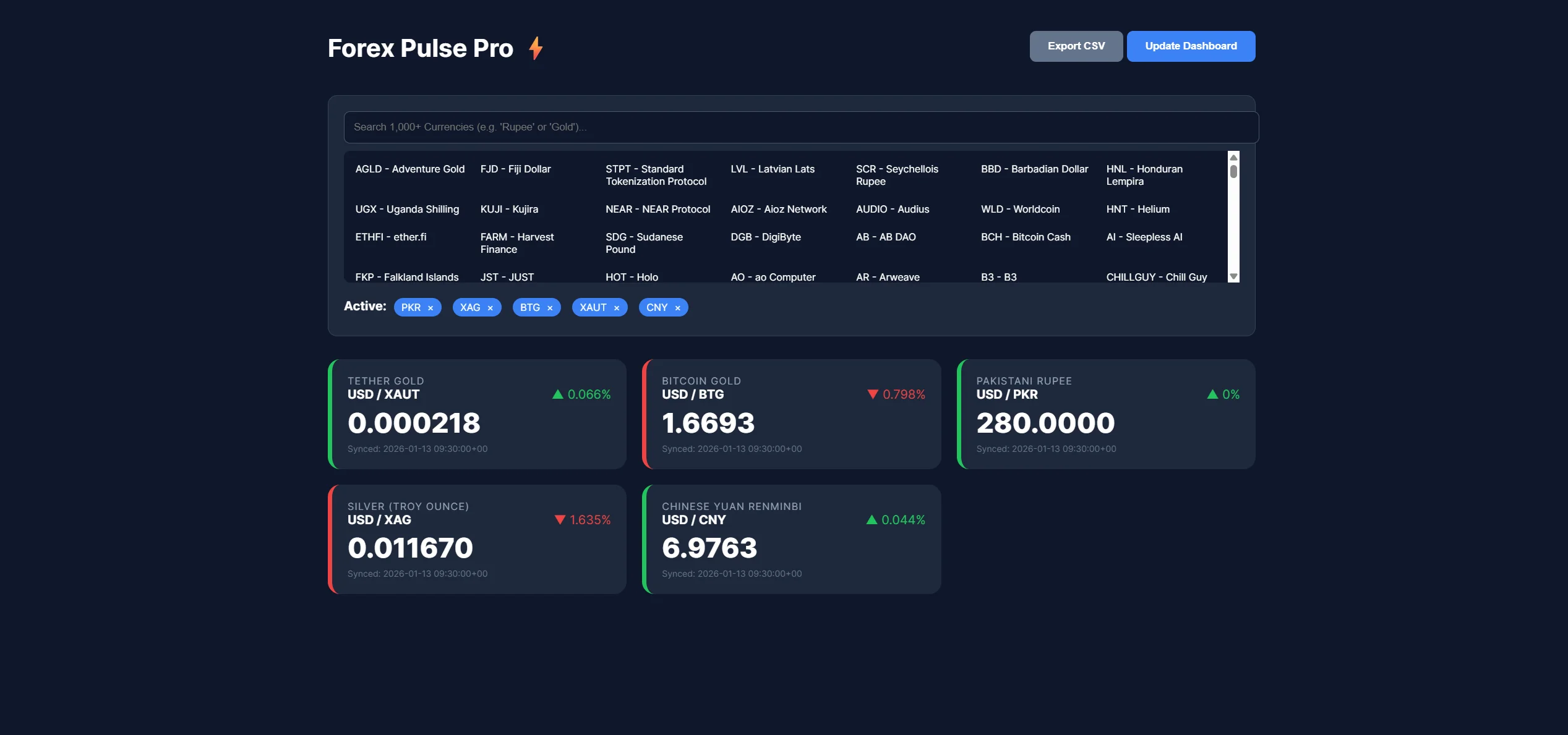
Here is a video:
Monitoring, Scaling, And Best Practices
Log every cron execution and price tick. Track failures clearly. Visibility builds trust during volatile economic events.
Handle API downtime gracefully. Retry with limits. Avoid endless loops that miss important ticks, economic results, and key signals.
Don’t make API calls you don’t need. Send requests in batches when you can. This reduces unnecessary tick checks and saves resources as notification use grows across users.
Store API keys safely. Change them from time to time. This helps protect your trading activity across all platforms.
Conclusion
This system runs quietly after setup. It replaces constant checking. That shift changes focus and helps hit save time daily.
Scheduled alerts beat manual scanning. They respect time and attention. Consistency matters when markets shift fast, and price changes accelerate.
CurrencyFreaks with Node.js works reliably, offering smart suggestion logic as the system grows with your needs. Rules and channels expand easily across more pairs. Get started with the free currency converter API and build your first alert in minutes.
FAQs
What Are Forex Alerts And Why Are They Useful?
Forex alerts notify you when conditions meet rules. They help track the forex market efficiently. You focus only when needed.
How Often Should Automated Forex Alerts Run?
Daily checks work for most strategies. They help receive trading alerts without overload. Higher frequency suits specific cases.
Can I Use CurrencyFreaks For Historical Forex Alerts?
Yes, historical data supports comparisons. It delivers accurate price change alerts. Context improves decisions.
Are Node.js Cron Jobs Reliable For Forex Alerts?
Cron jobs are stable when monitored. They power many stock alerts systems. Logging ensures reliability.
Can Forex Alerts Be Sent To Slack Or Mobile Apps?
Yes, alerts support email, Slack, and webhooks. They also support push notification delivery. Channels stay flexible.
Build smarter forex alerts with CurrencyFreaks and never miss a market shift.


