

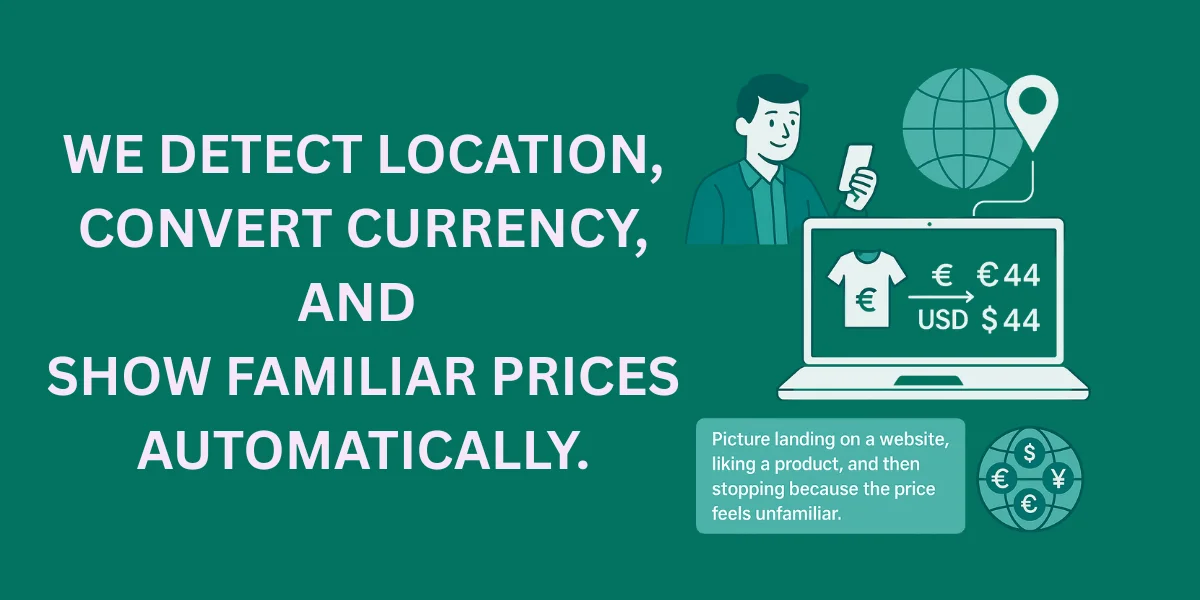
Picture landing on a website, liking a product, and then stopping because the price feels unfamiliar. You see numbers that do not match how you think about money, and suddenly the decision feels harder. That small moment of doubt costs businesses more users than most people realize.
Global products reach people all over the world, but many still show prices in just one currency. That makes users pause and do quick math in their heads. Once confusion creeps in, trust fades fast.
This is where dynamic currency conversion enters the picture as a practical fix. Prices adapt in real time based on where the user is, not where the business is located. IP-to-currency detection makes this possible without asking users to lift a finger.
What Is Dynamic Currency Conversion?
So, what is dynamic currency conversion in simple terms? Prices adjust to your currency on their own. The system detects location, converts values, and displays amounts that feel familiar.
Static currency selection allows users to choose their currency manually from a dropdown. Dynamic conversion removes that step and does the work quietly in the background. The difference feels small, but it changes how natural the experience feels.
A dynamic currency conversion example is an ecommerce store showing euros to shoppers in France and US dollars to users in the US. SaaS pricing pages work just like online marketplaces. The goal is clarity, not cleverness.
Why Currency Localization Matters For Global Users
Seeing prices in a familiar currency helps people feel confident right away. The numbers make sense because they match how they think about money every day. Feeling comfortable often beats fancy design updates.
Checkout and signup flows work better when users do not need to calculate exchange rates. Fewer steps mean fewer exits, especially on mobile. This directly affects how many users finish a transaction.
Currency localization also improves transparency. Users see the real price upfront, including any dynamic currency conversion fee. That removes doubt, lowers anxiety, and helps international shoppers move forward with confidence.
How IP-To-Currency Detection Works
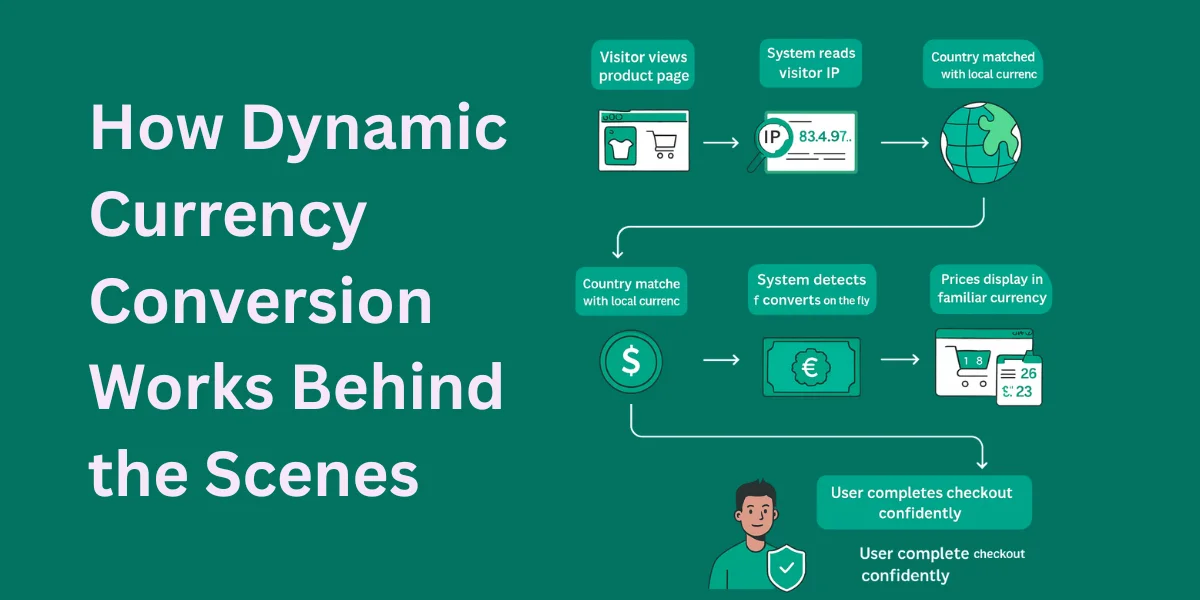
The first step is reading the IP address of the visitor. That IP points to a general country or region, not a person. It shows where the request comes from, nothing more.
Once the country is known, the system maps it to a local currency. A foreign country usually has a primary legal tender used for everyday transactions. That mapping step is simple but essential.
Accuracy is high in most cases, but not perfect. Mobile carriers and shared networks sometimes confuse location data. Good systems plan for these limits instead of ignoring them.
IP-To-Currency vs User-Selected Currency
Automatic detection removes friction and speeds things up. Users see prices instantly without making a choice or understanding exchange rules. For most cases, this feels smoother.
Manual selection gives users control when detection fails. Travelers, expats, or VPN users may prefer a different option. Forcing detection without flexibility can frustrate them.
A good setup does both. Show the currency automatically and give users the option to change it. That balance keeps things clear and puts people in control.
Core Components Of A Dynamic Currency Conversion System
Every system starts with an IP geolocation service. It works alongside a currency conversion service to figure out the user’s country from their IP address. It has to be fast and dependable.
Next comes the country to currency mapping. This step decides which currency to show as the user’s home currency, a setup commonly called dynamic currency conversion. Some regions use more than one currency, so this part needs extra attention.
Next, you need exchange rates and a pricing layer. The rates do the math. The pricing rules keep everything steady. Finally, the frontend shows prices in a clean and familiar format.
Choosing An IP Geolocation Provider
Get the accuracy right before anything else. Some dynamic currency conversion providers perform better in certain regions than others. Testing with real traffic helps you spot gaps early.
Latency is easy to overlook. But when lookups are slow, pages lag, and everything feels slower than it should. Lightweight responses make a big difference.
Privacy and compliance should never be an afterthought. Choose providers that minimize data retention and respect regulations. Clear communication earns trust in the long run.
Integrating Exchange Rate APIs
Real-time exchange rates keep prices honest. Outdated data leads to incorrect totals and unhappy users. Fresh rates reflect real market conditions.
A dynamic currency conversion api usually defines a base currency and converts from there. The system must calculate exchange rates consistently across products. Small rounding errors can add up.
Caching helps control performance and cost. Dynamic currency conversion rates do not need updating every second for most businesses. Smart intervals balance accuracy and speed.
Currency Formatting And Localization Rules
Currency symbols matter more than people think. Some users prefer symbols, while others trust currency codes like USD or EUR. Context determines what feels clearer.
Formatting rules vary by country. Decimal separators, thousands grouping, and rounding differ widely. Ignoring these details makes prices feel wrong.
Some countries use multiple currencies. Others accept foreign currency alongside local currency. Edge cases require clear fallback rules.
Building A Dynamic Currency Conversion Flow
It starts the moment someone opens a page. The system detects the IP and identifies the country. It then maps that country to a currency.
After this, it checks what the currency is trading at right now. It switches the amount into the right currency. Then it adjusts the final price.
Finally, prices are formatted and rendered. Users view prices in a way that feels natural. The entire process stays invisible.
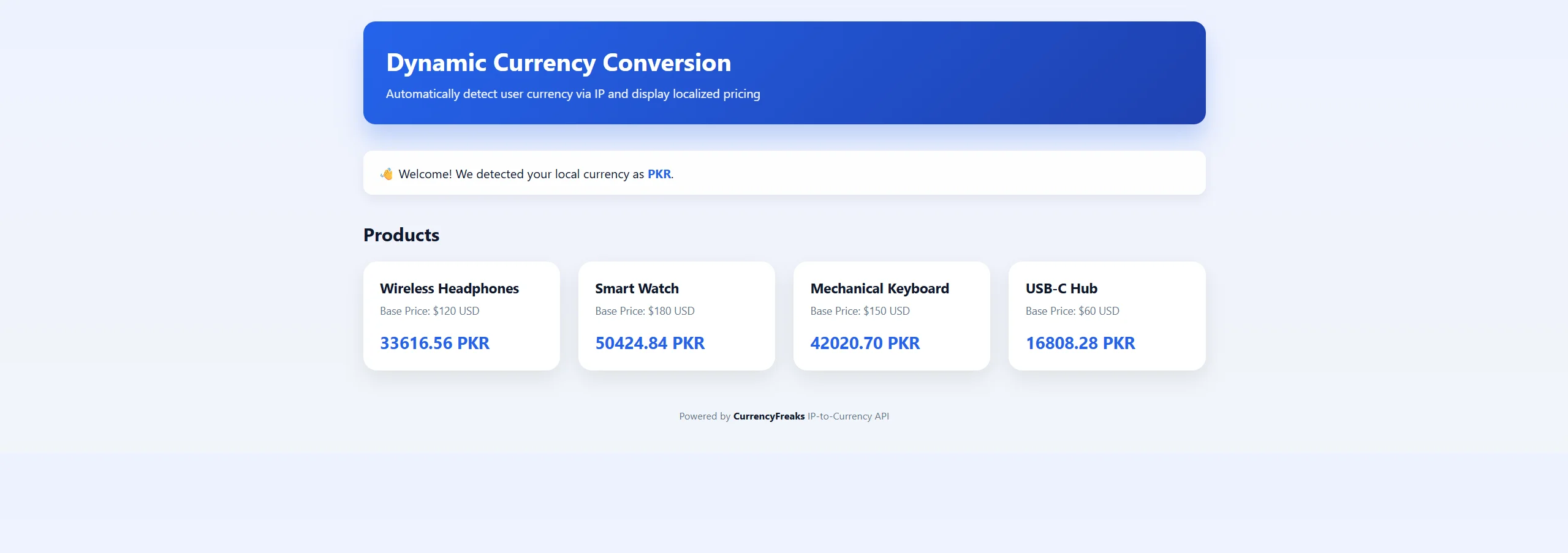
Here is a simple HTML, CSS, and JavaScript code. This code creates a dynamic product page. It automatically detects the user’s currency based on their IP. Then it converts product prices from USD to the local currency. The page displays products with their base price and the converted price in real time.
Access the complete code here.
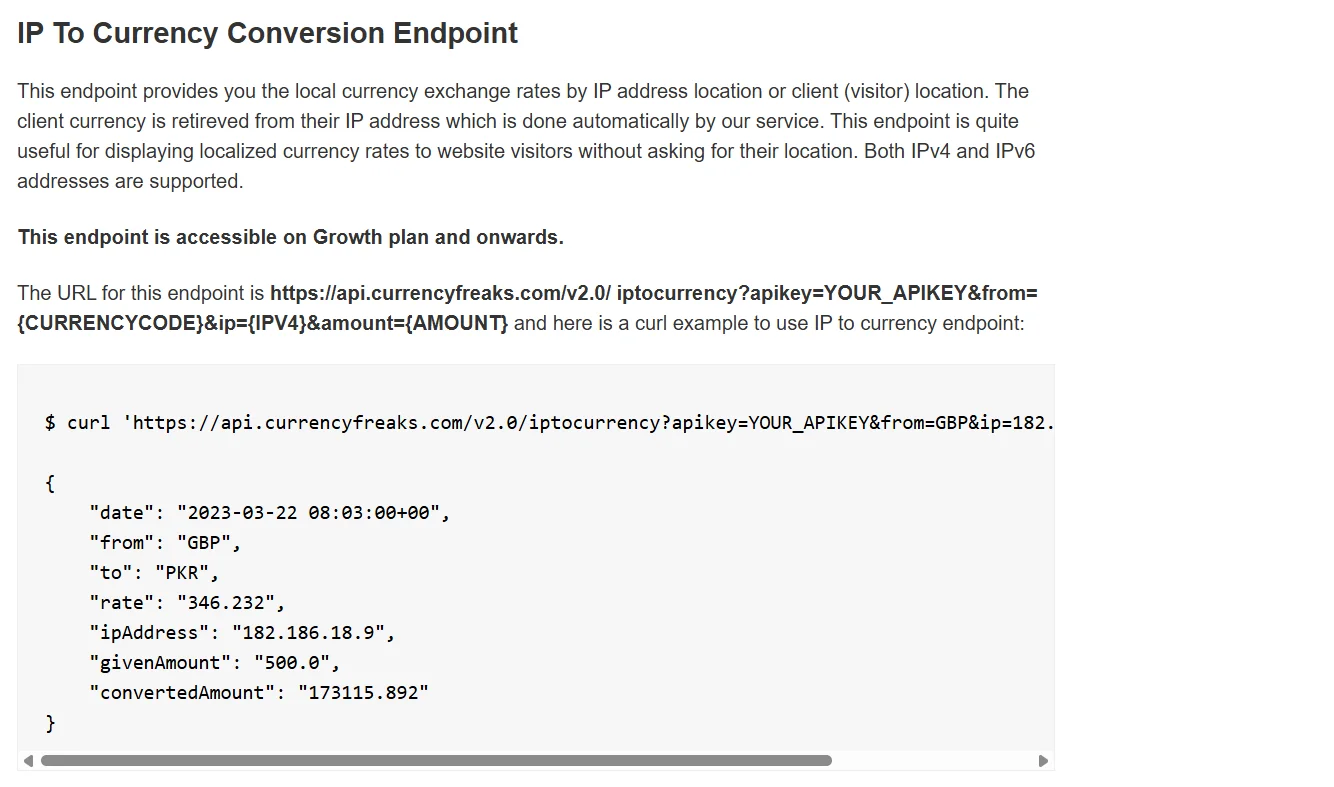
The code used the IP-to-Currency endpoint of CurrencyFreaks:
<!DOCTYPE html>
<html lang="en">
<head>
  <meta charset="UTF-8" />
  <title>Dynamic Currency Conversion via IP | CurrencyFreaks</title>

  <meta name="description" content="Detect user currency automatically using IP-to-currency detection and show localized prices in real time." />

  <style>
    :root {
      --primary: #2563eb;
      --secondary: #1e40af;
      --bg: #f1f5f9;
      --card: #ffffff;
      --text: #0f172a;
      --muted: #64748b;
    }

    * {
      box-sizing: border-box;
    }

    body {
      margin: 0;
      font-family: "Segoe UI", system-ui, -apple-system, BlinkMacSystemFont, sans-serif;
      background: linear-gradient(180deg, #eef2ff 0%, var(--bg) 100%);
      color: var(--text);
      padding: 40px 20px;
    }

    .container {
      max-width: 1100px;
      margin: auto;
    }

    header {
      background: linear-gradient(135deg, var(--primary), var(--secondary));
      color: #fff;
      padding: 30px;
      border-radius: 16px;
      margin-bottom: 35px;
      box-shadow: 0 20px 30px rgba(37, 99, 235, 0.25);
    }

    header h1 {
      margin: 0 0 10px;
      font-size: 32px;
    }

    header p {
      margin: 0;
      font-size: 16px;
      opacity: 0.95;
    }

    .welcome {
      background: rgba(255, 255, 255, 0.95);
      padding: 18px 20px;
      border-radius: 12px;
      margin-bottom: 35px;
      font-size: 16px;
      box-shadow: 0 6px 14px rgba(0,0,0,0.06);
    }

    .welcome strong {
      color: var(--primary);
    }

    h2 {
      margin-bottom: 20px;
      font-size: 24px;
    }

    .products {
      display: grid;
      grid-template-columns: repeat(auto-fit, minmax(250px, 1fr));
      gap: 24px;
    }

    .product {
      background: var(--card);
      border-radius: 18px;
      padding: 22px;
      box-shadow: 0 10px 25px rgba(0,0,0,0.08);
      transition: transform 0.25s ease, box-shadow 0.25s ease;
      position: relative;
      overflow: hidden;
    }

    .product::before {
      content: "";
      position: absolute;
      inset: 0;
      background: linear-gradient(135deg, rgba(37,99,235,0.08), transparent 60%);
      opacity: 0;
      transition: opacity 0.25s ease;
    }

    .product:hover {
      transform: translateY(-6px);
      box-shadow: 0 18px 40px rgba(0,0,0,0.12);
    }

    .product:hover::before {
      opacity: 1;
    }

    .product h3 {
      margin-top: 0;
      font-size: 18px;
      margin-bottom: 8px;
    }

    .product p {
      margin: 0;
      font-size: 14px;
      color: var(--muted);
    }

    .price {
      margin-top: 18px;
      font-size: 22px;
      font-weight: 700;
      color: var(--primary);
    }

    footer {
      text-align: center;
      margin-top: 50px;
      font-size: 13px;
      color: var(--muted);
    }

    footer strong {
      color: var(--text);
    }
  </style>
</head>
<body>

<div class="container">

  <header>
    <h1>Dynamic Currency Conversion</h1>
    <p>Automatically detect user currency via IP and display localized pricing</p>
  </header>

  <div class="welcome" id="welcomeMessage">
    Detecting your location and currency…
  </div>

  <h2>Products</h2>

  <div class="products" id="productList"></div>

  <footer>
    Powered by <strong>CurrencyFreaks</strong> IP-to-Currency API
  </footer>

</div>

<script>
  const API_KEY = "add-your-api-key-here";

  const products = [
    { name: "Wireless Headphones", price: 120 },
    { name: "Smart Watch", price: 180 },
    { name: "Mechanical Keyboard", price: 150 },
    { name: "USB-C Hub", price: 60 }
  ];

  const welcomeBox = document.getElementById("welcomeMessage");
  const productContainer = document.getElementById("productList");

  function renderProducts(rate, currency) {
    productContainer.innerHTML = "";

    products.forEach(product => {
      const convertedPrice = (product.price * rate).toFixed(2);

      const div = document.createElement("div");
      div.className = "product";
      div.innerHTML = `
        <h3>${product.name}</h3>
        <p>Base Price: $${product.price} USD</p>
        <div class="price">${convertedPrice} ${currency}</div>
      `;
      productContainer.appendChild(div);
    });
  }

  async function detectCurrencyByIP() {
    const response = await fetch(
      `https://api.currencyfreaks.com/v2.0/iptocurrency?apikey=${API_KEY}&from=USD&amount=1`
    );
    if (!response.ok) throw new Error("IP-to-Currency unavailable");
    return response.json();
  }

  async function init() {
    try {
      const data = await detectCurrencyByIP();

      welcomeBox.innerHTML = `
        👋 Welcome! We detected your local currency as
        <strong>${data.to}</strong>.
      `;

      renderProducts(parseFloat(data.rate), data.to);

    } catch {
      welcomeBox.innerHTML = `
        👋 Welcome! Showing prices in <strong>USD</strong> (default currency).
      `;
      renderProducts(1, "USD");
    }
  }

  init();
</script>

</body>
</html>
Here is the output:
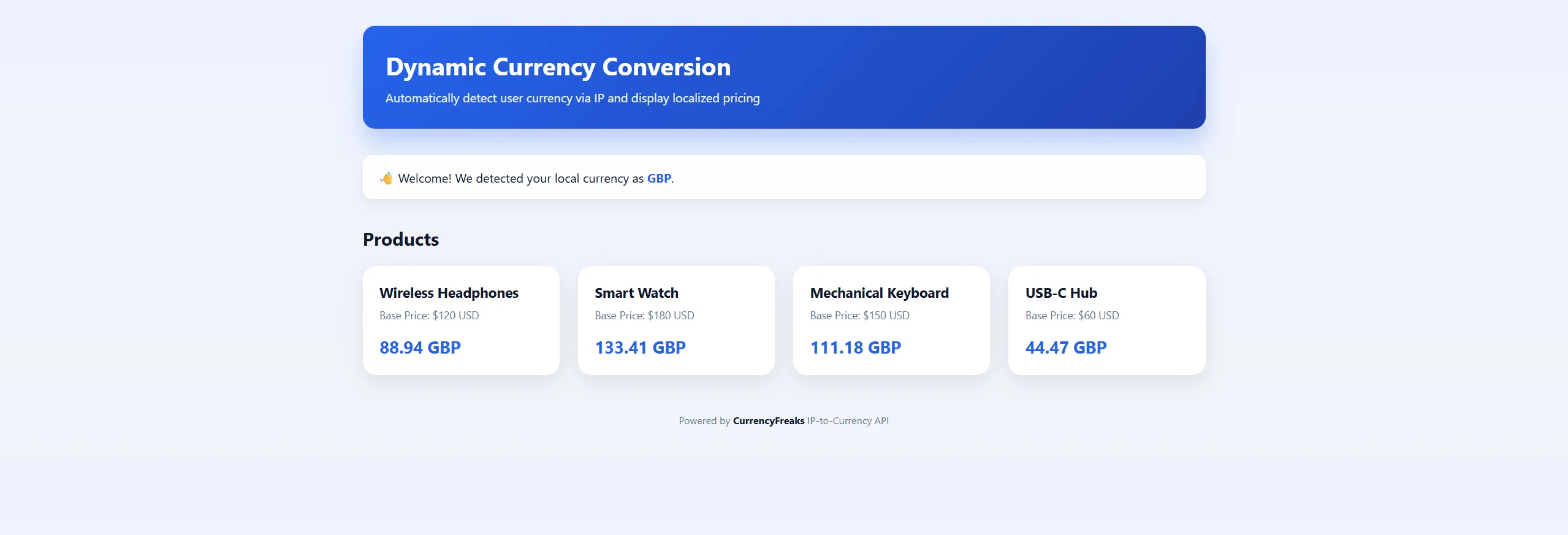
Let's say we turn on VPN and set it to UK:

Now, when we refresh our app, you can see the prices in UK currency:
Handling Edge Cases And Exceptions
VPNs and proxy IPs can confuse location. A traveler might look like they are in the wrong country. This is common in DCC transactions, so systems should expect it and stay flexible.
Some currencies will not be supported. When that happens, a simple default price is better than an error. People can still see the exact cost, which really matters at a payment terminal.
Edge cases need transparency. Let users turn off automatic conversion if it feels off, especially when financial institutions apply their own rules. Letting people choose prices in their customer’s home currency makes the whole experience feel safer and more transparent.
Performance Optimization Strategies
Caching IP lookups reduces repeated calls. A lot of users come from the same places, whether they are paying with a debit card in the cardholder's home currency or simply looking around. This saves time and resources.
Exchange ratescan also be cached safely. Frequent updates are not always necessary, even when showing competitive exchange rates from a DCC provider. Balance freshness with performance.
Server-side conversion often works best. It respects the cardholder preferred currency and keeps the transaction amount steady, without surprise additional fees. In some cases, simple client-side controls still help.
Security And Privacy Considerations
Treat IP data responsibly. Use it just to figure out the user’s currency. Do not keep it longer than required or link it to user accounts.
Regulations like GDPR cannot be ignored here. If you use dynamic currency conversion dcc, users should know what data is checked and why. Being clear upfront avoids problems later.
Stay away from storing personal details. Be careful with foreign transaction fees, but respect user privacy. Respect builds trust, and trust keeps users around.
SEO And UX Benefits Of Dynamic Currency Conversion
Localized pricing lowers bounce rates. When prices show up in a user’s own currency, things click right away. If something feels off or it’s not the currency they expect, people leave.
It’s easy to spot when users stick and explore. If DCC transactions feel smooth and prices match the customer’s home currency, users stay longer and click more. That kind of engagement sends the right signals for international SEO.
Checkout flows also get better. Showing a clear DCC exchange rate removes last-second hesitation. Fewer doubts mean more completed purchases, without making a big fuss about it.
Common Mistakes To Avoid
Outdated rates break trust fast. People spot price gaps right away, especially when a currency conversion service feels off. Accuracy really matters.
Forcing a currency choice frustrates users. Let them switch if they want, even when currency conversion takes place automatically. Respect works better than control.
Bad formatting slows people down. A missing symbol or wrong order can confuse, even if the math is right. This matters more when favourable exchange rates differ from what the customer’s bank finally applies. Localization is about the details, not just the language.
When To Use Dynamic Currency Conversion
This makes life easier for global ecommerce stores. International transactions feel smoother and clearer. Users spend with confidence.
Subscription-based SaaS products also gain from localization. Monthly pricing feels easier to say yes to. People are less likely to walk away.
Marketplaces and digital services rely on trust. Clear pricing helps sellers and buyers alike. Content monetization platforms usually notice the difference.
Future Trends In Currency Localization
Dynamic currency conversion will get sharper over time. It will follow habits, clicks, and choices, not guesswork. Prices will feel more natural and easier to trust.
Real-time regional optimization will keep getting better. Exchange rates will update on their own inside a dynamic currency conversion app. This helps businesses respond faster when markets shift.
Payment gateways will connect more closely with pricing. The price on screen will feel closer to the final charge. Smarter geo-pricing will feel normal, not technical.
Conclusion
Dynamic currency conversion solves a quiet but costly problem. It removes friction right where users hesitate, including confusion around fees dynamic currency conversion. Small changes like this drive real impact.
IP-to-currency detection makes this possible. Prices adjust on their own, with no clicks or setup. This is how dynamic currency conversion work in real life. People see numbers that already make sense to them.
Building currency-aware systems improves trust and helps products scale globally. It supports growth without adding complexity. The payoff shows up over time.
FAQs
What Is Dynamic Currency Conversion And How Does It Work?
It shows prices in a currency people already understand. It just shows up correctly. Everything feels clear, familiar, and easy to trust.
How Accurate Is IP-To-Currency Detection?
It works well for most people. VPNs and travel can affect results. Good systems allow easy overrides.
Should Users Be Allowed To Change Their Currency?
Definitely, choice reduces confusion and builds confidence. Hybrid setups just feel right.
Does Dynamic Currency Conversion Affect Performance?
It can if poorly implemented. Caching and efficient APIs keep it fast. Most users never notice a delay.
Is IP-Based Currency Detection GDPR Compliant?
Yes, when handled responsibly. Avoid storing IP data unnecessarily. Be transparent and respectful.


