

When money is involved, people want answers right away. Exchange rates move constantly, and nobody wants to open charts or jump between apps just to check a number. A currency exchange bot delivers the rate inside a chat people already use every day.
WhatsApp feels easy because people already use it every day. They trust it for quick chats, updates, and simple questions. Adding currency conversion there lets teams automate replies without slowing anyone down.
A bot currency exchange rate tool solves problems that websites and apps struggle with. There is no login, no interface to learn, and no page to refresh. Users send a message and get a clear answer back.
What Is a Currency Exchange Bot and How It Works
A currency exchange bot lives inside a chat and does one job well. You type a message, and it turns one currency into another. Many successful traders use these bots for quick checks without opening dashboards.
It reads your message. It figures out which currency conversion you want. It pulls live exchange rates from a trusted source and considers current trading volume before returning a clear number you can use right away.
The process stays simple. A user can send something like “100 USD to EUR,” or add a date for an older rate. The exchange rate bot picks up the request, contacts the exchange data source, and sends back the converted value without needing an exchange account.
How Exchange Rate Data Is Processed
Not every bot handles data the same way. Some use real-time exchange rates that follow the market as it changes. These are accurate, but they depend on API speed and traffic when handling a significant amount of requests.
Others rely on cached rates, which load faster and handle heavy trading. They need frequent updates to stay accurate. Many teams later add an affiliate program once the bot proves reliable.

Use Cases for a WhatsApp Currency Exchange Bot
When you are moving between countries, quick exchange checks matter. Travelers want clear exchange numbers before spending a large amount. Each stop has a new currency, and seeing the rate first makes spending easier. A WhatsApp bot works like lightweight trading software for simple decisions.
Freelancers working with international clients face currency questions daily. They convert invoices, plan pricing, and track transactions across borders. This helps traders of services manage profit without spreadsheets.
Finance teams use these bots for fast internal lookups. Support teams use them to answer billing questions quickly for other users. This saves time and reduces manual work across the account.
Choosing the Right Exchange Rate API for the Bot
Accuracy matters when dealing with money. Even experienced traders lose confidence when small mistakes start to appear. A great option API needs to keep up with fast market shifts and deliver clean data without missing a beat.
You need specific endpoints for a complete solution. Live rates, history, and conversions support clear strategy decisions. These tools help teams with different skill level needs.
Rate limits and latency also matter. When prices move fast, slow responses break trust and can stop trades right when they matter most. Providers that balance speed and coverage support steady automated trading.
WhatsApp Currency Exchange Bot Architecture Overview
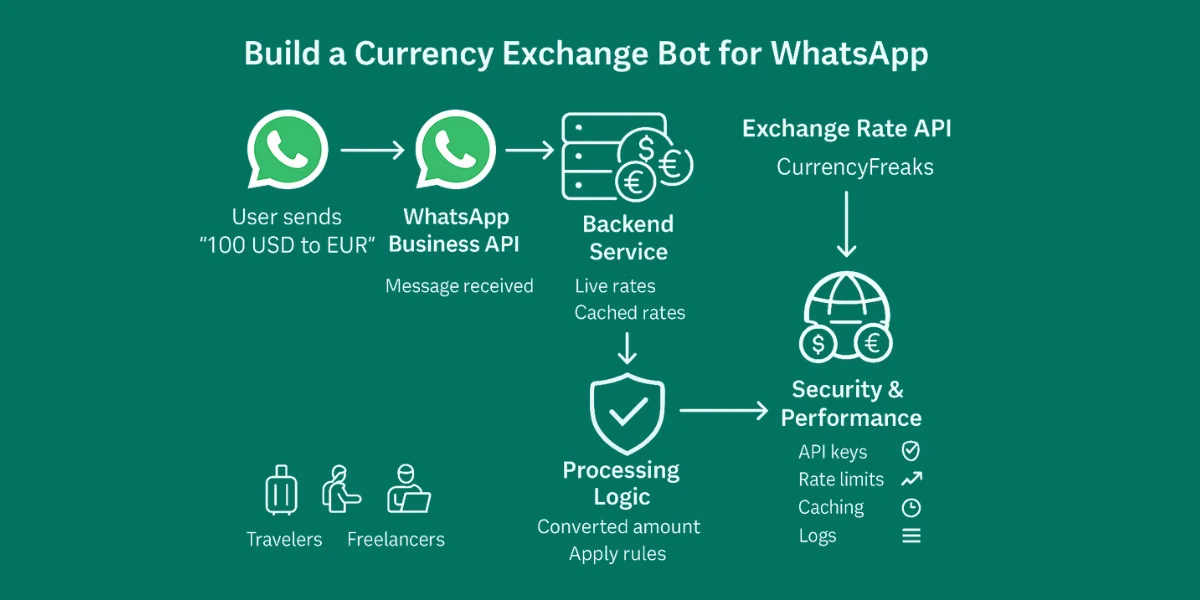
The bot starts with WhatsApp itself. You can use the WhatsApp Business API or Cloud API to simply connect messaging. This setup supports instant replies without manual refresh.
A backend service handles logic and flow. Node.js and Python are common choices because they scale well and support machine learning later. That flexibility supports smarter trading strategies.
The exchange rate API plugs straight into the backend and does its job quietly. Each message gets parsed, processed, and sent back in a clean response. Even as more users join, the system stays easy to manage and predictable.
Building the Currency Exchange Bot (Implementation)
Note: Access JavaScript Code for Currency Exchange Bot Here.
This bot will allow users to:
-
Enter a base currency.
-
Enter an amount.
-
Enter a target currency.
-
Choose latest or historical rates.
-
Get the converted amount step by step.
We will use:
-
Node.js → Backend server.
-
Twilio WhatsApp Sandbox → WhatsApp messaging.
-
CurrencyFreaks API → Exchange rates.
-
Ngrok → Expose local server to the internet for Twilio.
Step 1: Install Node.js
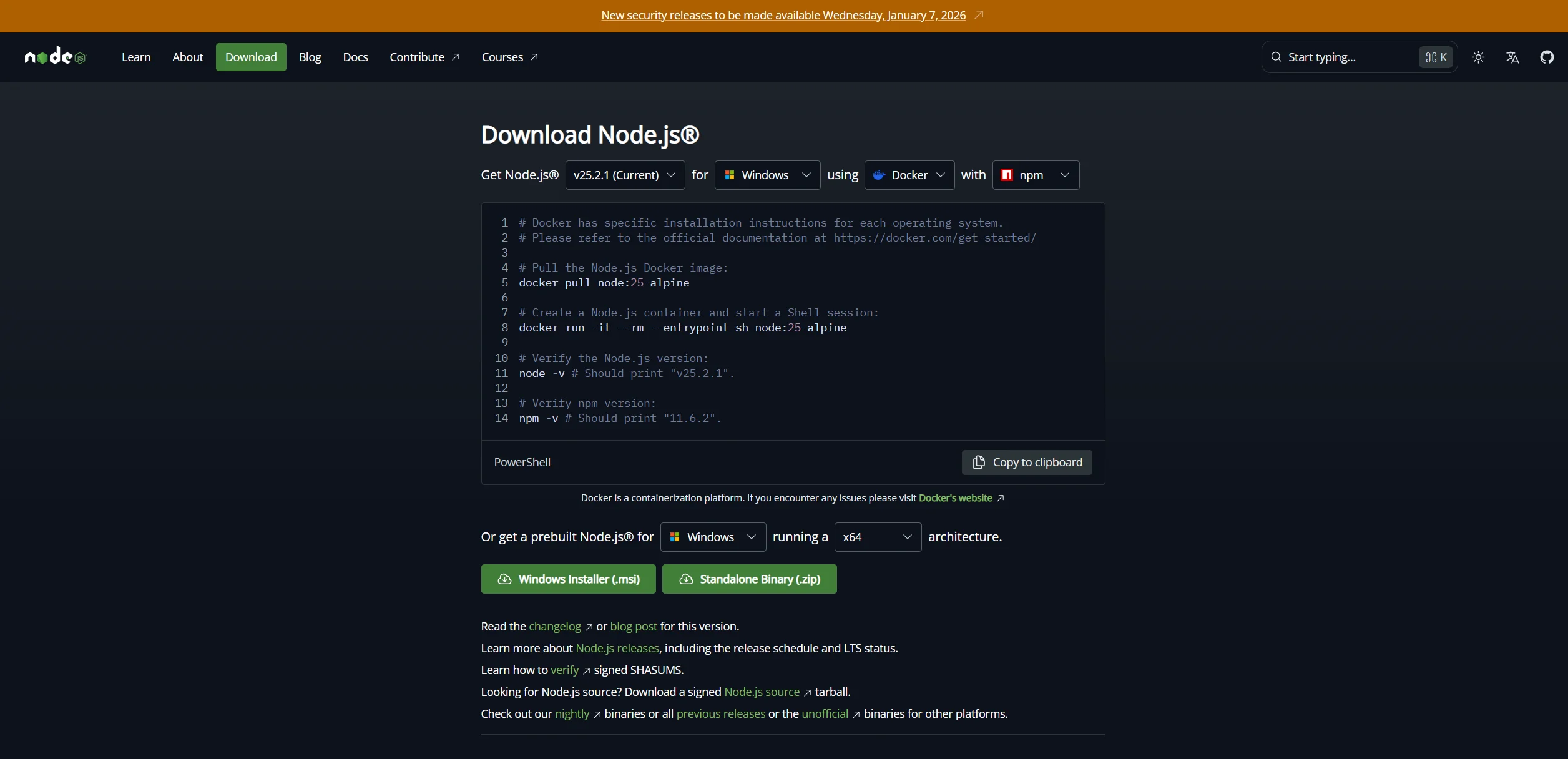
- Go to Node.js and download the LTS version.
-
Install Node.js with default options.
-
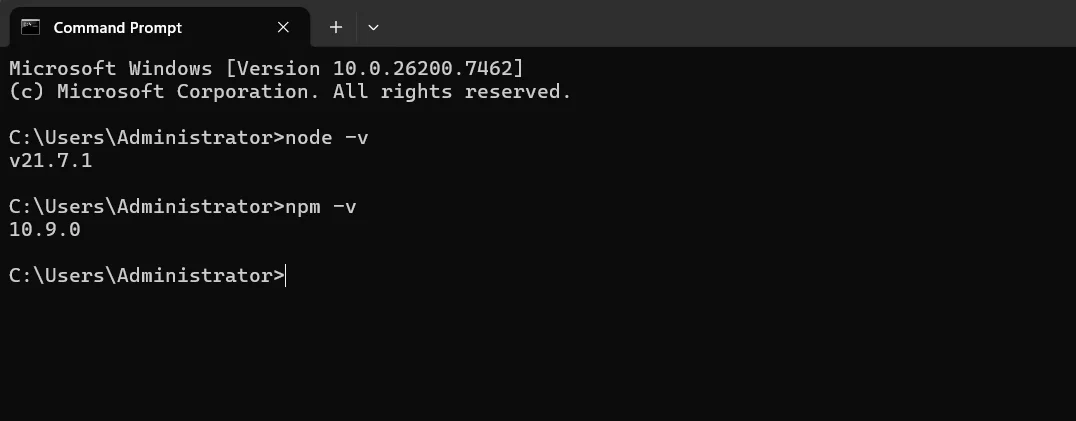
Verify installation in CMD or PowerShell:
node -v
npm -v
You should see version numbers:
Step 2: Create your bot project
- Open CMD/PowerShell and create a folder:
mkdir whatsapp-currency-bot
cd whatsapp-currency-bot
- Initialize Node project:
npm init -y
- Install dependencies:
npm install express axios twilio body-parser
Explanation:
-
express → Creates the web server.
-
axios → Fetches exchange rates.
-
twilio → Connects bot to WhatsApp.
-
body-parser → Reads incoming messages.
Step 3: Create index.js
Create index.js inside the project folder and paste the following final code:
const express = require("express");
const bodyParser = require("body-parser");
const axios = require("axios");
const twilio = require("twilio");

const app = express();
app.use(bodyParser.urlencoded({ extended: false }));

const API_KEY = "YOUR_CURRENCYFREAKS_API_KEY"; // Replace with your API key

// In-memory session storage
const sessions = {};

app.post("/whatsapp", async (req, res) => {
  const from = req.body.From; // User's phone number
  const msg = req.body.Body.trim();
  const twiml = new twilio.twiml.MessagingResponse();

  // Initialize session if new user
  if (!sessions[from]) {
    sessions[from] = { step: 1 }; // Step 1: ask for currency
    twiml.message("👋 Welcome! Which currency do you want to convert from? (e.g., USD)");
    return res.send(twiml.toString());
  }

  const session = sessions[from];

  try {
    if (session.step === 1) {
      session.base = msg.toUpperCase();
      session.step = 2;
      twiml.message(`✅ Base currency set to ${session.base}\nNow enter the amount you want to convert.`);
    } else if (session.step === 2) {
      const amount = parseFloat(msg);
      if (isNaN(amount)) {
        twiml.message("❌ Amount must be a number. Please enter the amount.");
        return res.send(twiml.toString());
      }
      session.amount = amount;
      session.step = 3;
      twiml.message("Great! Which currency do you want to convert TO? (e.g., PKR)");
    } else if (session.step === 3) {
      session.target = msg.toUpperCase();
      session.step = 4;
      twiml.message("Do you want to use latest rates or historical rates?\nReply with:\n1️⃣ Latest\n2️⃣ Historical (then provide date in YYYY-MM-DD)");
    } else if (session.step === 4) {
      let date = null;
      if (msg.startsWith("1")) {
        // Latest rate
        session.step = 5;
      } else if (msg.startsWith("2")) {
        // Historical rate
        session.step = 5;
        twiml.message("Please enter the date (YYYY-MM-DD):");
        session.awaitingDate = true;
        return res.send(twiml.toString());
      } else if (session.awaitingDate) {
        date = msg;
        session.date = date;
        session.awaitingDate = false;
      } else {
        twiml.message("❌ Invalid option. Reply with 1 for latest or 2 for historical.");
        return res.send(twiml.toString());
      }

      const apiUrl = session.date
        ? "https://api.currencyfreaks.com/v2.0/rates/historical"
        : "https://api.currencyfreaks.com/v2.0/rates/latest";

      const response = await axios.get(apiUrl, {
        params: {
          apikey: API_KEY,
          base: session.base,
          symbols: session.target,
          ...(session.date && { date: session.date }),
        },
      });

      const rate = response.data.rates[session.target];
      const convertedAmount = (session.amount * rate).toFixed(2);

      let reply = `💱 ${session.amount} ${session.base} = ${convertedAmount} ${session.target}`;
      reply += session.date ? `\n📅 Rate Date: ${session.date}` : `\n📅 Latest Rate`;

      twiml.message(reply);

      // Reset session
      delete sessions[from];
    }

    res.send(twiml.toString());
  } catch (error) {
    console.error(error);
    twiml.message("⚠️ Unable to fetch exchange rate. Please try again.");
    res.send(twiml.toString());
  }
});

app.listen(3000, () => console.log("Bot running on port 3000"));
Step 4: Set up Twilio WhatsApp Sandbox
-
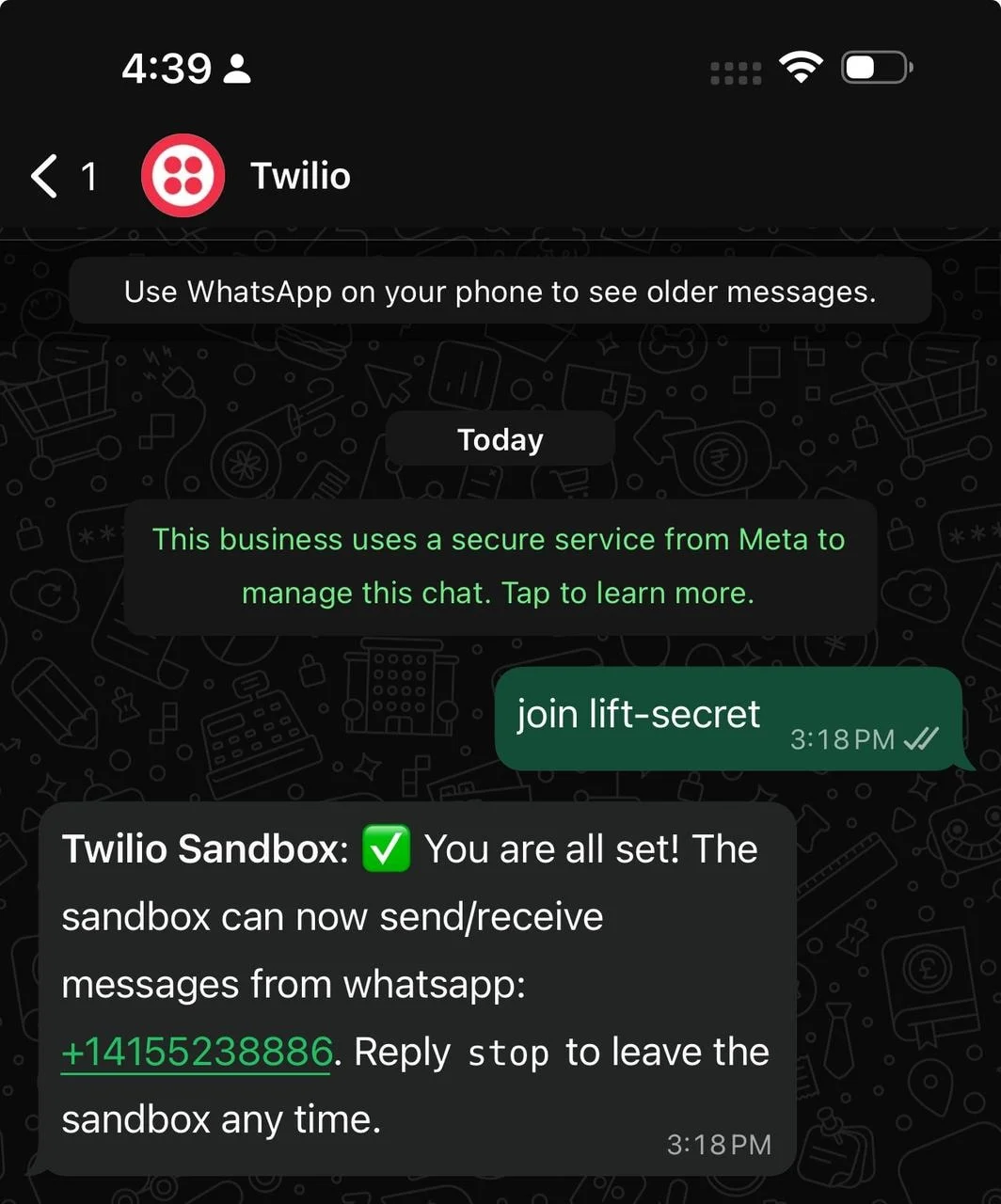
Go to Twilio Console → WhatsApp Sandbox
-
Send the join code to the sandbox number from your WhatsApp.
-
Sandbox is now linked to your WhatsApp.
Step 5: Download & run Ngrok
-
Download Ngrok here (Windows 64-bit).
-
Extract ngrok.exe to Desktop or a folder.
-
Open CMD/PowerShell in that folder and run:
.\ngrok.exe http 3000
- Copy the HTTPS forwarding URL, e.g.:
https://3c6d1fbd0631.ngrok-free.app
Step 6: Connect Ngrok URL to Twilio
-
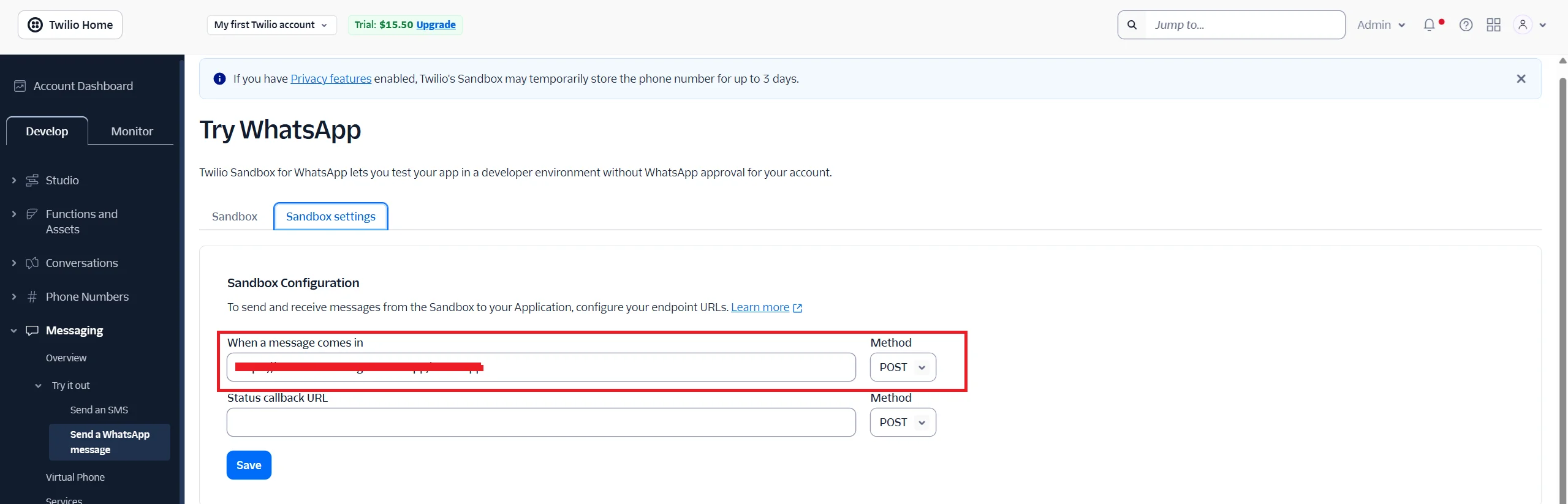
Go to Twilio WhatsApp Sandbox → WHEN A MESSAGE COMES IN
-
Paste the Ngrok URL with /whatsapp:
https://3c6d1fbd0631.ngrok-free.app/whatsapp
-
Method: POST
-
Click Save
Step 7: Run your bot
-
Open VS Code terminal in project folder.
-
Run:
node index.js
- Output:
Bot running on port 3000

Step 8: Test your bot
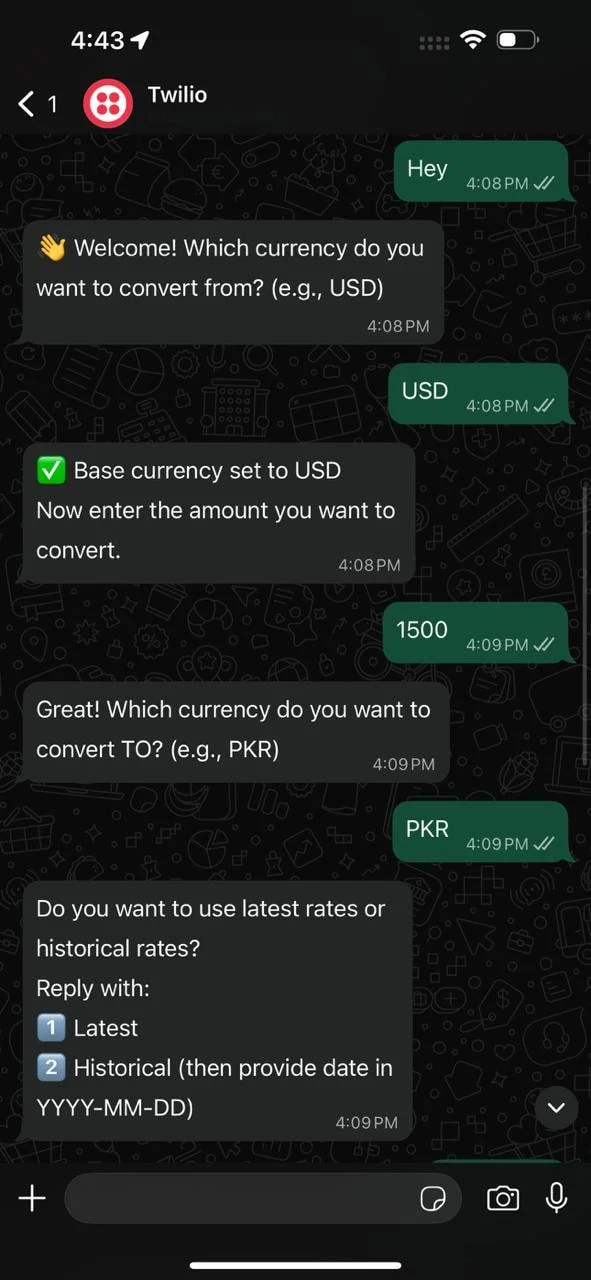
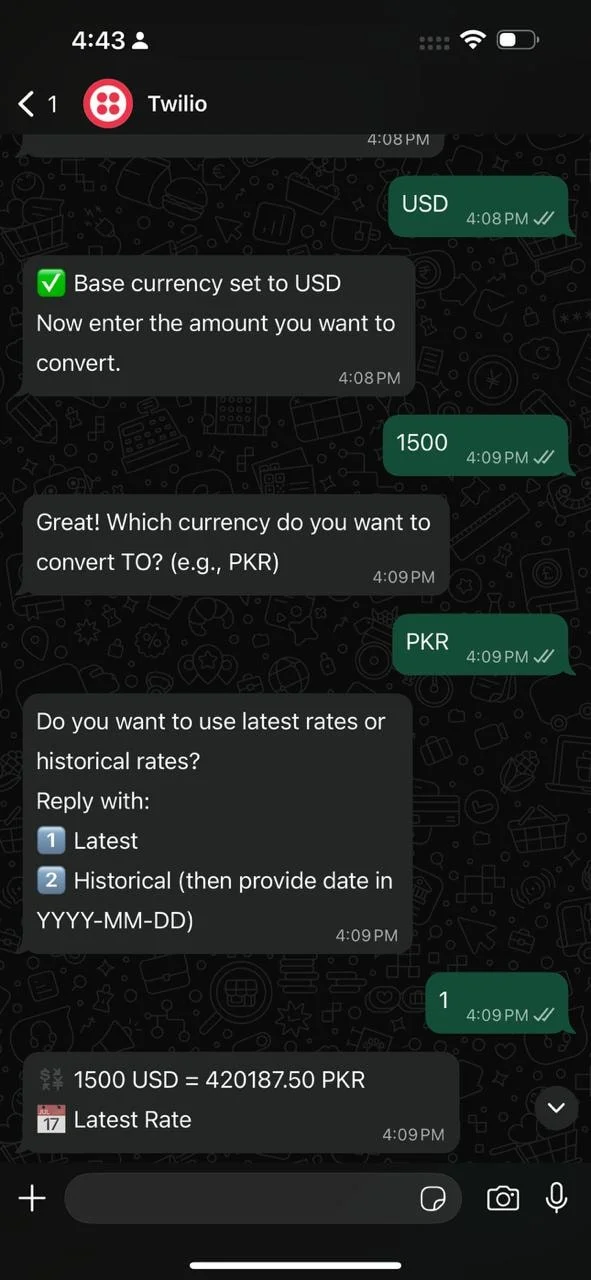
Send messages to your Twilio WhatsApp number:
-
Any message → Bot asks for base currency.
-
Enter base currency → Bot asks for amount.
-
Enter amount → Bot asks for target currency.
-
Enter target currency → Bot asks latest or historical.
-
If historical → Enter date → Bot responds with converted amount.
Example:
User: Hi
Bot: 👋 Welcome! Which currency do you want to convert from? (e.g., USD)
User: USD
Bot: ✅ Base currency set to USD. Enter the amount you want to convert.
User: 100
Bot: Which currency do you want to convert TO? (e.g., PKR)
User: PKR
Bot: Do you want to use latest rates or historical rates?
Reply with: 1️⃣ Latest 2️⃣ Historical
User: 1
Bot: 💱 100 USD = 27845.00 PKR
📅 Latest Rate
Step 9: Updating the bot
Whenever you change code:
-
Save changes in VS Code.
-
Stop server (Ctrl + C) and restart:
node index.js
- Ngrok keeps forwarding to port 3000. Twilio uses the same URL. Your bot is updated instantly.
Tips
-
Free Ngrok URLs change every time → Update Twilio if URL changes.
-
Sessions are in-memory, so restarting Node.js clears them.
-
Optional improvements:
-
Validate currencies automatically.
-
Deploy to cloud (Render / Railway / Vercel) for 24/7 uptime.
-
Add a help menu or short commands.
Formatting Currency Conversion Responses
Clear formatting improves trust. Messages show base, quote, and result clearly. This helps forex traders act with confidence.
Decimals stay consistent. Too many numbers confuse people. Clean formatting supports fast reading across devices.
WhatsApp replies stay short. Line breaks help scanning. This keeps replies human and useful.
Handling Errors and Edge Cases
Invalid currency codes happen often. The bot points out what went wrong and shows how to fix it. This reduces repeat mistakes for users.
Some currency pairs may not exist. In those cases, the bot responds politely. Clear feedback keeps trust intact.
If APIs go down, the bot responds by retrying or showing fallback messages. This keeps the system reliable during volatile market conditions.
Security, Logging, and Performance Best Practices
Treat API keys like passwords. Keep API keys out of public code and rotate them often to protect any market bot used for long-term investment. These small steps help teams and investors avoid costly issues later.
Webhook verification blocks fake traffic. Signature checks ensure each bot foreign exchange rate request is valid during real-time analysis. This step reduces risk and keeps data reliable under load.
Caching rates improves speed. Logs track failures and load when serving bot forex rates used in arbitrage workflows. This makes performance tuning an essential step before advanced features.
Strong logging helps trace issues quickly. It also shows usage patterns and traffic spikes over time. These insights support better scaling decisions.
Rate limits protect APIs from abuse. They keep the system stable during sudden demand. This balance helps maintain accuracy and trust.
Conclusion
A WhatsApp bot can work as a Telegram bot alternative with better reach. It answers a bot currency exchange rate today request fast and clearly. Many teams still pair it with a currency exchange bot telegram setup for wider coverage.
Once the system is stable, you can extend it to crypto trading and digital assets. The same logic can support a free crypto bot without heavy changes. Over time, it can evolve into a full crypto currency exchange bot.
Scaling comes next. You can add affiliates, connect exchanges, and compete with the best currency exchange bots. What starts small as a simple bot currency rate tool can support real traders and real value.
As more people use the system, reliability becomes critical. Fast and stable replies earn user trust. Consistency matters more than new features right now.
Clean logging shows how the bot behaves and responds over time. They reveal slow paths, failed requests, and peak usage hours. That insight makes future improvements easier to plan.
In the end, the goal is usefulness. A well-built bot saves time and removes friction. When people trust the results, they keep coming back.
FAQs
How Fast Should a Currency Exchange Bot Respond on WhatsApp?
A currency exchange bot should reply within one to two seconds. Fast replies keep the experience natural. Speed depends on API response and backend processing.
Can a Currency Exchange Bot Handle Multiple Requests at Once?
Yes, this works well because a stateless backend scales across users. Async processing prevents slowdowns. This helps manage higher traffic safely.
How Often Should Exchange Rates Be Updated in the Bot?
Live rates work best when you want to note accuracy. For general use, updates every few minutes are enough. The refresh rate should respect limits.
What Message Formats Can Users Send to a Currency Exchange Bot?
Most bots understand simple formats like USD to EUR. Clear examples reduce confusion. This keeps user input clean.
Can a Currency Exchange Bot Be Monetized?
Yes, monetization can include premium tiers or limits. Some businesses use it to manage internal funds and pricing. Reliable data increases trust.
Power your currency exchange bot with fast, reliable rates from CurrencyFreaks. Start building with confidence.


