

Machine learning works best when the data behaves. Your models stay sharp when the numbers line up and follow a clear rhythm. That’s why a steady currency exchange rate API makes such a big difference.
FX data drives forecasting, trading signals, anomaly checks, and risk scores. It reacts fast to global events, so your inputs need to stay clean. CurrencyFreaks helps you manage all of that without stress.
It gives you organized data that fits neatly into ML pipelines. You don’t waste time fixing broken fields or chasing down formatting issues. This blog will walk you through FX basics, pipelines, premium features, examples, and simple best practices.
Reliable FX data also helps you spot long-term patterns with more confidence. You can test ideas faster when the inputs stay consistent day after day. Even tiny moves in a currency or how you convert it can change the way your model learns.
Understanding FX Data and Machine Learning Requirements
FX data moves in its own rhythm, shaped by liquidity cycles, policy shifts, real events, and influences like the European Central Bank. It doesn’t behave like stocks or crypto. A strong currency exchange rate API helps you capture those moves the right way and makes integration easier for developers using any programming language.
Machine learning works best when the FX data is detailed and reliable. Even a tiny gap in timing can throw off your features or break a model. That’s where an API to get currency exchange rate data becomes valuable, especially when you need accurate foreign exchange rates for your next project.
You need clean timestamps, one reliable base currency, and complete historical records. A missing hour or an incomplete currency pair can bend your results in the wrong direction. A dependable API helps you avoid those issues and keeps your pipeline consistent whenever you gain access to commercial sources.
Overview of CurrencyFreaks and Its Data Capabilities
CurrencyFreaks is simple, stable, and easy to slot into any ML workflow. It gives you clean, trusted FX data with no odd spikes or missing values. That kind of stability makes your long-running experiments feel a lot less stressful and keeps your exchange rate logic predictable.
By using this API, you can fetch the past data, time-series trends, real time exchange rates, currency conversions, and even crypto from the same API. You can build all kinds of datasets from the same place without juggling extra tools. It behaves well as a multi-currency exchange rate API when you need wide coverage and multiple base currencies.
The API returns JSON or XML with clear fields like base currency, timestamps, rates, and each currency code you need. These fields make it easy to structure and check your dataset. A steady currency exchange rate API saves you from early mistakes and makes integration smoother for real projects.
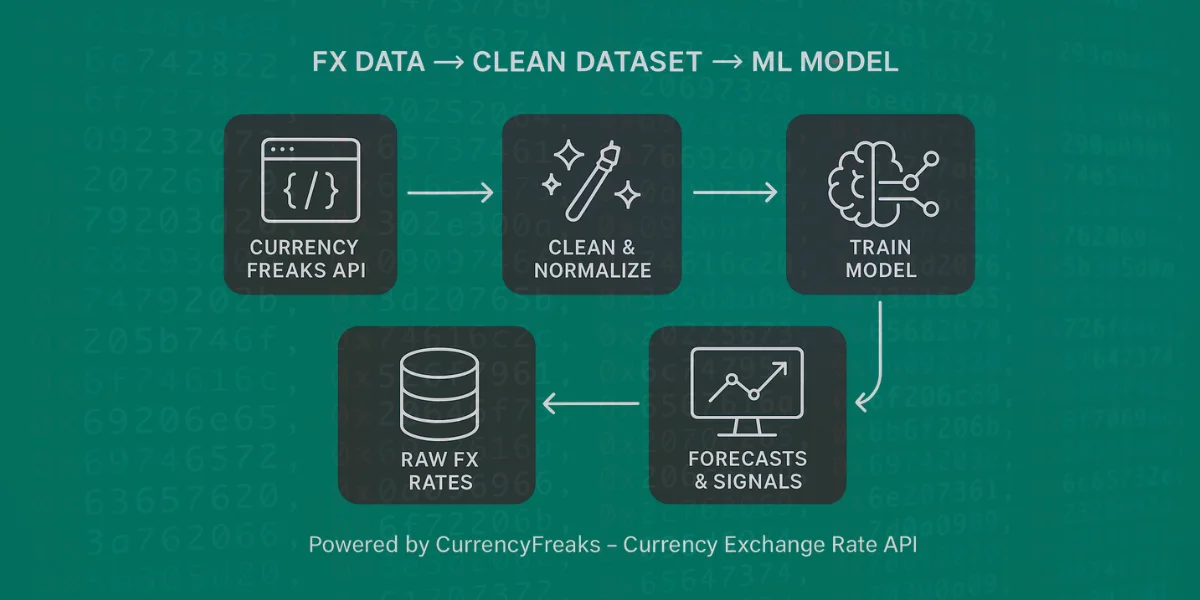
Designing a Financial Dataset Pipeline With the CurrencyFreaks Currency Exchange Rate API
A pipeline keeps everything repeatable and stable. You don’t want your model to break because of inconsistent inputs. Using a reliable currency exchange rate API helps you avoid that problem when handling foreign exchange or creating perfect building blocks for feature engineering.
1. Fetching Raw Data
Start by pulling data from the Latest and Time-Series endpoints using your API key. Pick daily or hourly updates based on your model. If you're on a free plan or a currency API with tight limits, keep an eye on your request count so you can save usage for the important pulls.
Use retries to handle network issues. Log every call with a specific date for later checks. Clean inputs always make modeling easier and reduce error rates across transactions.
2. Data Normalization
Convert everything into one base currency. It makes your comparisons easier. It also keeps things from getting confusing. A consistent schema keeps your code cleaner and helps you avoid messy surprises in your dataset.
Keep timestamps in one format. Fill missing values with smoothing or interpolation. FX data can be noisy, so this step matters, especially when you want updates, option control, and effortless integration.
3. Feature Engineering
Most models work better with derived features instead of raw prices. Build log returns, moving averages, and volatility bands. A strong currency exchange rate API ensures these inputs stay stable and predictable.
You can also create strength indicators and cross-currency ratios. These signals often help forecasting models. Good raw data always produces better features and helps users implement ML ideas faster.
4. Storage and Versioning
Store your dataset in BigQuery, PostgreSQL, or Parquet. These formats scale without slowing down. Version your datasets so you don’t mix old and new data and lose instant access to clean lines of information.
5. Automating the Pipeline
Use cron jobs, Airflow, or serverless scripts for daily updates. Automation keeps your models fresh without manual effort. It becomes even more important when using a foreign currency exchange rate API for frequent pulls in USD, EUR, or other currencies.
Building Labeled Training Sets for ML Models
Labels define what your model learns. For FX forecasting, labels usually reflect future movements. Keep the logic simple and consistent to avoid common product management mistakes related to shifting targets.
Create classification or regression labels depending on your goal. Align timestamps so nothing leaks into the past. Even one mistake can inflate performance or cause issues that customers later question.
Split data by time instead of random shuffling. Markets shift across seasons and events. Proper sequencing protects your results when using an API currency exchange rate source and ensures reliable training.
Example Implementation Using Python
A hands-on workflow makes the process easier to get the hang of. And CurrencyFreaks works in Python the way you’d expect, without giving you a hard time. The code stays short, clear, and pulls accurate data from the exchangerate API.
1. Fetching Rates
You can fetch data by using API requests from the currency exchange rate API. Pull the JSON string, check the timestamp, and load it into pandas. You can also use the historical currency exchange rates API when needed or store the historical data for clear reference.
import requests

import pandas as pd

api_key = "YOUR_KEY"

url = "<https://api.currencyfreaks.com/v2.0/rates/latest>"

resp = requests.get(url, params={"apikey": api_key})

data = resp.json()

df = pd.DataFrame(\[data\["rates"\]\])

df\["timestamp"\] = data\["date"\]
2. Creating Features
Use pandas to compute log returns. Add moving averages or volatility features. Clean data from a steady currency exchange rate API helps a lot here and avoids manual error handling.
3. Combining Multiple Currencies
Merge time-aligned currencies into one table. Keep timestamps synchronized to avoid drift. A good multi-currency exchange rate API makes this easy and avoids confusion when you need world-level consistency.
4. Exporting for ML
Save your dataset as CSV or Parquet. You can push it to S3 or BigQuery if you need cloud storage. After that, you can train a simple RandomForest or LSTM on this pipeline.
Code Example
Create a folder using the command prompt.
mkdir ml_dataset
Open the folder inside Visual Studio Code.
cd ml_dataset
code .
Create a Python file named "build_ml_dataset.py."
Paste the following code to that file:
import requests
import pandas as pd
import numpy as np

# =======================
# Configuration
# =======================
API_KEY = "add-your-api-key"
BASE_CURRENCY = "USD"
CURRENCIES = ["EUR", "GBP", "JPY", "CAD", "AUD"]

START_DATE = "2023-12-01"
END_DATE = "2023-12-10"

OUTPUT_CSV = "fx_ml_dataset.csv"

API_URL = "https://api.currencyfreaks.com/v2.0/timeseries"


# =======================
# Fetch Time-Series FX Data
# =======================
def fetch_timeseries():
    params = {
        "apikey": API_KEY,
        "startDate": START_DATE,
        "endDate": END_DATE,
        "base": BASE_CURRENCY,
        "symbols": ",".join(CURRENCIES)
    }

    response = requests.get(API_URL, params=params, timeout=15)
    response.raise_for_status()
    data = response.json()

    rows = []

    for item in data["historicalRatesList"]:
        row = {"Date": item["date"]}
        for cur in CURRENCIES:
            rate = item["rates"].get(cur)
            if rate is None:
                raise ValueError(f"Missing rate for {cur} on {item['date']}")
            row[f"{cur}_Rate"] = float(rate)
        rows.append(row)

    df = pd.DataFrame(rows)
    df["Date"] = pd.to_datetime(df["Date"])
    df.set_index("Date", inplace=True)
    return df.sort_index()


# =======================
# ML Feature Engineering
# =======================
def build_ml_features(df):
    # Log returns
    df["EUR_Return"] = np.log(df["EUR_Rate"] / df["EUR_Rate"].shift(1))
    df["GBP_Return"] = np.log(df["GBP_Rate"] / df["GBP_Rate"].shift(1))

    # Rolling features
    df["EUR_MA_5"] = df["EUR_Rate"].rolling(5).mean()
    df["EUR_VOL_5"] = df["EUR_Return"].rolling(5).std()

    # Cross-currency strength
    df["EUR_GBP_Ratio"] = df["EUR_Rate"] / df["GBP_Rate"]

    # Target (classification: next-day direction)
    df["Target"] = (df["EUR_Rate"].shift(-1) > df["EUR_Rate"]).astype(int)

    return df.dropna()


# =======================
# Main Pipeline
# =======================
def run_pipeline():
    raw_df = fetch_timeseries()
    ml_df = build_ml_features(raw_df)

    ml_df.to_csv(OUTPUT_CSV)
    print(f"\n✅ ML dataset saved as {OUTPUT_CSV}")
    print("\nPreview:")
    print(ml_df.head())


if __name__ == "__main__":
    run_pipeline()
Add the API key at the given placeholder before running the code.
Next, activate the virtual environment:
python -m venv .venv

.venv\Scripts\activate
Next, install the required libraries.
pip install requests pandas numpy
Finally, run the code:
python build_ml_dataset.py
Here is the output:
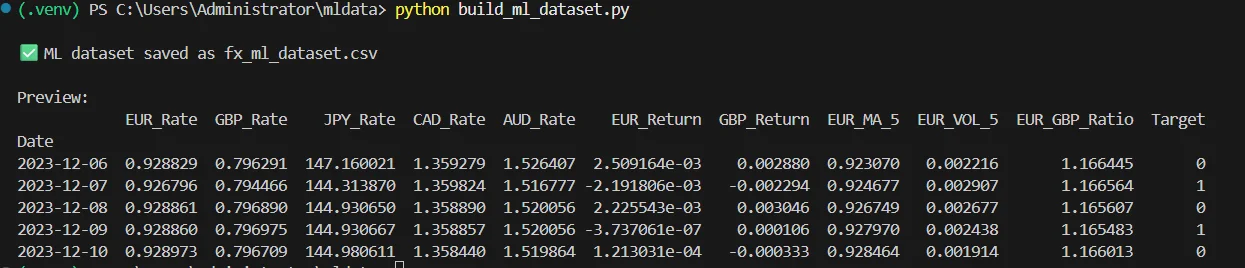
This file is an ML dataset because it doesn’t just store currency prices, but also shows how those prices change over time and what happens next. Each row represents one day of exchange rate data, while the extra columns describe trends, movement strength, and comparisons between currencies.
The final column indicates whether the currency went up or down the next day. Because the data is clean, ordered by time, and clearly labeled, it can be used to train machine learning models to predict currency direction, analyze market behavior, and build basic trading or forecasting systems.
Best Practices for Maintaining FX Datasets
Keep everything in UTC to avoid timezone problems. Use one source currency for stability. FX markets also pause on holidays, so plan for gaps in the data.
Watch for spikes, stale data, or missing entries. These issues can corrupt features and make it harder to manage issue access in your workflow. Keep an eye on your free API for currency exchange rates if you scale up and need support team help.
Keep logs of changes in your pipeline. This helps you debug problems faster. Clean habits always pay off in ML projects, especially when you use platinum support click or a quarterly briefing call.
Common Pitfalls When Preparing FX Data
Many people accidentally use future information. This makes models look stronger than they are. Always check label alignment to avoid misleading customers.
Bad resampling can distort patterns in FX data. Timezones can also move your rows around without you noticing. Validate everything when using an API for currency exchange rates or any api marketplace feed.
Target variables need to match the prediction window. Don’t skip this step. It’s one of the quickest ways to break a model or lose meaningful priority roadmap input, especially when product management feature requests depend on accurate results and accurate rates.
Conclusion
Good FX datasets give ML models a strong base. Clean timestamps and reliable numbers help your model behave the way you expect. A solid currency exchange rate API like CurrencyFreaks gives you that confidence without worrying about hidden fees starter, hidden fees professional level, or hidden fees business issues.
Once your pipeline is automated, the work becomes easier. You can explore forecasting, anomaly detection, or spreads without worrying about data quality. That freedom helps you build better ideas faster, and you can start exploring today with intuitive APIs that guide you toward limitless opportunities.
FAQs
What Is A Currency Exchange Rate API?
A currency exchange rate API is simply a tool that gives you real-time and past FX data. People use it in apps, dashboards, and ML projects to pull clean numbers they can trust. It keeps the data clean, so you don't have to fix anything.
How Does CurrencyFreaks Help With Machine Learning Workflows?
It offers clean FX data that works well with ML inputs. The structure stays predictable and easy to parse. The currency exchange rate API format keeps things simple, no matter what you need to pull.
Can I Fetch Multiple Currencies In One Request?
Yes, the API lets you pull multiple currencies at once. You can use the Latest or Time-Series endpoints. It works a lot like a free currency exchange rate API when you’re testing small datasets or trying out code.
What’s The Best Way To Store Large FX Datasets?
Use Parquet, BigQuery, or S3 for scaling. They handle large files well. They also load fast for ML tasks and help maintain commercial sources cleanly.
How Often Should I Refresh My FX Dataset?
Daily updates work for most models. Fast trading models may need hourly updates. An API to get current currency exchange rates helps with that and fits well into annual billing cycles.
Start building cleaner FX datasets with CurrencyFreaks today.


